
Twitter/X Followers Scraper
by xtcodetech
Scrape any Twitter/X account’s Followers, Following, and Verified Followers via a single API call, it outputs clean CSV/JSON datasets ready for analys...
Opens on Apify.com
About Twitter/X Followers Scraper
Scrape any Twitter/X account’s Followers, Following, and Verified Followers via a single API call, it outputs clean CSV/JSON datasets ready for analysis.
What does this actor do?
Twitter/X Followers Scraper is a web scraping and automation tool available on the Apify platform. It's designed to help you extract data and automate tasks efficiently in the cloud.
Key Features
- Cloud-based execution - no local setup required
- Scalable infrastructure for large-scale operations
- API access for integration with your applications
- Built-in proxy rotation and anti-blocking measures
- Scheduled runs and webhooks for automation
How to Use
- Click "Try This Actor" to open it on Apify
- Create a free Apify account if you don't have one
- Configure the input parameters as needed
- Run the actor and download your results
Documentation
What You Can Scrape - Followers: Everyone who follows the target user. - Following: Accounts the user follows. - Verified followers: All verified followers of a specific User - Rich profile metadata for every retrieved user (ID, username, name, bio, stats, creation date, …) ## Why Scrape Followers/Following With 400 M+ active users, Twitter/X is a goldmine for social-graph intelligence. Teams use this actor to: - Discover influencers & outreach targets within a niche - Map competitor audiences and refine ad-targeting or content strategy - Generate lead lists from followers that match specific intent signals - Build research datasets for academic or sentiment analysis ## Output Data Fields Each exported user contains the following 18 fields: | Field | Type | Description | | -------------------------- | ------- | -------------------------------------------- | | 🆔 ID | string | Twitter user unique identifier | | 👤 Handle | string | Twitter user handle (e.g., "elonmusk") | | 📛 Name | string | Display name of the user | | 📝 Bio | string | User biography/description | | 💬 CanDM | boolean | Whether the user can receive direct messages | | 📅 AccountCreateDate | string | Account creation date in ISO format | | 📍 Location | string | User location as specified in profile | | 👥 FollowersCount | number | Number of followers | | 🔗 FollowingCount | number | Number of accounts following | | ❤️ TotalFavouritesByUser | number | Total number of likes given by user | | 🖼️ MediaCount | number | Number of media files posted | | 🌐 UserPageURL | string | Direct URL to user profile page | | 🖼️ ProfileBannerURL | string | URL to profile banner image | | 📷 ProfileURL | string | URL to profile image | | 🎭 AvatarURL | string | URL to user avatar image | | 📊 PostCount | number | Total number of posts/tweets | | ✅ Verified | boolean | Legacy verification status | | 🔵 IsBlueVerified | boolean | Twitter Blue verification status | ## Example output (JSON) json { "TaskId": "20250907104346422435", "ID": "2285608116", "Handle": "TheMarriageFdn", "Name": "The Marriage Foundation", "Bio": "A one-time divorce mediator I became a marriage healer in 2003 and founded the nonprofit in 2009. We helped thousands achieve a permanently happy marriage.", "CanDM": true, "AccountCreateDate": "1/11/2014, 4:34:22 AM", "Location": "San Diego, CA", "FollowersCount": 794, "FollowingCount": 1938, "TotalFavouritesByUser": 403, "MediaCount": 325, "UserPageURL": "https://x.com/TheMarriageFdn", "ProfileBannerURL": "https://pbs.twimg.com/profile_banners/2285608116/1677992995", "ProfileURL": "https://t.co/NIYKSSM9Cx", "AvatarURL": "https://pbs.twimg.com/profile_images/1632246989739159554/exnm2NBP_normal.png", "PostCount": 794, "Verified": false, "IsBlueVerified": false } ## Getting Started ### 1.Getting Twitter/X Cookies Install the Cookie Editor Chrome extension. Log in to your Twitter/X account in the same browser window. Click the Cookie-Editor icon in the toolbar. In the popup, click Export button (at bottom-right corner). Choose “Header String”. Paste that string into the cookie field of this actor’s input (or pass it in your API call). 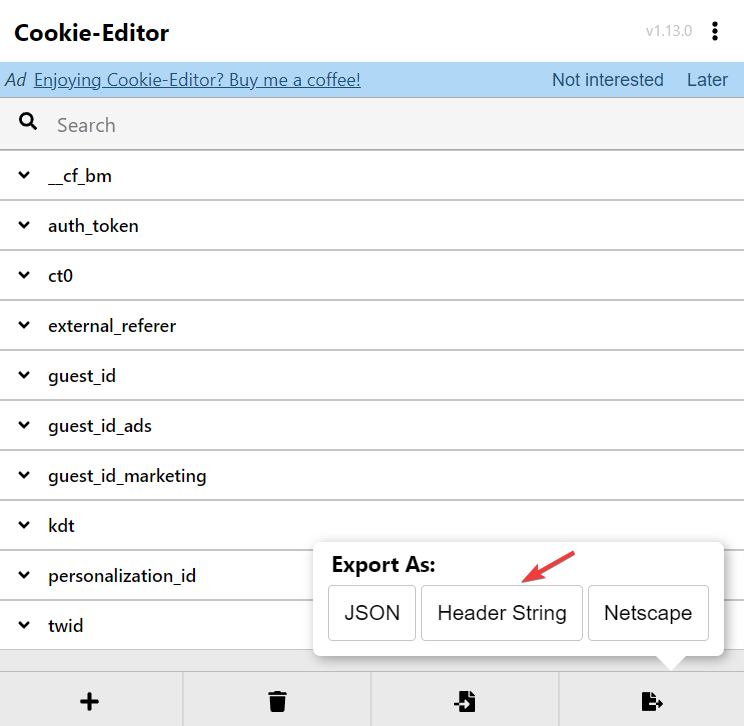 🛡️ note:Your cookie is stored as a secret input on Apify—automatically encrypted and never exposed in logs, so it remains completely secure. ### 2. Configure Your Actor Run Now you're ready to configure the actor. Here's how to set up your input parameters: | Field | Type | Required | Description | | -------------------- | ------ | -------- | ----------------------------------------------------------------------------------------------------- | |
 handle | string | ✅ | Twitter user handle (e.g., @elonmusk) | | exportType | string | ✅ | Type of data to export: "followers", "followings", or "verified_followers" | | cookie | string | ✅ | Complete Twitter cookie string for authentication | | maxResults | number | ❌ | Maximum number of users to export (default: 1000, you can set a large number for extensive scraping) | | delay | number | ❌ | Delay between requests in seconds (default: 10, recommended: 10s) | | proxyConfiguration | object | ❌ | Optional proxy settings. Leave empty for default behavior, configure only if needed for special cases | ### 3. Run it through APIFY Console or API #### 3.1 Run in Apify Console (very easy to use) - Open Apify Console, go to this Actor page, and click “Run” (or create a Task first and run it). - In the Input panel, fill in: - handle: Target username (without @), e.g., elonmusk. - exportType: Select from the dropdown: Followers / Following / Verified Followers. - cookie: Paste the cookie obtained with the Cookie Editor extension described above. - maxResults: Number of users to export for this run, e.g., 10000. - delay: Request interval in seconds; recommended 10–20 (default 10). - proxyConfiguration: Usually not required; leave empty unless you have special needs. - Click “Run”. During the run and reviewing results: - Dataset tab: View/download results as JSON/CSV/NDJSON. - Logs: Check logs #### 3.2 Run via API - handle: Target username (without @), e.g., elonmusk. - exportType must be one of: "followers", "following", "verified_followers". - cookie: Paste the cookie obtained with the Cookie Editor extension described above. JavaScript: javascript import { ApifyClient } from 'apify-client'; // Initialize the ApifyClient with your Apify API token // Replace the '<YOUR_API_TOKEN>' with your token const client = new ApifyClient({ token: '<YOUR_API_TOKEN>', }); // Prepare Actor input const input = { handle: 'elonmusk', exportType: 'Followers', cookie: 'auth_token=...; ct0=...; ...', maxResults: 1000, }; // Run the Actor and wait for it to finish const run = await client.actor('xtcodetech/twitter-x-followers-scraper').call(input); // Fetch and print Actor results from the run's dataset (if any) console.log('Results from dataset'); console.log(`💾 Check your data here: https://console.apify.com/storage/datasets/${run.defaultDatasetId}`); const { items } = await client.dataset(run.defaultDatasetId).listItems(); items.forEach((item) => { console.dir(item); }); Python: python from apify_client import ApifyClient # Initialize the ApifyClient with your Apify API token # Replace '<YOUR_API_TOKEN>' with your token. client = ApifyClient("<YOUR_API_TOKEN>") # Prepare the Actor input run_input = { "handle": "elonmusk", "exportType": "Followers", "cookie": "auth_token=...; ct0=...; ...", "maxResults": 1000, } # Run the Actor and wait for it to finish run = client.actor("xtcodetech/twitter-x-followers-scraper").call(run_input=run_input) # Fetch and print Actor results from the run's dataset (if there are any) print("💾 Check your data here: https://console.apify.com/storage/datasets/" + run["defaultDatasetId"]) for item in client.dataset(run["defaultDatasetId"]).iterate_items(): print(item)
Categories
Common Use Cases
Market Research
Gather competitive intelligence and market data
Lead Generation
Extract contact information for sales outreach
Price Monitoring
Track competitor pricing and product changes
Content Aggregation
Collect and organize content from multiple sources
Ready to Get Started?
Try Twitter/X Followers Scraper now on Apify. Free tier available with no credit card required.
Start Free TrialActor Information
- Developer
- xtcodetech
- Pricing
- Paid
- Total Runs
- 1,285
- Active Users
- 18
Related Actors

Video Transcript Scraper: Youtube, X, Facebook, Tiktok, etc.
by invideoiq

Linkedin Profile Details Scraper + EMAIL (No Cookies Required)
by apimaestro

Twitter (X.com) Scraper Unlimited: No Limits
by apidojo

Content Checker
by jakubbalada
Apify provides a cloud platform for web scraping, data extraction, and automation. Build and run web scrapers in the cloud.
Learn more about ApifyNeed Professional Help?
Couldn't solve your problem? Hire a verified specialist on Fiverr to get it done quickly and professionally.
Trusted by millions | Money-back guarantee | 24/7 Support