
Upwork Job Scraper | Scrape up to 10k Jobs ✨
by upwork-vibe
Get ALL Upwork jobs instantly. Pre-indexed database delivers 10,000+ jobs at once. No cookies, no timeouts, filters that actually work. Perfect for fr...
Opens on Apify.com
About Upwork Job Scraper | Scrape up to 10k Jobs ✨
Get ALL Upwork jobs instantly. Pre-indexed database delivers 10,000+ jobs at once. No cookies, no timeouts, filters that actually work. Perfect for freelancers, agencies, and Clay/Zapier automations. Pay only $0.003 per job - no subscriptions required. upwork@vistorio.online
What does this actor do?
Upwork Job Scraper | Scrape up to 10k Jobs ✨ is a web scraping and automation tool available on the Apify platform. It's designed to help you extract data and automate tasks efficiently in the cloud.
Key Features
- Cloud-based execution - no local setup required
- Scalable infrastructure for large-scale operations
- API access for integration with your applications
- Built-in proxy rotation and anti-blocking measures
- Scheduled runs and webhooks for automation
How to Use
- Click "Try This Actor" to open it on Apify
- Create a free Apify account if you don't have one
- Configure the input parameters as needed
- Run the actor and download your results
Documentation
Upwork Scraper - Extract up to 10,000 Jobs per request Experience seamless Upwork job extraction with fast access to comprehensive job data. Pull up to 10,000 jobs from a single search without any authentication hassles. ## ✨ Key Features - 🔑 No Credentials Required: Simply configure your search parameters and start extracting. No cookies, login details, or complex authentication needed. - 📈 High Volume Capacity: Extract up to 10,000 jobs per search - perfect for comprehensive market analysis and bulk data collection. - ⚡ Fast Data Access: Get results quickly from our pre-indexed database. Optimized for speed and reliability. - 🎯 Precision Filtering: 40+ filter parameters that work exactly as configured - budget, location, skills, client history, and more. - 📊 Complete Job Data: Access all public job fields including budget details, client stats, vendor requirements, and application costs. ## 🛠️ How It Works 1. Configure Your Search: Set your desired filters - keywords, budget ranges, client requirements, experience levels 2. Set Volume Limit: Choose how many jobs to extract (1 to 10,000) 3. Run Extraction: Get results in clean, structured JSON format 4. Export or Integrate: Use with Clay, Zapier, Make, or export to your preferred format ### Input Sample javascript { "limit": 100, "fromDate": "2025-01-13", "toDate": "2025-01-14", "jobCategories": ["Web Development"], "includeKeywords.keywords": ["React", "TypeScript"], "includeKeywords.matchTitle": true, "includeKeywords.matchDescription": true, "budget.hourlyRate.min": "50", "client.paymentMethodVerified": true, "client.includeLocations": [ {"type": "COUNTRY", "value": "US"} ] } ## 💰 Transparent Pricing & Performance $0.003 per job ($3.00 per 1,000 jobs) - Pay only for what you extract - No subscriptions or hidden fees - Platform costs included ### Volume Examples with Timing | Jobs | Cost | Time | |------|------|------| | 100 jobs | $0.30 | ~6 seconds | | 500 jobs | $1.50 | ~15 seconds | | 1,000 jobs | $3.00 | ~20 seconds | | 5,000 jobs | $15.00 | ~40 seconds | | 10,000 jobs | $30.00 | ~70 seconds | ## 📖 How to Use Upwork Job Scraper (Best practice) ### Daily Freelancer Monitor javascript { "limit": 200, "fromDate": "2025-01-13", // Yesterday "toDate": "2025-01-14", // Today "jobCategories": ["Web Development", "Mobile Development"], "includeKeywords.keywords": ["React", "Node.js", "TypeScript"], "includeKeywords.matchTitle": true, "includeKeywords.matchSkills": false, "includeKeywords.matchDescription": true, "budget.hourlyRate.min": "40", "client.includeLocations": [ {"type": "COUNTRY", "value": "US"}, {"type": "COUNTRY", "value": "CA"}, {"type": "COUNTRY", "value": "GB"} ], "client.paymentMethodVerified": true } ### Agency Market Analysis javascript { "limit": 5000, "fromDate": "2025-01-01", "toDate": "2025-01-14", "jobCategories": ["Web Development", "Web & Mobile Design"], "budget.fixedPrice.min": "5000", "client.totalSpent.min": "10000", "client.minFeedbackScore": "4.0", "client.includeLocations": [ {"type": "REGION", "value": "north_america"}, {"type": "REGION", "value": "europe"} ], "vendor.experienceLevel": ["INTERMEDIATE", "EXPERT"] } ### Clay Automation Daily Pull javascript { "limit": 300, "fromDate": "2025-01-13T00:00:00Z", "toDate": "2025-01-13T23:59:59Z", "includeKeywords.keywords": ["SaaS", "B2B", "startup"], "includeKeywords.matchSkills": false, "includeKeywords.matchTitle": false, "includeKeywords.matchDescription": true, "budget.minClientHireRate": 50, "client.includeLocations": [ {"type": "COUNTRY", "value": "US"} ], "client.paymentMethodVerified": true, "client.totalSpent.min": "5000" } ### Advanced Filtering Example javascript { "limit": 2000, "fromDate": "2025-01-01T12:30:00Z", "jobCategories": [ "Web Development", "Web & Mobile Design" ], "includeKeywords.keywords": ["React", "TypeScript", "Next.js"], "includeKeywords.matchTitle": true, "includeKeywords.matchDescription": true, "includeKeywords.matchSkills": true, "excludeKeywords.keywords": ["WordPress", "PHP", "Shopify"], "excludeKeywords.matchTitle": true, "excludeKeywords.matchDescription": true, "excludeKeywords.matchSkills": true, "budget.hourlyRate.min": "40", "budget.hourlyRate.max": "150", "budget.jobDurations": [ "UP_TO_THREE_MONTHS", "UP_TO_SIX_MONTHS", "MORE_THAN_SIX_MONTHS" ], "budget.minClientHireRate": 50, "client.paymentMethodVerified": true, "client.minFeedbackScore": "4.0", "client.includeLocations": [ {"type": "COUNTRY", "value": "US"}, {"type": "REGION", "value": "europe"}, {"type": "COUNTRY", "value": "GB"} ], "client.totalSpent.min": "5000", "vendor.experienceLevel": ["INTERMEDIATE", "EXPERT"], "vendor.englishProficiency": "FLUENT" } ## 📊 Output format Clean, structured JSON with all job details: json { "uid": "1955020056847176693", "title": "React Developer for SaaS Platform", "description": "We are looking for an experienced React Developer to help us build and scale our SaaS platform for small-to-medium businesses. You’ll be working closely with our product and backend teams to deliver high-quality, performant, and maintainable features that enhance user experience and support rapid growth.", "createdAt": "2025-01-15T10:30:00.000Z", "skills": [ "React", "TypeScript", "Node.js", "Redux", "REST APIs" ], "externalLink": "https://www.upwork.com/jobs/~021955020056847176693", "applicationCost": 6, "featured": false, "category": "Web Development", "ciphertext": "~021955020056847176693", "questions": null, "budget": { "fixedBudget": 5000, "hourlyRate": { "min": 40, "max": 80 } }, "client": { "name": "TechStartup Inc", "timezone": "America/New_York", "industry": "Technology", "companySize": 10, "countryCode": "US", "phoneNumberVerified": true, "paymentMethodVerified": true, "enterprise": false, "connectedAt": "2024-05-01T00:00:00.000Z", "stats": { "totalSpent": 125000, "totalHires": 42, "hireRate": 85, "avgRate": 65, "feedbackRate": 4.95, "feedbackCount": 38 } }, "vendor": { "hireType": "FREELANCER", "countryCodes": ["US", "CA", "UK"], "experienceLevel": "EXPERT", "englishLevel": "FLUENT" }, "customJobScore": 4.8 } ### 📸 Output Sample 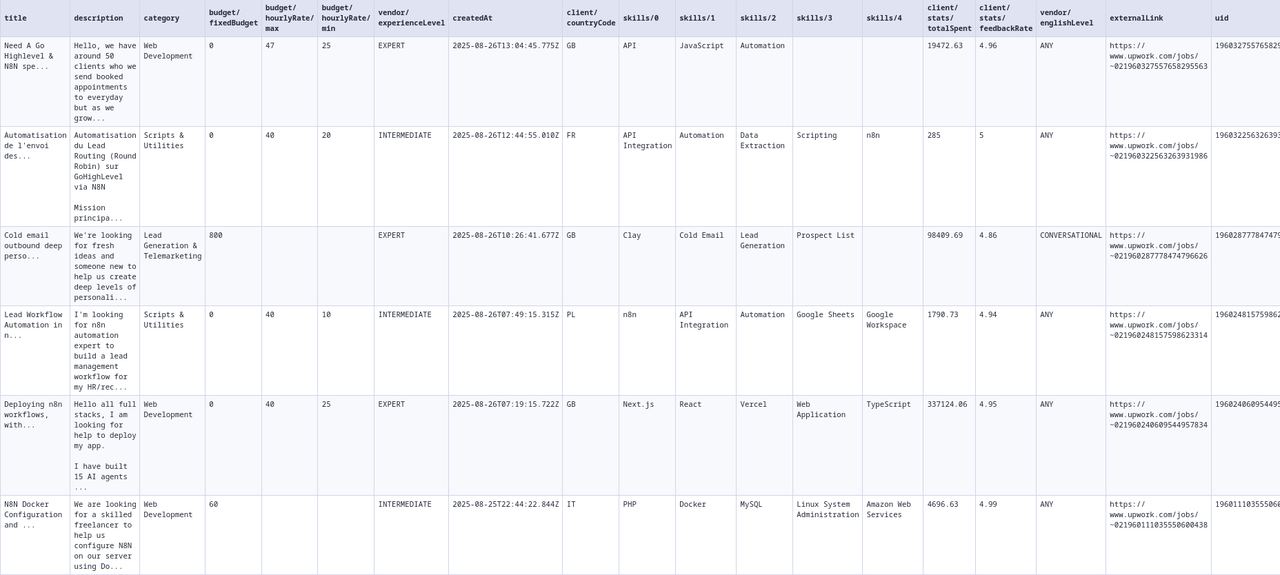 ### Field Descriptions Core Fields: -
 uid: Unique identifier for the job - title: Job title/headline - description: Job description - createdAt: When the job was posted (ISO 8601) - externalLink: Direct link to job on Upwork - applicationCost: Connects required to apply - featured: Whether it's a featured/promoted job - category: Job category on Upwork - ciphertext: Encoded job reference - questions: Screening questions (array or null) - customJobScore: Client quality score (0-5) based on verification status, ratings, hire history, and spending patterns Budget Object: - fixedBudget: Fixed price amount (0 if hourly) - hourlyRate.min/max: Hourly rate range (null if fixed) Client Object: - name: Company/client name (may be null) - timezone: Client's timezone (IANA format) - industry: Client's industry sector - companySize: Number of employees - countryCode: 2-letter country code - phoneNumberVerified: Phone verification status - pymentMethodVerified: Payment method verified - enterprise: Enterprise client flag - connectedAt: When joined Upwork - stats.totalSpent: Total spent on platform - stats.totalHires: Number of hires made - stats.hireRate: Percentage of jobs that result in hire - stats.avgRate: Average hourly rate paid - stats.feedbackRate: Average rating given (0-5) - stats.feedbackCount: Number of feedback entries Vendor Object: - hireType: "FREELANCER", "AGENCY", or "ANY" - countryCodes: Preferred freelancer locations - experienceLevel: "BEGINNER", "INTERMEDIATE", or "EXPERT" - englishLevel: "ANY", "BASIC", "CONVERSATIONAL", "FLUENT", or "NATIVE" ## 📋 Complete Input Parameters ### ⚙️ Basic Settings | Parameter | Type | Description | Example | |-----------|------|-------------|---------| | limit | integer | Max jobs to return (1-10000) | 1000 | | fromDate | string | Jobs posted after (YYYY-MM-DD or YYYY-MM-DDTHH:MM:SSZ) | "2025-01-01" or "2025-01-01T00:00:00Z" | | toDate | string | Jobs posted before (YYYY-MM-DD or YYYY-MM-DDTHH:MM:SSZ) | "2025-12-31" or "2025-12-31T23:59:59Z" | | jobCategories | array | Upwork category names | ["Web Development", "UI/UX Design"] | ### 🔎 Keyword Filters | Parameter | Type | Description | Example | |-----------|------|-------------|---------| | includeKeywords.active | boolean | Enable include keywords | true | | includeKeywords.keywords | array | Must contain these terms | ["React", "Node.js"] | | includeKeywords.matchTitle | boolean | Search in titles | true | | includeKeywords.matchDescription | boolean | Search in descriptions | true | | includeKeywords.matchSkills | boolean | Search in required skills | true | | excludeKeywords.active | boolean | Enable exclude keywords | true | | excludeKeywords.keywords | array | Exclude jobs with these terms | ["WordPress", "PHP"] | | excludeKeywords.matchTitle | boolean | Search in titles | true | | excludeKeywords.matchDescription | boolean | Search in descriptions | true | | excludeKeywords.matchSkills | boolean | Search in required skills | true | ### 💰 Budget & Payment | Parameter | Type | Description | Example | |-----------|------|-------------|---------| | budget.hourlyRate.min | string | Minimum hourly rate (USD) | "50" | | budget.hourlyRate.max | string | Maximum hourly rate (USD) | "150" | | budget.fixedPrice.min | string | Minimum fixed price (USD) | "1000" | | budget.fixedPrice.max | string | Maximum fixed price (USD) | "10000" | | budget.connectsPrice.min | integer | Minimum connects required | 1 | | budget.connectsPrice.max | integer | Maximum connects required | 10 | | budget.jobDurations | array | Contract lengths | ["UP_TO_THREE_MONTHS"] | | budget.hourlyWorkloads | array | Weekly commitment | ["LESS_THAN_30_HOURS"] | | budget.minClientHireRate | integer | Min hire rate (%) | 50 | ### 🏢 Client Requirements | Parameter | Type | Description | Example | |-----------|------|-------------|---------| | client.paymentMethodVerified | boolean | Verified payment only | true | | client.minFeedbackScore | string | Min rating (0-5) | "4.5" | | client.totalSpent.min | string | Minimum total spent (USD) | "10000" | | client.totalSpent.max | string | Maximum total spent (USD) | "50000" | | client.includeLocations | array | Client locations | [{"type": "COUNTRY", "value": "US"}] | | client.excludeLocations | array | Exclude locations | [{"type": "COUNTRY", "value": "PK"}] | | client.companySizeRange | array | Company sizes | ["UP_TO_100_EMPLOYEES"] | ### 👤 Vendor Preferences | Parameter | Type | Description | Example | |-----------|------|-------------|---------| | vendor.experienceLevel | array | Required experience | ["INTERMEDIATE", "EXPERT"] | | vendor.englishProficiency | string | English level | "FLUENT" | | vendor.type | array | Freelancer/Agency | ["FREELANCER"] | | vendor.includeLocations | array | Vendor locations | [{"type": "COUNTRY", "value": "US"}] | | vendor.includeFeatured | boolean | Featured jobs only | true | ### Job Categories Most Popular Categories: - "Web Development" - Frontend, backend, full-stack - "Mobile Development (Web/Mobile)" - Cross-platform mobile apps - "Mobile Development (IT)" - Native iOS/Android development - "UI/UX Design" - User interface and experience design - "AI/ML Engineering" - Machine learning and AI projects - "Data Science & Analytics" - Data analysis and visualization - "Digital Marketing" - SEO, PPC, social media - "Content Writing" - Articles, blogs, copywriting - "Ecommerce Development" - Online stores, Shopify - "DevOps Engineering" - CI/CD, cloud infrastructure Development & Tech: - "Web Development" - "Mobile Development (Web/Mobile)" - "Mobile Development (IT)" - "Desktop Software Development" - "Ecommerce Development" - "Game Development" - "Game Design & Development" - "Blockchain & Cryptocurrency" - "AI/ML Engineering" - "Data Engineering" - "Cloud Computing" - "DevOps Engineering" - "DevOps & Solution Architecture" - "QA & Testing (Software)" - "QA & Testing (Web/Mobile)" Design & Creative: - "UI/UX Design" - "Product Design" - "Visual Design" - "Illustration & Design" - "Web & Mobile Design" - "3D Modeling & CAD" - "Architecture & Interior Design" Business & Admin: - "Product Management (Business)" - "Product Management (Tech)" - "Project Management" - "Business Analysis & Strategy" - "Virtual Assistance" - "Data Entry & Transcription" - "Market Research" Marketing & Sales: - "Digital Marketing" - "Social Media Marketing" - "Content Writing" - "Brand Strategy & Marketing" - "Marketing Automation" - "Sales & Business Development" Note: Use exact category names as shown (case-sensitive). Full list of 70+ categories available. ## 🔔 Set Notifications Notifications are ideal for real-time job monitoring when combined with scheduled runs. Get instant alerts for new opportunities directly to your preferred communication channel. ### When to Use Notifications - Real-time monitoring: Get alerts as soon as matching jobs appear - Scheduled scraping: Receive job updates at regular intervals (every hour, daily, etc.) - Team collaboration: Share opportunities with your team via Discord/Slack - Personal alerts: Get notifications to your Telegram for urgent opportunities ### Configuration Overview #### Basic Settings - Notification Limit: 1-20 jobs per platform (default: 3) - Run Metadata: Optional summary message with run details and dataset URLs - Platform Support: Telegram, Discord, and Slack ### Setting Up Telegram Notifications 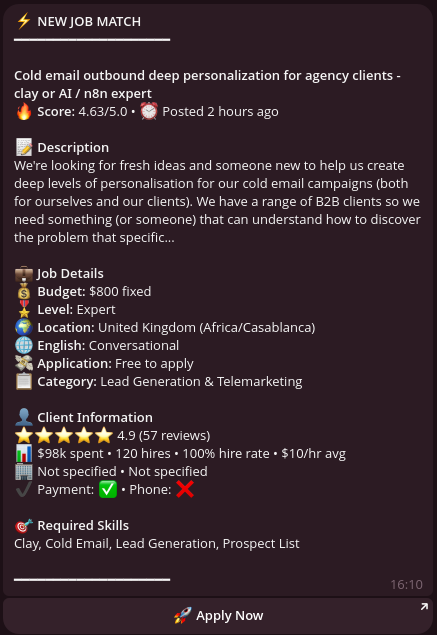 1. Create a Bot: - Message @BotFather on Telegram - Send
 /newbot and follow instructions - Save your bot token (e.g., 1234567890:ABCdefGHIjklMNOpqrsTUVwxyz) 2. Get Your Chat ID: - Message @userinfobot to get your personal chat ID - For channels: Add bot as admin, channel ID starts with -100 3. Configure in Actor: javascript { "notifications.telegram.token": "YOUR_BOT_TOKEN", "notifications.telegram.channelId": "YOUR_CHAT_ID", "notifications.limit": 5, "notifications.shouldSendRunMetadata": true } ### Setting Up Discord Notifications 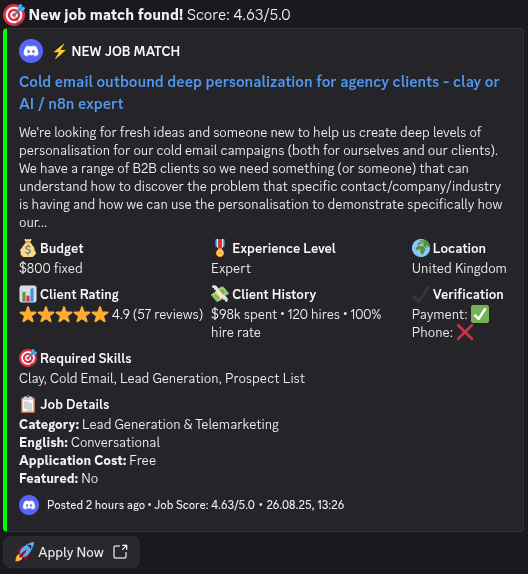 1. Create a Bot: - Go to Discord Developer Portal - Create new application → Bot → Copy token - Add bot to server with "Send Messages" permission 2. Get Channel ID: - Enable Developer Mode in Discord settings - Right-click channel → Copy ID 3. Configure in Actor:
 javascript { "notifications.discord.token": "YOUR_BOT_TOKEN", "notifications.discord.channelId": "CHANNEL_ID", "notifications.limit": 10 } ### Setting Up Slack Notifications 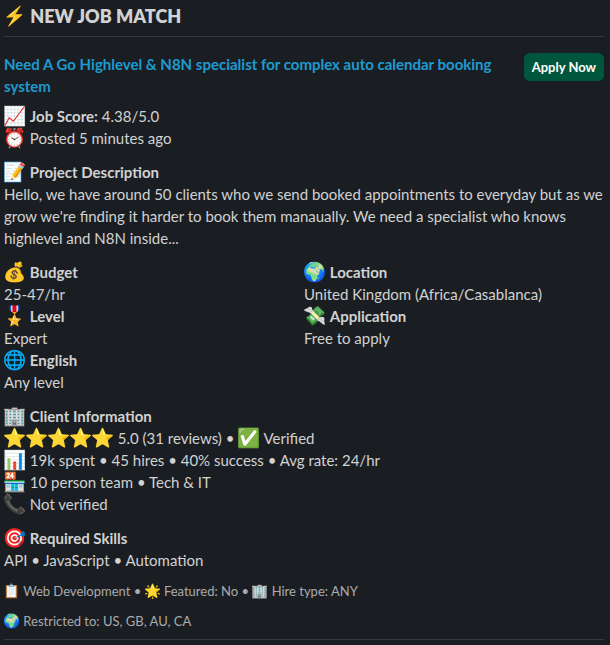 1. Create Slack App: - Go to api.slack.com/apps - Create new app → OAuth & Permissions - Add scopes:
 chat:write and channels:read - Install to workspace → Copy bot token (starts with xoxb-) 2. Add Bot to Channel: - Invite bot to your channel: /invite @your-bot-name 3. Configure in Actor: javascript { "notifications.slack.token": "xoxb-YOUR-TOKEN", "notifications.slack.channelId": "CHANNEL_ID", "notifications.limit": 5 } ### Example: Real-Time Job Monitoring with Notifications javascript { // Search parameters "limit": 50, "fromDate": "2025-01-14T12:00:00Z", "toDate": "2025-01-14T14:00:00Z", "jobCategories": ["Web Development"], "includeKeywords.keywords": ["React", "urgent", "ASAP"], "budget.hourlyRate.min": "75", "client.paymentMethodVerified": true, // Notification settings "notifications.limit": 10, // Send up to 10 newest jobs "notifications.shouldSendRunMetadata": true, // Include run summary // Telegram configuration "notifications.telegram.token": "YOUR_TOKEN", "notifications.telegram.channelId": "YOUR_CHAT_ID", // Discord configuration (optional - can use multiple platforms) "notifications.discord.token": "YOUR_DISCORD_TOKEN", "notifications.discord.channelId": "YOUR_DISCORD_CHANNEL" } ### Notification Features - Smart Filtering: Only the newest jobs matching your criteria are sent - Run Metadata: Optional summary with total results, dataset URLs, and run details - Multi-Platform: Send to multiple channels simultaneously - Limit Control: Prevent notification spam with configurable limits (1-20) - Schedule Compatible: Perfect for hourly/daily scheduled runs ### Tips for Effective Notifications 1. Use with Schedules: Set up hourly runs with 10-30 minute overlap for real-time monitoring 2. Adjust Limits: Start with 3-5 notifications, increase if needed 3. Multiple Channels: Use Telegram for personal alerts, Discord/Slack for team 4. Filter Quality: Use strict filters to ensure only high-quality jobs trigger notifications 5. Metadata Option: Enable for first few runs to verify configuration ## 💡 Smart Usage Tips - Don't Pay Twice! ### Live Job Monitoring (Near Real-Time) ⚠️ Use 10-30 minute overlap ONLY when scraping up to the present moment Jobs can take up to 30 minutes to sync to our database. If you're monitoring live jobs (toDate = now), use overlap to catch delayed jobs: javascript // First run at 9:00 AM (scraping up to NOW) { "limit": 50, "fromDate": "2025-01-14T07:00:00Z", "toDate": "2025-01-14T09:00:00Z" // NOW } // Next run at 11:00 AM (scraping up to NOW) { "limit": 50, "fromDate": "2025-01-14T08:30:00Z", // 30-min overlap "toDate": "2025-01-14T11:00:00Z" // NOW } // Next run at 1:00 PM (scraping up to NOW) { "limit": 50, "fromDate": "2025-01-14T10:30:00Z", // 30-min overlap "toDate": "2025-01-14T13:00:00Z" // NOW } When to use overlap: Only when your toDate is the current time (live monitoring) Overlap duration: 10-30 minutes maximum (30 min for maximum safety) ### Historical Data Collection (Past Jobs) ✅ NO overlap needed when scraping historical data When collecting past jobs (not up to the present moment), use exact date boundaries: javascript // Day 1: Get January jobs { "limit": 1000, "fromDate": "2025-01-01T00:00:00Z", "toDate": "2025-01-31T23:59:59Z" // Past date - NO overlap needed } // Day 2: Get February jobs { "limit": 1000, "fromDate": "2025-02-01T00:00:00Z", // Exact boundary - no overlap "toDate": "2025-02-28T23:59:59Z" // Past date - NO overlap needed } ### Daily Batch Collection (Previous Day's Jobs) ✅ NO overlap needed for daily historical pulls javascript // Monday: Get Sunday's jobs { "fromDate": "2025-01-13T00:00:00Z", // Sunday start "toDate": "2025-01-13T23:59:59Z" // Sunday end - NO overlap } // Tuesday: Get Monday's jobs { "fromDate": "2025-01-14T00:00:00Z", // Monday start - exact boundary "toDate": "2025-01-14T23:59:59Z" // Monday end - NO overlap } Key Rule: Overlap is ONLY for live monitoring when toDate = current time ### Cost-Effective Filtering Start with strict filters to minimize costs: - Use "client.paymentMethodVerified": true to filter serious clients - Set "budget.minClientHireRate": 50 to avoid job collectors - Add "client.totalSpent.min": "1000" for proven clients ## 🔧 Integration Options ### Automation Platforms - Clay.com - Direct table import with enrichment - Make/Zapier - 5000+ app connections - n8n - Self-hosted workflows - API - REST API for custom integrations ### Export Formats - JSON (default) - CSV - Direct to Google Sheets - Webhook delivery ## 🔄 n8n Integration Example n8n is a powerful workflow automation tool that works perfectly with our Upwork Job Scraper. Here's a complete example workflow that scrapes jobs hourly and sends notifications to Slack. ### n8n Workflow: easily expandable minimal example Import this workflow JSON directly into n8n: json { "nodes": [ { "parameters": { "rule": { "interval": [ { "field": "minutes" } ] } }, "name": "Schedule Trigger", "type": "n8n-nodes-base.scheduleTrigger", "typeVersion": 1, "position": [ -176, -32 ], "id": "237b1913-b1db-48fe-84ac-71a066ee7685" }, { "parameters": { "operation": "Run actor and get dataset", "actorId": { "__rl": true, "value": "YdYsB7rsRY0EUb1lP", "mode": "list", "cachedResultName": "Upwork Job Scraper | Scrape up to 10k Jobs ✨ (upwork-vibe/upwork-job-scraper)", "cachedResultUrl": "https://console.apify.com/actors/YdYsB7rsRY0EUb1lP/input" }, "customBody": "={\n \"limit\": 100,\n \"fromDate\": \"{{ $now.minus(5, 'minutes').toUTC().toString() }}\",\n \"toDate\": \"{{ $now.toUTC().toString() }}\",\n \"jobCategories\": [\"Web Development\"]\n}" }, "name": "Run Upwork Scraper", "type": "@apify/n8n-nodes-apify.apify", "typeVersion": 1, "position": [ 48, -32 ], "id": "03ef964f-d758-436d-a47a-62b49168d9c3", "credentials": { "apifyApi": { "id": "x5aAtsWTvkSeaXn9", "name": "Apify account" } } } ], "connections": { "Schedule Trigger": { "main": [ [ { "node": "Run Upwork Scraper", "type": "main", "index": 0 } ] ] } }, "pinData": {}, "meta": { "templateCredsSetupCompleted": true, "instanceId": "b1f96afe5804f8bb3692e38aeb44df7e1ef44f291dd2e3122a0e54fe737453c0" } } ## 📚 API Documentation ### Node.js javascript import { ApifyClient } from 'apify-client'; const client = new ApifyClient({ token: 'YOUR_API_TOKEN' }); const run = await client.actor('upwork-vibe/upwork-job-scraper').call(input); ### Python python from apify_client import ApifyClient client = ApifyClient('YOUR_API_TOKEN') run = client.actor('upwork-vibe/upwork-job-scraper').call(input) ### REST API bash curl -X POST "https://api.apify.com/v2/acts/upwork-vibe~upwork-job-scraper/runs?token=YOUR_API_TOKEN" \ -H "Content-Type: application/json" \ -d '{ "limit": 100, "includeKeywords.active": true, "includeKeywords.keywords": ["react", "javascript"], "includeKeywords.matchSkills": false, "includeKeywords.matchTitle": true, "includeKeywords.matchDescription": true }' --- ## 📍 Location Reference Guide ### How to Use Locations Locations in client.includeLocations, client.excludeLocations, and vendor.includeLocations use this format: javascript {"type": "COUNTRY", "value": "US"} // For countries {"type": "REGION", "value": "europe"} // For regions ### Common Country Codes (ISO 3166-1 alpha-2) | Country | Code | Country | Code | |---------|------|---------|------| | United States | US | United Kingdom | GB | | Canada | CA | Australia | AU | | Germany | DE | France | FR | | Netherlands | NL | Switzerland | CH | | Sweden | SE | Denmark | DK | | Norway | NO | Finland | FI | | Spain | ES | Italy | IT | | Poland | PL | Ukraine | UA | | India | IN | Pakistan | PK | | Bangladesh | BD | Philippines | PH | | Singapore | SG | Japan | JP | | Brazil | BR | Mexico | MX | | Argentina | AR | Israel | IL | | United Arab Emirates | AE | South Africa | ZA | ### Available Regions | Region | Value | Includes | |--------|-------|----------| | North America | north_america | US, CA, MX | | Europe | europe | All EU countries + UK, CH, NO | | Asia | asia | All Asian countries | | South America | south_america | All South American countries | | Africa | africa | All African countries | | Oceania | oceania | AU, NZ, Pacific Islands | ### Example Usage javascript // Include only US and European clients "client.includeLocations": [ {"type": "COUNTRY", "value": "US"}, {"type": "REGION", "value": "europe"} ] // Exclude specific countries "client.excludeLocations": [ {"type": "COUNTRY", "value": "PK"}, {"type": "COUNTRY", "value": "BD"}, {"type": "COUNTRY", "value": "IN"} ] // Vendor location preferences "vendor.includeLocations": [ {"type": "REGION", "value": "north_america"}, {"type": "COUNTRY", "value": "PH"} ] Note: For the complete list of ISO country codes, see ISO 3166-1 alpha-2 ## 🔍 Troubleshooting ### Getting 0 Results? 1. Check your date range - Ensure dates aren't in the future 2. Verify category names - Must match exactly from the enum list (e.g., "Web Development" not "Web Dev") 3. Remove filters progressively - Start broad, then add filters one by one 4. Check parameter structure - Use dot notation format (e.g., "budget.hourlyRate.min": "50") ### Validation Errors? 1. Use dot notation - Not nested objects: "includeKeywords.active": true ✅ vs {"includeKeywords": {"active": true}} ❌ 2. Exact category names - "Mobile Development (Web/Mobile)" not "Mobile Development" 3. Location format - Must have both fields: {"type": "COUNTRY", "value": "US"} 4. Quote string values - Budget amounts must be strings: "50" not 50 ### Performance Issues? 1. Start small - Test with limit: 100 before scaling up 2. Simplify filters - Complex keyword combinations slow processing 3. Segment large requests - Use date ranges to break up big searches 4. Avoid overlapping filters - Don't use contradictory include/exclude rules ### Unexpected Costs? 1. Always set limit - Without it, you might pull thousands of jobs 2. Test first - Start with limit: 10 to verify your filters work 3. Check itemCount - Monitor response counts before scaling up 4. Remember billing - You pay $0.003 per job returned, not per API call ## ✏️ Support ⚡ Feel free to reach out to the developer for any issues or suggestions for improvement. 💬 📧 🐛 💡 🚀
Categories
Common Use Cases
Market Research
Gather competitive intelligence and market data
Lead Generation
Extract contact information for sales outreach
Price Monitoring
Track competitor pricing and product changes
Content Aggregation
Collect and organize content from multiple sources
Ready to Get Started?
Try Upwork Job Scraper | Scrape up to 10k Jobs ✨ now on Apify. Free tier available with no credit card required.
Start Free TrialActor Information
- Developer
- upwork-vibe
- Pricing
- Paid
- Total Runs
- 47,265
- Active Users
- 342
Related Actors

Company Employees Scraper
by build_matrix

🔥 LinkedIn Jobs Scraper
by bebity

Linkedin Company Detail (No Cookies)
by apimaestro

Linkedin Profile Details Batch Scraper + EMAIL (No Cookies)
by apimaestro
Apify provides a cloud platform for web scraping, data extraction, and automation. Build and run web scrapers in the cloud.
Learn more about ApifyNeed Professional Help?
Couldn't solve your problem? Hire a verified specialist on Fiverr to get it done quickly and professionally.
Trusted by millions | Money-back guarantee | 24/7 Support