Google search Parser google maps / my business
by saswave
Extract company infos from google search results, right side box (website, phone number, reviews, social accounts, address..) Allows you to automate e...
Opens on Apify.com
About Google search Parser google maps / my business
Extract company infos from google search results, right side box (website, phone number, reviews, social accounts, address..) Allows you to automate enrichment using queries with a combination of company name, website domain and street address (complete or partial). Check readme for some exemples.
What does this actor do?
Google search Parser google maps / my business is a web scraping and automation tool available on the Apify platform. It's designed to help you extract data and automate tasks efficiently in the cloud.
Key Features
- Cloud-based execution - no local setup required
- Scalable infrastructure for large-scale operations
- API access for integration with your applications
- Built-in proxy rotation and anti-blocking measures
- Scheduled runs and webhooks for automation
How to Use
- Click "Try This Actor" to open it on Apify
- Create a free Apify account if you don't have one
- Configure the input parameters as needed
- Run the actor and download your results
Documentation
Google Search Parser – Maps & Google My Business Extract business profile data directly from Google Search result pages by parsing the Google Maps / Google My Business right-side panel (Business Profile card). This scraper focuses on the knowledge panel / map box that appears on the right side of Google search results when searching for businesses. Turn raw search results into structured business intelligence. ## 🚀 What This Tool Does This parser extracts business information from the Google Business Profile box displayed in search results. You simply provide business search queries, and the scraper returns structured company data. ## ✅ Extracted Fields (When Available) Each parsed business record may contain: Business name Full address Phone number Website URL Google Maps link Business category Rating Reviews count Opening hours Popular times Price range Social media links Coordinates (latitude / longitude) Status (open / closed) Description snippet Amenities / services Business ID (if available) Logo / images (if available) ⚠ Google only shows the right-side business panel for recognized businesses. If the business is not listed on Google Maps, the panel may not appear. ## 🧾 Example Input Queries You can mix different types of queries. The more precise the query, the more accurate the extraction. Recommended formats: Company name + full address Company name + city Company name + country Website domain (ex: staycation.co) Company name only ## What do we extract from the google search We collect data present in the right box of a google search As seen in the screenshot below (inside the red circle) 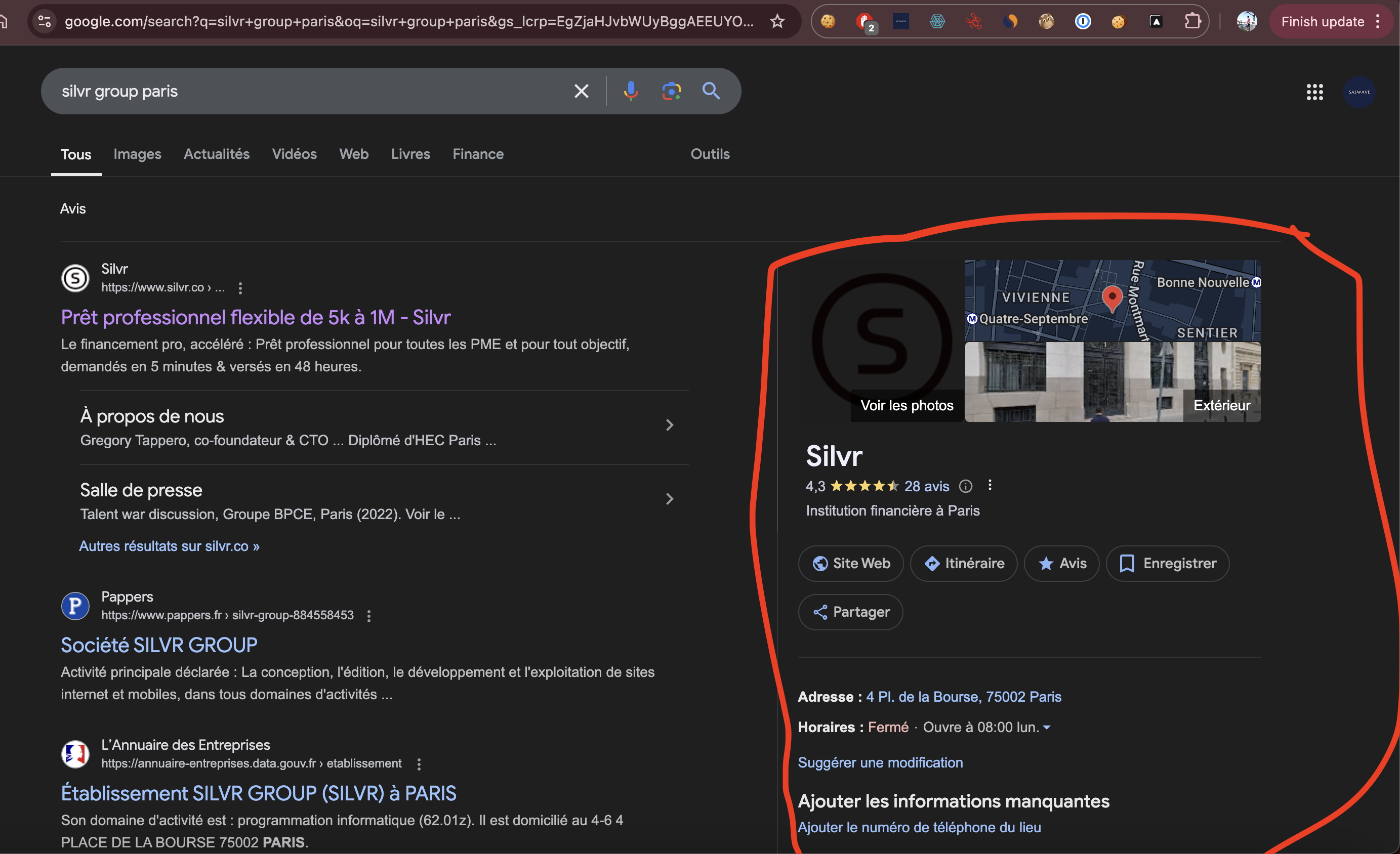 ## Outputs returns a list of parsed google maps results ## Inputs - list of queries: One query per line - country code : af, al, dz, as, ad, ao, ai, aq, ag, ar, am, aw, au, at, az, bs, bh, bd, bb, by, be, bz, bj, bm, bt, bo, ba, bw, bv, br, io, bn, bg, bf, bi, kh, cm, ca, cv, ky, cf, td, cl, cn, cx, cc, co, km, cg, cd, ck, cr, ci, hr, cu, cy, cz, dk, dj, dm, do, ec, eg, sv, gq, er, ee, et, fk, fo, fj, fi, fr, gf, pf, tf, ga, gm, ge, de, gh, gi, gr, gl, gd, gp, gu, gt, gn, gw, gy, ht, hm, va, hn, hk, hu, is, in, id, ir, iq, ie, il, it, jm, jp, jo, kz, ke, ki, kp, kr, kw, kg, la, lv, lb, ls, lr, ly, li, lt, lu, mo, mk, mg, mw, my, mv, ml, mt, mh, mq, mr, mu, yt, mx, fm, md, mc, mn, ms, ma, mz, mm, na, nr, np, nl, an, nc, nz, ni, ne, ng, nu, nf, mp, no, om, pk, pw, ps, pa, pg, py, pe, ph, pn, pl, pt, pr, qa, re, ro, ru, rw, sh, kn, lc, pm, vc, ws, sm, st, sa, sn, cs, sc, sl, sg, sk, si, sb, so, za, gs, es, lk, sd, sr, sj, sz, se, ch, sy, tw, tj, tz, th, tl, tg, tk, to, tt, tn, tr, tm, tc, tv, ug, ua, ae, gb, us, um, uy, uz, vu, ve, vn, vg, vi, wf, eh, ye, zm, zw If country code not provided, default usage is us (united states) ## 🎯 Use Cases This tool is ideal for: Lead generation Business directories CRM enrichment Market research Outreach automation Competitive analysis Local SEO research Store locators Business auditing Geolocation analysis ## ⚠ Limitations Results depend on Google showing a business profile. Some businesses may not appear in the right-side panel. Data availability varies by region and business type. Rate limits apply based on Google behavior. ## ✅ Best Practices Use full company names + city/country for higher accuracy. Avoid vague queries like "marketing agency". Prefer real business names over generic keywords. Use country code for non-US searches. Deduplicate results by name + address. ## 🛟 SUPPORT Share your runs with the developer team and create issues on error to help us improve actor quality. You might discover edge case we didn't test yet We stay available anytime
Categories
Common Use Cases
Market Research
Gather competitive intelligence and market data
Lead Generation
Extract contact information for sales outreach
Price Monitoring
Track competitor pricing and product changes
Content Aggregation
Collect and organize content from multiple sources
Ready to Get Started?
Try Google search Parser google maps / my business now on Apify. Free tier available with no credit card required.
Start Free TrialActor Information
- Developer
- saswave
- Pricing
- Paid
- Total Runs
- 72,276
- Active Users
- 757
Related Actors

🏯 Tweet Scraper V2 - X / Twitter Scraper
by apidojo

Instagram Scraper
by apify

TikTok Scraper
by clockworks

Instagram Profile Scraper
by apify
Apify provides a cloud platform for web scraping, data extraction, and automation. Build and run web scrapers in the cloud.
Learn more about ApifyNeed Professional Help?
Couldn't solve your problem? Hire a verified specialist on Fiverr to get it done quickly and professionally.
Trusted by millions | Money-back guarantee | 24/7 Support