
🧞♂️ LinkedIn to Airtable Jobs Scraper
by radiodigitalai
Scrape high quality LinkedIn jobs with AI powered analysis and directly store them in your Airtable base. No need to worry about Cookies and Authentic...
Opens on Apify.com
About 🧞♂️ LinkedIn to Airtable Jobs Scraper
Scrape high quality LinkedIn jobs with AI powered analysis and directly store them in your Airtable base. No need to worry about Cookies and Authentication!!
What does this actor do?
🧞♂️ LinkedIn to Airtable Jobs Scraper is a web scraping and automation tool available on the Apify platform. It's designed to help you extract data and automate tasks efficiently in the cloud.
Key Features
- Cloud-based execution - no local setup required
- Scalable infrastructure for large-scale operations
- API access for integration with your applications
- Built-in proxy rotation and anti-blocking measures
- Scheduled runs and webhooks for automation
How to Use
- Click "Try This Actor" to open it on Apify
- Create a free Apify account if you don't have one
- Configure the input parameters as needed
- Run the actor and download your results
Documentation
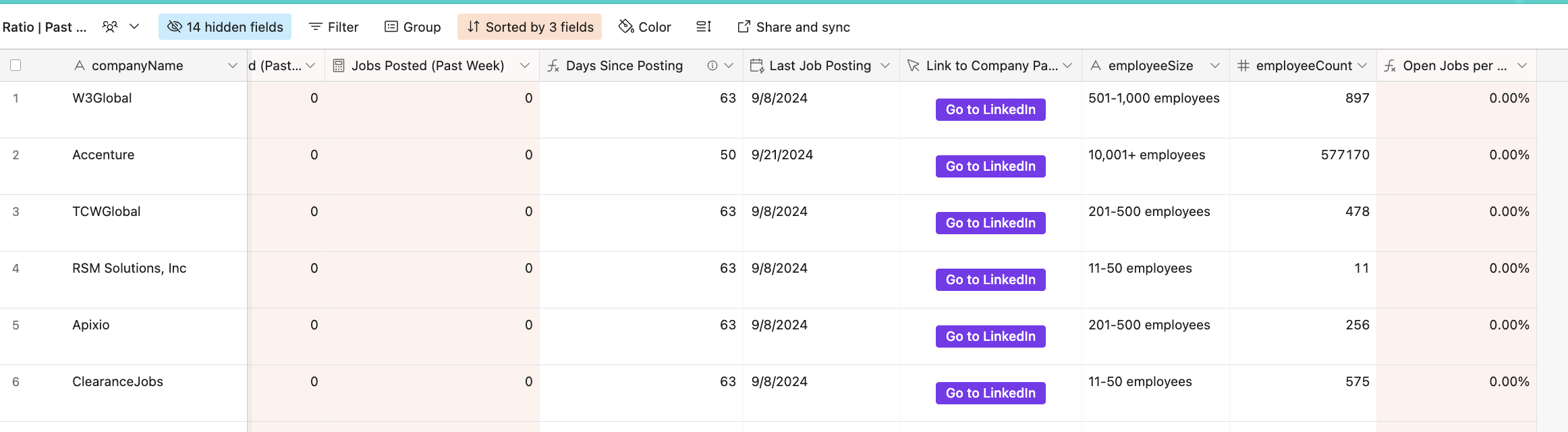
LinkedIn Job Scraper with AI-Powered Match Analysis + Airtable Integration (Optional) 🚀 Transform your job search or market research with this powerful LinkedIn Job Scraper that not only collects detailed job listings but also provides AI-powered match analysis of how well your resume matches each position! (as well as Airtable integration) ## Who is this for? 1. Job Seekers: Get job listings with AI-powered resume match scores + Airtable integration to track your applications 2. Staffing Agencies: Track hiring companies and get detailed insights + Built-in Airtable integration for managing clients 3. Recruiters: Access comprehensive job market data and hiring trends for better decision making. ## 🎯 Airtable Setup (Optional) ### 1. Copy my airtable base template for FREE - Get Airtable Job Search Template ### 2. Set Up API Key - Go to your Airtable Account - Create or copy your API key from the API section - Add it to the actor's input under AIRTABLE_API_KEY ### 3. Get Template IDs - After getting the template, copy it into your account and get these IDs: Airtable URL: www.airtable.com/{base_id}/{table_id}/{view_id} Base ID: Get the base_id Jobs Table ID: Get the table_id for jobs table Companies Table ID: Get the table_id for companies table Jobs Table: 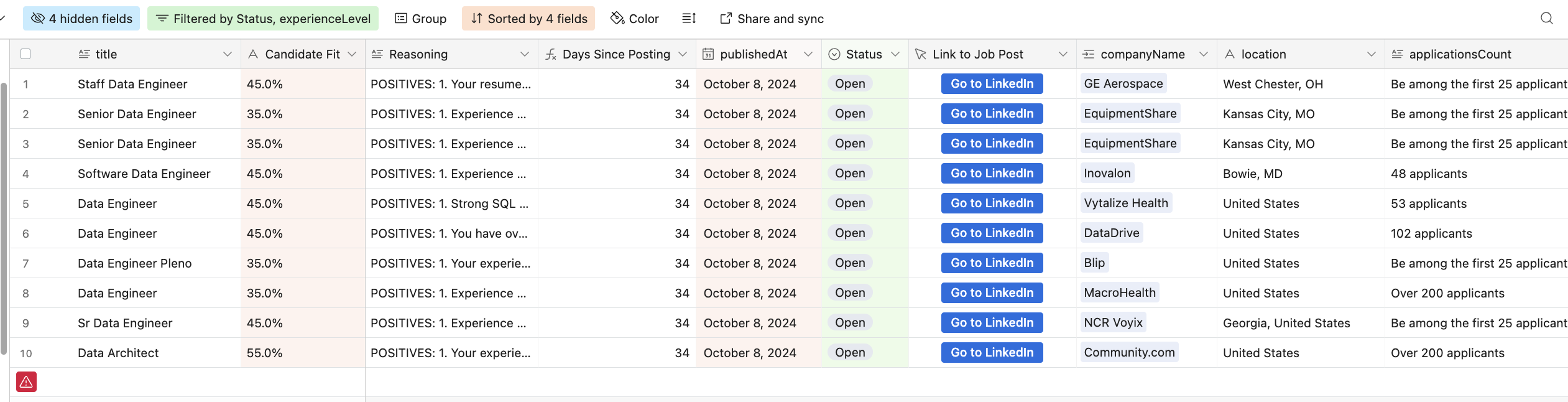 Companies Table:
  ## What is the output?
  ## 🎯 DeepSeek Setup (Optional: For Resume Matching Score) ### 1. Set Up API Key - Go to your DeepSeek Account - Create a new secret key for apify actor. - Add it to the actor's input under
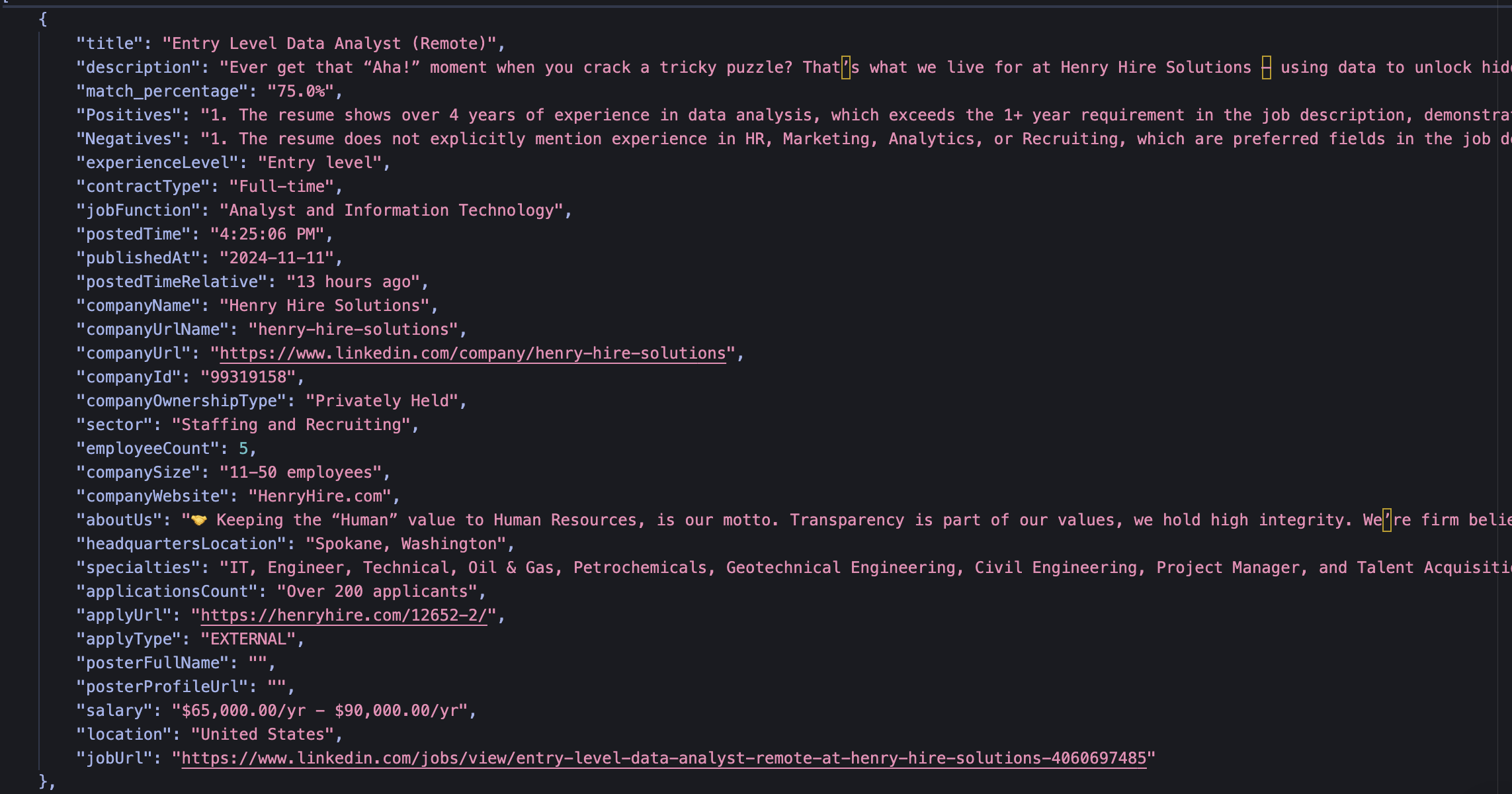
 DEEPSEEK_API_KEY - Note: You have to add credit your DeepSeek account in order for the API to work. ## 🎯 OpenAI Setup (Optional: For Resume Matching Score) ### 1. Set Up API Key - Go to your OpenAI Account - Create a new secret key for apify actor. - Add it to the actor's input under OPENAI_API_KEY - Note: You have to add credit your OpenAI account in order for the API to work. ## ✨ Key Features - 🎯 AI Resume Matching: Analyzes each job against your resume to provide a match percentage and detailed feedback - 🔍 Advanced Filtering: Exclude specific companies, industries, and job titles - 📊 Rich Data Collection: Captures comprehensive job and company details - 📈 Airtable Integration: Optional direct export to Airtable for easy data management - 🤖 Proxy Support: Built-in proxy rotation for reliable scraping ## 📝 Input Configuration ### Required Fields | Field | Type | Description | |-------|------|-------------| | user_country | String | Country in which you are searching jobs in | | titles_query | String | Job titles to search for (e.g., "('Data Analyst' OR 'Product Manager')") | | rows | Integer | 50 | Maximum number of jobs to scrape | ### Optional Fields | Field | Type | Default | Description | |-------|------|---------|-------------| | hours | Integer | 24 | Only show jobs posted within these hours | | distance | String | "100" | Search radius in miles | | work_type | Array | ["Remote"] | Work types ("Remote", "On-site", "Hybrid") | | job_type | Array | ["Full-time"] | Job types ("Full-time", "Part-time", "Contract", etc.) | | experience_level | Array | ["Associate", "Entry level", "Mid-Senior level"] | Required experience levels | ### Filtering Options | Field | Type | Description | |-------|------|-------------| | excluded_companies | Array | Companies to exclude from results | | excluded_industries | Array | Industries to exclude (e.g., ["Staffing and Recruiting", "Consulting"]) | | excluded_titles | Array | Job titles to exclude (e.g., ["director", "manager", "intern"]) | ### Airtable Integration (Optional) | Field | Type | Default | Description | |-------|------|---------|-------------| | enable_airtable_processing | Boolean | false | Enable/disable Airtable export | | airtable_base_id | String | | Your Airtable base ID | | airtable_company_table_id | String | | Company table ID | | airtable_jobs_table_id | String | | Jobs table ID | ### Advanced Options | Field | Type | Description | |-------|------|-------------| | user_prompt | String | Custom instructions for AI analysis | | include_additional_job_search_criteria | Boolean | Include additional search parameters | | proxy | Object | Proxy configuration settings | ## 📊 Output The actor provides detailed job information including: - Job details (title, description, requirements, salary) - Company information (size, industry, location) - AI-generated match analysis - Match percentage - Reasoning behind the match - Hard Skills, Soft Skills, Action Verbs, and Certifications from Job Description - Application details (apply URL, posting date, application count) ## 💡 Usage Tips 1. Optimize Search Results: - Use boolean operators in titles_query for better matches - Start with a smaller rows value to test your configuration 2. Resume Matching: - Provide complete resume text for accurate matching - Use user_prompt to customize the AI analysis 3. Airtable Integration: - Enable enable_airtable_processing for automatic data export - Ensure all Airtable IDs are correctly configured ## ⚠️ Important Notes - Rate limiting and proxy rotation are handled automatically - Results are deduplicated when using Airtable integration - The actor respects LinkedIn's terms of service and implements appropriate delays ## 🔧 Technical Requirements - Airtable API key (if using Airtable integration) - DeepSeek API key (for resume matching score) - OpenAI API key (for resume matching score) - Valid proxy configuration recommended ## 🚀 Get Started 1. Configure your input parameters 2. Add your resume text (optional) 3. Set up Airtable integration (optional) 4. Run the actor and watch as it collects and analyzes jobs for you! ## 📫 Support For issues, feature requests, or questions, please open an issue in the repository or contact the maintainer. Happy job hunting! 🎯
Categories
Common Use Cases
Market Research
Gather competitive intelligence and market data
Lead Generation
Extract contact information for sales outreach
Price Monitoring
Track competitor pricing and product changes
Content Aggregation
Collect and organize content from multiple sources
Ready to Get Started?
Try 🧞♂️ LinkedIn to Airtable Jobs Scraper now on Apify. Free tier available with no credit card required.
Start Free TrialActor Information
- Developer
- radiodigitalai
- Pricing
- Paid
- Total Runs
- 13,368
- Active Users
- 30
Related Actors

Company Employees Scraper
by build_matrix

🔥 LinkedIn Jobs Scraper
by bebity

Linkedin Company Detail (No Cookies)
by apimaestro

Linkedin Profile Details Batch Scraper + EMAIL (No Cookies)
by apimaestro
Apify provides a cloud platform for web scraping, data extraction, and automation. Build and run web scrapers in the cloud.
Learn more about ApifyNeed Professional Help?
Couldn't solve your problem? Hire a verified specialist on Fiverr to get it done quickly and professionally.
Trusted by millions | Money-back guarantee | 24/7 Support