
Stress & Load Testing Tool
by onescales
Test your website's performance under load with this comprehensive stress testing tool and see the results in a table, json or export to excel or goog...
Opens on Apify.com
About Stress & Load Testing Tool
Test your website's performance under load with this comprehensive stress testing tool and see the results in a table, json or export to excel or google sheets via csv. Simulate multiple concurrent users, measure response times, and identify bottlenecks before they impact your real customers.
What does this actor do?
Stress & Load Testing Tool is a web scraping and automation tool available on the Apify platform. It's designed to help you extract data and automate tasks efficiently in the cloud.
Key Features
- Cloud-based execution - no local setup required
- Scalable infrastructure for large-scale operations
- API access for integration with your applications
- Built-in proxy rotation and anti-blocking measures
- Scheduled runs and webhooks for automation
How to Use
- Click "Try This Actor" to open it on Apify
- Create a free Apify account if you don't have one
- Configure the input parameters as needed
- Run the actor and download your results
Documentation
Test your website's performance under load with this comprehensive stress testing tool and see the results in a table, json or export to excel or google sheets via csv. Simulate multiple concurrent users, measure response times, and identify bottlenecks before they impact your real customers. Recently Added: Summary Graphs for response time, errors and status codes in png image. 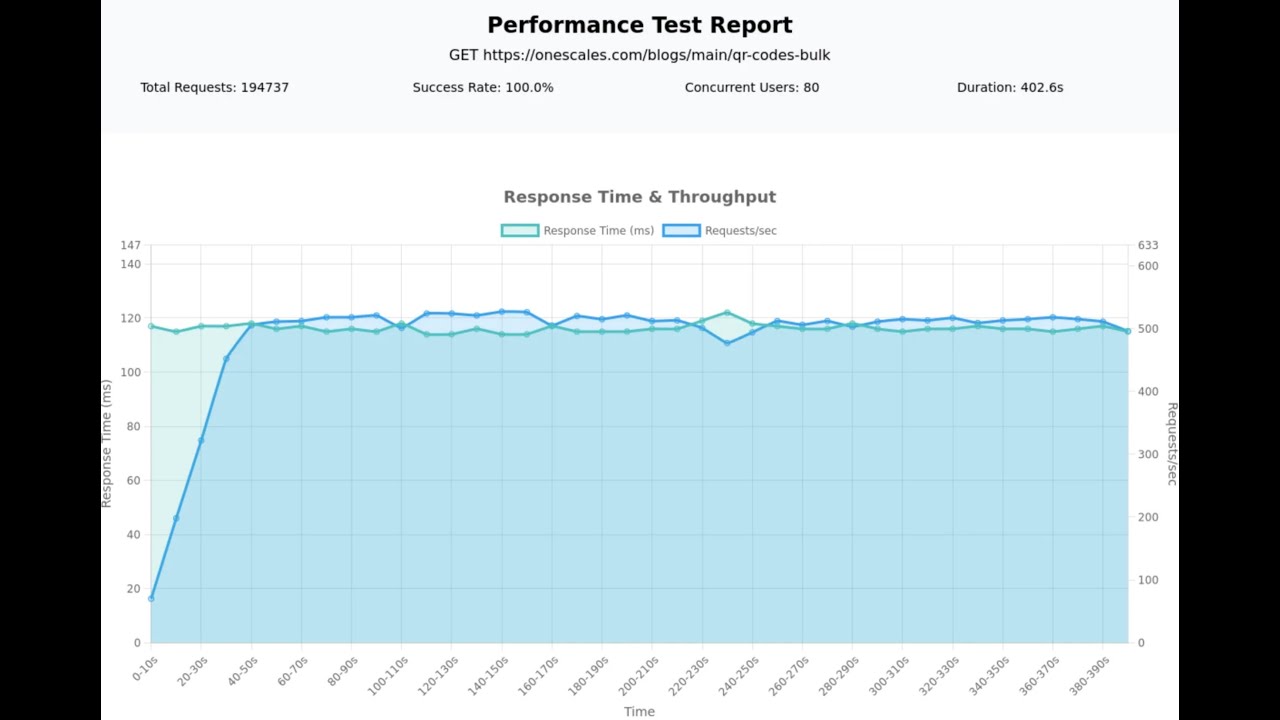 ## Description This actor helps you stress test websites and APIs by simulating concurrent user traffic. Get detailed performance metrics including response times, success rates, throughput, and error analysis. Perfect for: - Load testing - Verify your site can handle expected traffic - Performance benchmarking - Measure response times under various load conditions - Capacity planning - Determine your infrastructure limits - API testing - Test RESTful endpoints with different HTTP methods - Pre-launch validation - Ensure your site is production-ready ### Key Features - Test multiple URLs simultaneously with different HTTP methods (GET, POST, PUT, PATCH, DELETE) - Configure concurrent virtual users to simulate real traffic patterns - Duration-based testing (run for X seconds) - Gradual ramp-up periods to simulate realistic traffic growth - Proxy support to distribute load and avoid IP blocking - Custom User-Agent for request customization - Comprehensive metrics: response times (min/max/avg/median/P95/P99), throughput, success rates - Detailed error analysis and status code breakdown - Per-request and aggregated summary data - Visual performance reports with charts (Response Time, Requests/Errors, Status Codes) ## Tips for Effective Stress Testing ### Start Small and Scale Up Begin with low concurrent users (5-10) and gradually increase to identify your breaking point. Use the ramp-up time feature to simulate realistic traffic growth. ### Use Realistic Test Scenarios - Test the actual user journeys on your site (login, browse, checkout, etc.) - Include appropriate User-Agent for your use case ### Interpret Your Results - Response time P95/P99 - Focus on these percentiles rather than averages, as they show what your slowest users experience - Success rate - Aim for 99%+ success rate; anything lower indicates problems - Throughput - Requests per second your system can handle - Error patterns - Check error details to identify specific bottlenecks (database, API, memory, etc.) - Visual reports - Review the generated PNG charts for visual insights into performance trends ## Input Configure your stress test using the following parameters: ### UI Configuration #### Basic Settings Start URLs (required) - List of URLs to test - Supports multiple endpoints simultaneously - Each URL can use different HTTP methods (GET, POST, PUT, PATCH, DELETE) - Example:
 https://api.example.com/users Concurrent Users - Number of virtual users simulating traffic simultaneously - Free plan: 1-10 users - Paid plans: 1-100 users - Default: 10 - Tip: Start with 5-10 and increase gradually Test Duration in Seconds (required) - Run test for a specific time period - Free plan: 1-1200 seconds (30 minutes) - Paid plans: 1-1200 seconds (30 minutes) - Default: 20 Ramp-Up Time - Gradually increase load over X seconds - Set to 0 for immediate full load - Range: 0-720 seconds - Default: 0 - Tip: Use 30-60 seconds for more realistic scenarios #### Proxy Settings Proxy Configuration - Enable Apify proxy to distribute requests across multiple IPs - Recommended for tests with >20 concurrent users - Helps avoid rate limiting and IP blocking #### Advanced Settings User-Agent - Custom User-Agent string - Leave empty to use default Chrome user agent - Default: Mozilla/5.0 (Windows NT 10.0; Win64; x64) AppleWebKit/537.36 (KHTML, like Gecko) Chrome/120.0.0.0 Safari/537.36 Request Timeout - Maximum time to wait for response - Range: 1000-30000ms (1-30 seconds) - Default: 30000ms Follow Redirects - Automatically follow HTTP redirects (301, 302, etc.) - Default: enabled ### JSON API Configuration json { "startUrls": [ { "url": "https://api.example.com/users", "method": "GET" }, { "url": "https://api.example.com/products", "method": "GET" }, { "url": "https://api.example.com/orders", "method": "POST" } ], "concurrentUsers": 25, "durationSeconds": 60, "rampUpSeconds": 30, "proxyConfiguration": { "useApifyProxy": true }, "userAgent": "MyApp/1.0", "timeoutMs": 30000, "followRedirects": true } ## Output The actor generates comprehensive performance data with two types of records: SUMMARY records (aggregated metrics per URL) and REQUEST records (individual request details). ### UI Output Results are displayed in a table view with the following information: #### SUMMARY Records (One per URL tested) Test Information - Type - Always "SUMMARY" for aggregated records - Page (URL) - The endpoint that was tested - Method - HTTP method used (GET, POST, etc.) - Test Start Time - When the test began - Test End Time - When the test completed - Total Duration (s) - How long the test ran Request Statistics - Total Requests - Total requests sent to this URL - Successful Requests - Requests with 2xx status codes - Failed Requests - Failed or non-2xx requests - Success Rate (%) - Percentage of successful requests - Error Rate (%) - Percentage of failed requests - Throughput (req/s) - Average requests per second Performance Metrics - Response Time - Object containing: - min - Fastest response time (ms) - max - Slowest response time (ms) - avg - Average response time (ms) - median - Median response time (ms) - p95 - 95th percentile (95% of requests faster than this) - p99 - 99th percentile (99% of requests faster than this) Analysis Data - Status Code Breakdown - Count of each HTTP status code received - Error Summary - Breakdown of error types and counts - Error Details - Sample errors with occurrence counts (top 5) - Visual Report - PNG image with performance charts showing: - Response Time over time with Request counts - Requests & Errors over time - Status Codes Distribution (pie chart) - Configuration - Test parameters used: - Target URLs with methods - Concurrent Users - Duration in seconds - Ramp-up time in seconds - Concurrent Users - Number of virtual users in this test #### REQUEST Records (One per individual request) - Type - Always "REQUEST" for individual request records - Page (URL) - The endpoint that was requested - Method - HTTP method used - Request Number - Sequential number of this request - Response Time - Individual request response time (ms) - Status Code - HTTP status code returned - Success - Whether the request succeeded (true/false) - Error - Error code or message if request failed - Timestamp - When this request completed - Actual URL - The final URL after any redirects ### Example Output Record (SUMMARY) json { "type": "SUMMARY", "page": "https://api.example.com/users", "method": "GET", "testStartTime": "2025-10-29T03:00:00.000Z", "testEndTime": "2025-10-29T03:01:00.000Z", "totalDuration": 60.5, "totalRequests": 150, "successfulRequests": 148, "failedRequests": 2, "successRate": 98.67, "errorRate": 1.33, "throughput": 2.48, "concurrentUsers": 25, "responseTime": { "min": 45, "max": 523, "avg": 125, "median": 110, "p95": 234, "p99": 412 }, "statusCodes": { "200": 148, "500": 2 }, "errors": { "Connection timeout": 2 }, "errorDetails": [ { "error": "Connection timeout", "count": 2 } ], "visualReport": "https://api.apify.com/v2/key-value-stores/abc123/records/chart-0-1698556800000.png", "config": { "targetUrls": ["GET https://api.example.com/users"], "concurrentUsers": 25, "durationSeconds": 60, "rampUpSeconds": 30 } } ## Roadmap - Load JMeter test scripts and execute them - Additional chart types and customization options ## Support Have Questions or Need Additional Features? We're here to support you! Whether you need help with setup, have questions about interpreting results, or want to request additional features, we've got you covered. Contact Us: Just fill out the form at https://docs.google.com/forms/d/e/1FAIpQLSfsKyzZ3nRED7mML47I4LAfNh_mBwkuFMp1FgYYJ4AkDRgaRw/viewform?usp=dialog, and we'll try our best to help as quickly as possible. --- Note: Always ensure you have permission to stress test websites. Unauthorized stress testing may violate terms of service or laws. Use responsibly and ethically.
Categories
Common Use Cases
Market Research
Gather competitive intelligence and market data
Lead Generation
Extract contact information for sales outreach
Price Monitoring
Track competitor pricing and product changes
Content Aggregation
Collect and organize content from multiple sources
Ready to Get Started?
Try Stress & Load Testing Tool now on Apify. Free tier available with no credit card required.
Start Free TrialActor Information
- Developer
- onescales
- Pricing
- Paid
- Total Runs
- 244
- Active Users
- 9
Related Actors

Web Scraper
by apify

Cheerio Scraper
by apify

Website Content Crawler
by apify

Legacy PhantomJS Crawler
by apify
Apify provides a cloud platform for web scraping, data extraction, and automation. Build and run web scrapers in the cloud.
Learn more about ApifyNeed Professional Help?
Couldn't solve your problem? Hire a verified specialist on Fiverr to get it done quickly and professionally.
Trusted by millions | Money-back guarantee | 24/7 Support