My Spotify History Data
by onescales
View your complete Spotify play history in a report and analyze how much time you've spent with your favorite artists and songs! This app processes yo...
Opens on Apify.com
About My Spotify History Data
View your complete Spotify play history in a report and analyze how much time you've spent with your favorite artists and songs! This app processes your Spotify stats data, export files and delivers detailed insights into your listening habits so you can view in Excel or Google Sheets (csv) & image.
What does this actor do?
My Spotify History Data is a web scraping and automation tool available on the Apify platform. It's designed to help you extract data and automate tasks efficiently in the cloud.
Key Features
- Cloud-based execution - no local setup required
- Scalable infrastructure for large-scale operations
- API access for integration with your applications
- Built-in proxy rotation and anti-blocking measures
- Scheduled runs and webhooks for automation
How to Use
- Click "Try This Actor" to open it on Apify
- Create a free Apify account if you don't have one
- Configure the input parameters as needed
- Run the actor and download your results
Documentation
View your complete Spotify play history and analyze how much time you've spent with your favorite artists and songs! This app processes your Spotify data export files and delivers detailed statistics and insights into your listening habits so you can view and explore the data in Excel or Google Sheets (CSV format). 📌 Note: This app analyzes Streaming History and Extended Streaming History files only. (ONLY Upload files named Streaming_History....) It does not process other Spotify export data types (like playlists, library, or user data). 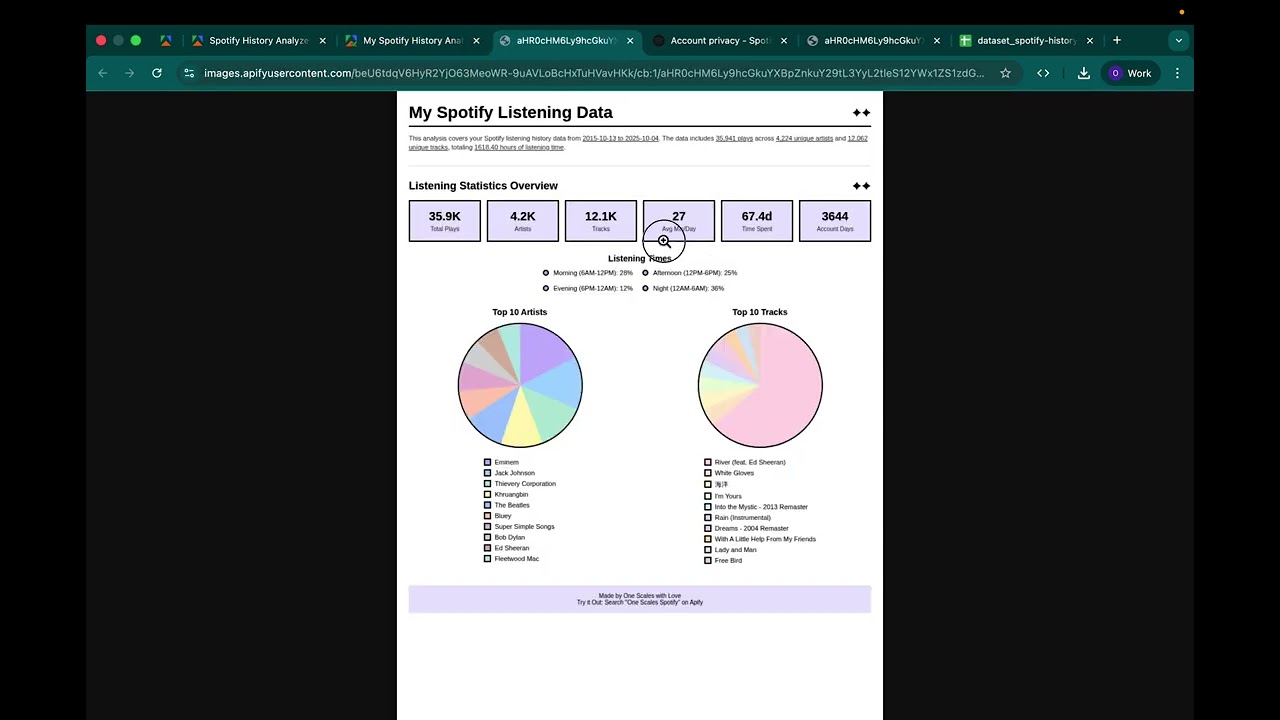 ## What You Get - Overall Statistics: Total plays, listening time, date range, and daily averages - Top Artists: Your most-played artists with play counts and listening hours (unlimited or set your own limit) - Top Tracks: Your favorite songs ranked by play count (unlimited or set your own limit) - Timeline Data: When you discovered artists and tracks - Detailed Metrics: Play counts, percentages, and time breakdowns - All in One View: Single "My Data" tab with summary, artists, and tracks all together ## How to Use ### Step 1: Get Your Spotify Data 1. Go to Spotify Privacy Settings 2. Scroll down to "Download your data" 3. Select either: - "Account data": Faster delivery (usually a few days, sometimes just 1 day), includes full metadata - "Extended streaming history": Can take up to 30 days (but sometimes arrives in 1 day), more complete history 4. Wait for Spotify to email you 5. Download and unzip the files 6. Look for files named
 StreamingHistory0.json, StreamingHistory1.json, etc. ### Step 2: Upload Your Files 1. In the Apify actor input form, find the file upload fields: - 📁 Spotify JSON File 1 (required) - 📁 Spotify JSON File 2-5 (optional) 2. For each file: - Click on the upload field - Either upload the JSON file from your computer, OR - Provide a URL to the JSON file if hosted online 3. Upload all your StreamingHistory files (you can use up to 5 files) 4. (Optional) Configure additional settings like date filters 5. Click "Start" ### Step 3: View Your Results Check the Dataset tab to see the "My Data" view with: - 📊 Row 1: Summary of your listening habits - 🎤 Next rows: All your top artists (ranked by plays) - 🎵 Final rows: All your top tracks (ranked by plays) ## Output Fields | Field | Description | |-------|-------------| | rank | Ranking position (0 = summary, 1+ = most played) | | name | Artist or track name | | type | Summary, Artist, or Track | | image | Link to Infographic image of summary of your data | | playCount | Number of times played | | totalMinutes | Total minutes listened | | totalHours | Total hours listened | | totalDays | Total days listened (summary only) | | percentage | Percentage of your total listening time | | firstPlayed | Date you first played this | | lastPlayed | Most recent play date | | daysCovered | Number of days between first and last play (summary only) | | avgMinutesPerDay | Average minutes per day (summary only) | | uniqueArtists | Total unique artists (summary only) | | uniqueTracks | Number of unique tracks (summary or for each artist) | | trackName | Track name (tracks only) | | artistName | Artist name (tracks only) | ## Input Options ### Required - Spotify JSON File 1: Upload your first StreamingHistory JSON file ### Optional Files - Spotify JSON File 2-5: Upload additional StreamingHistory files (up to 5 total) ### Optional Filters - Start Date: Filter plays from this date onwards (YYYY-MM-DD format). Leave empty for all data. - End Date: Filter plays up to this date (YYYY-MM-DD format). Leave empty for all data. - Minimum Play Time: Only count songs played for at least X seconds (helps filter out skips). Leave empty to include all plays (no filtering). - Maximum Artists to Export: Limit the number of top artists in results. Leave empty for unlimited. Recommended: 500 - Maximum Tracks to Export: Limit the number of top tracks in results. Leave empty for unlimited. Recommended: 500 ## Tips - Multiple Files: Upload all your StreamingHistory files (up to 5) to get complete analysis - No Default Filtering: By default, ALL plays are included. Set minimum play time only if you want to filter out skips - Export Limits: For very large datasets, use the max artists/tracks settings to limit output size and improve performance - Filter Skips: Set minimum play time to 60+ seconds to filter out skipped songs - Date Ranges: Use date filters to compare different time periods (e.g., 2023 vs 2024) - Download Results: Export the dataset as CSV/JSON/Excel for further analysis ## Troubleshooting Most plays show as "Unknown" artist/track - Some Spotify exports don't include full metadata - This can happen with certain export types or older data - The actor will still calculate time statistics correctly even without full metadata - If you need complete metadata, try requesting a different export type from Spotify "Failed to fetch file" or "File not found" - Make sure you uploaded the correct JSON files from Spotify - Files should be named StreamingHistory*.json from your Spotify export - If providing URLs, ensure they are publicly accessible - Try re-uploading the files "JSON data must be an array" - Your file might be corrupted or in the wrong format - Make sure you're uploading the actual StreamingHistory JSON files from Spotify - Content should start with [ and contain streaming history records "Some plays are missing" - Check your date filters (Start Date / End Date) - Check if you set a minimum play time (plays shorter than this are excluded) - Spotify only provides data from when you started using the service Output is too large / Actor times out - Use the "Maximum Artists to Export" and "Maximum Tracks to Export" settings - Try setting both to 500 for a reasonable dataset size - Or filter by date range to analyze smaller time periods ## Privacy This actor runs entirely in your Apify account. Your Spotify data is: - Only processed during the actor run - Stored only in your Apify dataset ## Roadmap Here are the future features we will be developing. If you have any additional suggestions, contact us at https://docs.google.com/forms/d/e/1FAIpQLSfsKyzZ3nRED7mML47I4LAfNh_mBwkuFMp1FgYYJ4AkDRgaRw/viewform?usp=dialog - Support Stream History File for Podcasts (i.e. StreamingHistory_podcast_0.json) - Support Playlists (i.e. Playlist1.json) ## Support Have Questions or Need Additional Features? We're here to support you! Whether you need help with setup, have questions about interpreting results, or want to request additional features for Pitches Pro, we've got you covered. Contact Us: Just fill out the form at https://docs.google.com/forms/d/e/1FAIpQLSfsKyzZ3nRED7mML47I4LAfNh_mBwkuFMp1FgYYJ4AkDRgaRw/viewform?usp=dialog, and we'll try our best to help as quickly as possible.
Categories
Common Use Cases
Market Research
Gather competitive intelligence and market data
Lead Generation
Extract contact information for sales outreach
Price Monitoring
Track competitor pricing and product changes
Content Aggregation
Collect and organize content from multiple sources
Ready to Get Started?
Try My Spotify History Data now on Apify. Free tier available with no credit card required.
Start Free TrialActor Information
- Developer
- onescales
- Pricing
- Paid
- Total Runs
- 490
- Active Users
- 137
Related Actors

Video Transcript Scraper: Youtube, X, Facebook, Tiktok, etc.
by invideoiq

Linkedin Profile Details Scraper + EMAIL (No Cookies Required)
by apimaestro

Twitter (X.com) Scraper Unlimited: No Limits
by apidojo

Content Checker
by jakubbalada
Apify provides a cloud platform for web scraping, data extraction, and automation. Build and run web scrapers in the cloud.
Learn more about ApifyNeed Professional Help?
Couldn't solve your problem? Hire a verified specialist on Fiverr to get it done quickly and professionally.
Trusted by millions | Money-back guarantee | 24/7 Support