
Patreon Extractor 🎯 ⭐5.0
by jupri
💫 All-in-One Patreon.com Scraper [v5.0]
Opens on Apify.com
About Patreon Extractor 🎯 ⭐5.0
💫 All-in-One Patreon.com Scraper [v5.0]
What does this actor do?
Patreon Extractor 🎯 ⭐5.0 is a web scraping and automation tool available on the Apify platform. It's designed to help you extract data and automate tasks efficiently in the cloud.
Key Features
- Cloud-based execution - no local setup required
- Scalable infrastructure for large-scale operations
- API access for integration with your applications
- Built-in proxy rotation and anti-blocking measures
- Scheduled runs and webhooks for automation
How to Use
- Click "Try This Actor" to open it on Apify
- Create a free Apify account if you don't have one
- Configure the input parameters as needed
- Run the actor and download your results
Documentation
💫 Welcome To Patreon Scraper 
 👉 For more up-to-date content, please refresh this page ## 🎯 About Patreon.com
  Patreon (/ˈpeɪtriɒn/, /-ən/) is a membership platform that provides business tools for content creators to run a subscription service. It helps creators and artists earn a monthly income by providing rewards and perks to their subscribers. Patreon charges a commission of 9 to 12 percent of creators' monthly income, in addition to payment processing fees. ## 🎯 About This Actor 💫 All-In-One Patreon.com Scraper - ⭐ Scrape creator info - ⭐ Scrape campaign info, collection, products, chats, etc. - ⭐ Scrape & search posts - ⭐ Scrape comments - ⭐ Accept
 URL inputs - ⭐ Multiple query in single request - ⭐ Scrape personal data (session cookie required session_id) ### Disclaimer : - 👉 This scraper is not intended to scrape Patreon.com creators protected content that requires a subscription for free. - 👉 To access creators protected content, please subscribe to the Creator, then try including session_id cookie value from your Patreon.com Login Session - 👉 Free Trial query is limited to 5 per request. - 👉 Free Trial results is limited to first 100 results. ## 🎯 Input Parameters | Name | Type | Description | |-|-|-| | query | array | List of QUERY, URL or KEYWORD | | limit | integer | Number of results per-query | | filters | object | Various filters ## 🎯 Basic Usage 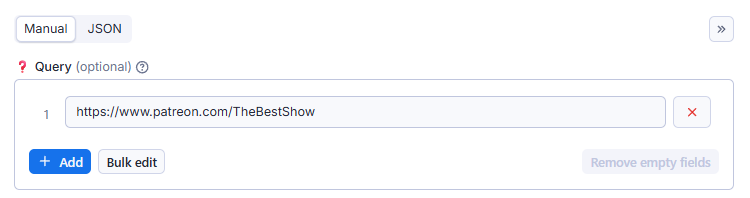
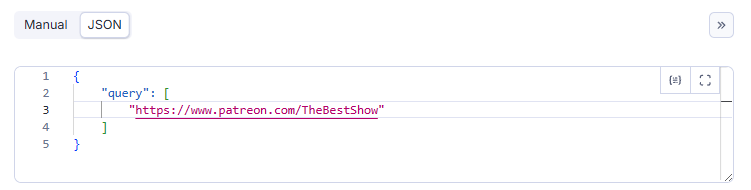 - 👉 Probably the easiest and most sensible use is just to paste a URL or KEYWORD, easy ... right ? - 👉 This Examples for TheBestShow campaign. - 👉 This Examples is in
 JSON format. - 👉 QUERY parameter can accept string of arrays (bulk requests) - 👉 For more control over what to scrape see Advanced Usage (especially the Example column) below. Search for campaign based on KEYWORD yaml { "query": "square pants" } Get campaign info yaml { "query": "https://www.patreon.com/TheBestShow" } OR yaml { "query": "https://www.patreon.com/TheBestShow/about" } OR use @ sign yaml { "query": "@TheBestShow" } Scrape campaign posts yaml { "query": "https://www.patreon.com/TheBestShow/posts" } OR yaml { "query": "@TheBestShow/posts" } Scrape campaign collection list yaml { "query": "https://www.patreon.com/TheBestShow/collections" } OR yaml { "query": "@TheBestShow/collections" } Scrape campaign product list yaml { "query": "https://www.patreon.com/TheBestShow/shop" } OR yaml { "query": "@TheBestShow/products" } Scrape a post Copy paste the post-ID yaml { "query": "100277166" } scrape post comments yaml { "query": "100277166/comments" } Watch the log to see what the Actor is currently scraping. 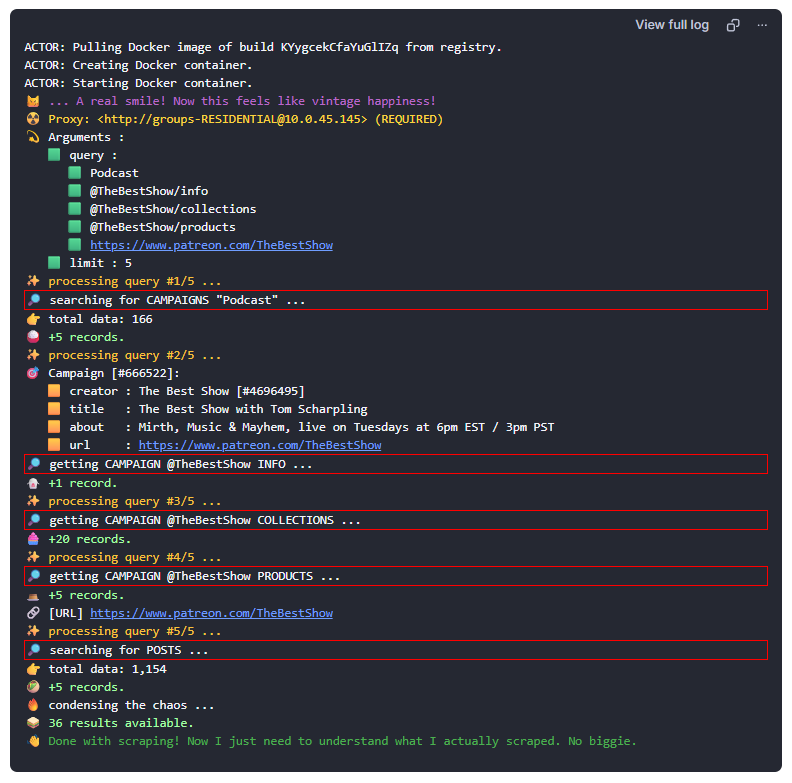 ## 🎯 Advanced Usage ### Patreon Query Language (PQL)
 html [ <COMMAND>: | # | @ ] [ <NAME> | <ID> | <KEYWORD> | <URL> ] [ /<SECTION> ] - 👉 Not all data points can be accessed using a URL. - 👉 Use QUERY for more control over what to scrape. - 👉 Think of this as a SHORTCUT 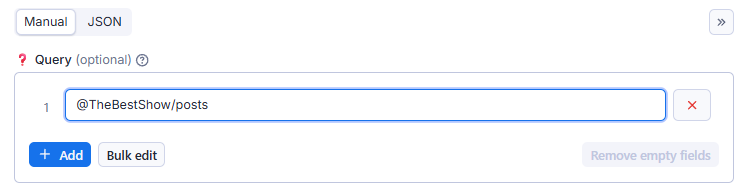 ### Possible
 Query Values | Format | Examples | Description| |-|-|-| | <KEYWORDS> | Search terms | Search Anything | | posts:<KEYWORDS> | posts:Sponge Bob | Search for posts | | creators:<KEYWORDS> | creators:Cat Animations | Search for creators | | @<CAMPAIGN_ID>
@<CAMPAIGN_NAME> | @666522
@TheBestShow | Campaign Data | | /info | @TheBestShow/info | Campaign info | | /socials | @TheBestShow/socials | Campaign & creator social links | | /posts| @TheBestShow/posts | Campaign posts | | /images| @TheBestShow/images | Campaign image posts | | /videos| @TheBestShow/videos | Campaign video posts | | /audios| @TheBestShow/audios | Campaign audio posts | | /episodes| @TheBestShow/podcasts | Campaign podcasts episodes | | /links| @TheBestShow/images | Campaign link posts | | /polls| @TheBestShow/images | Campaign polls | | /collections|@TheBestShow/collections | Campaign collections | | /podcasts|@TheBestShow/podcasts | Campaign podcast collections | | /products|@TheBestShow/products | Campaign products (shop) | | /chats | @TheBestShow/chats | Campaign chats | | /tags | @TheBestShow/tags | Campaign posts tags | | user:<USER_ID>| user:4696495 | Creator/User Data | | /info | user:4696495/info | Creator info | | <POST_ID> | 100277166 | Post Data | | /info | 100277166/info | Post content| | /comments | 100277166/comments | Post comments | | /related | 100277166/related | Related posts | | collection:<COLLECTION_ID> | collection:12345678 | Collection Data | | /info | collection:12345678/info | Collection info | /posts | collection:12345678/posts | Collection post | product:<PRODUCT_ID> | product:12345678 | Product Data | | /info | product:12345678/info | Product info | home:<SECTION> | home:info | Personal Data | | :info | home:info | User info | | :updates | home:updates | Feed updates | | :notifications | home:notifications | Notifications | | https:<URL> | https://www.patreon.com/... | Start URL | | /<CAMPAIGN>| |@<CAMPAIGN> | /<CAMPAIGN>/shop| | @<CAMPAIGN>/products | /<CAMPAIGN>/collections | | @<CAMPAIGN>/collections | /posts/title-slug-<POST_ID>|| <POST_ID> ### Why use a QUERY parameter instead of URL? Using QUERY instead of URL gives you more flexibility and clarity when scraping. While a full URL points to a specific page, a query typically represents a search term, filter, or dynamic input used to generate results on a site. Many modern websites—especially those with search or filter functions—construct pages dynamically based on queries, not fixed URLs. By using QUERY, you : - Focus on what data you want, not where it lives. - Allow the Actor to build the right URL internally. - Enable batch operations on multiple queries more easily. - Support non-URL-based inputs, like keywords, IDs, or product names. In short, QUERY is often more intuitive and powerful when you're scraping based on intent rather than specific page addresses. ### FAQ : [F]requently [A] very Wrong or Misunderstood [Q]ueries | | QUERY | Description | |-|-|-| |❌| https://www.patreon.com/TheBestShow/info | This URL does not exists! You probably want to use QUERY: @TheBestShow/info or just @TheBestShow |❌| https://www.patreon.com/TheBestShow:info | This URL also does not exists! use @TheBestShow, easy ... right ? | | ... to be continued ... ## 🎯 Input Examples ### Example #1: Scrape a Post yaml { "query": ["https://www.patreon.com/posts/post-title-slug-3001122"] } OR yaml { "query": ["3001122"] } # just input the POST_ID ### Example #2: Scrape a Post Comments yaml { "query": ["3001122/comments"] } ## 🎯 LOGIN SESSION You may want to include your login session from your browser. If that's the case, you need to include the cookie named session_id. To get the cookie value, follow these steps : ### Google Chrome 1. Login to patreon.com 2. Open Chrome Developer Tools (Ctrl + Shift + I) 3. Open Application Tab 4. On left panel, go to: Storage -> Cookies -> https://www.patreon.com 5. Find cookie named session_id 6. Copy & Paste 
 ## 🎯 Output Examples
 yaml { "access_rules": [ { "access_rule_type": "tier", "amount_cents": null, "currency": "USD", "id": "7909551", "post_count": 603, "type": "access-rule" }, { "access_rule_type": "tier", "amount_cents": null, "currency": "USD", "id": "9059915", "post_count": 337, "type": "access-rule" } ], "audio": { "file_name": "AdFree-DraftV1-20221007-TCO-Hillsong1.mp3", "id": "171203911", "image_urls": null, "metadata": {}, "type": "media" }, "change_visibility_at": null, "comment_count": 56, "commenter_count": 34, "current_user_can_comment": false, "current_user_can_delete": false, "current_user_can_view": false, "has_ti_violation": false, "id": "72996515", "image": { "height": 480, "large_url": "https://c10.patreonusercontent.com/4/patreon-media/p/campaign/1508621/d2bfcfd4a278419abad6926b2155d514/eyJoIjozNDksInciOjYyMH0%3D/3?token-time=2145916800&token-hash=b3gTD8SkGyerTsc2f5mkx7NeQhl0lhl7qj_bihrza9I%3D", "thumb_square_large_url": "https://c10.patreonusercontent.com/4/patreon-media/p/campaign/1508621/d2bfcfd4a278419abad6926b2155d514/eyJoIjozNDksInciOjYyMH0%3D/3?token-time=2145916800&token-hash=b3gTD8SkGyerTsc2f5mkx7NeQhl0lhl7qj_bihrza9I%3D", "thumb_square_url": "https://c10.patreonusercontent.com/4/patreon-media/p/campaign/1508621/d2bfcfd4a278419abad6926b2155d514/eyJoIjozNDksInciOjYyMH0%3D/3?token-time=2145916800&token-hash=b3gTD8SkGyerTsc2f5mkx7NeQhl0lhl7qj_bihrza9I%3D", "thumb_url": "https://c10.patreonusercontent.com/4/patreon-media/p/campaign/1508621/d2bfcfd4a278419abad6926b2155d514/eyJoIjozNDksInciOjYyMH0%3D/3?token-time=2145916800&token-hash=b3gTD8SkGyerTsc2f5mkx7NeQhl0lhl7qj_bihrza9I%3D", "url": "https://c10.patreonusercontent.com/4/patreon-media/p/campaign/1508621/d2bfcfd4a278419abad6926b2155d514/eyJoIjozNDksInciOjYyMH0%3D/3?token-time=2145916800&token-hash=b3gTD8SkGyerTsc2f5mkx7NeQhl0lhl7qj_bihrza9I%3D", "width": 640 }, "images": [], "insights_last_updated_at": "2022-10-11T05:36:00.659+00:00", "is_paid": false, "like_count": 188, "media": [ { "file_name": "AdFree-DraftV1-20221007-TCO-Hillsong1.mp3", "id": "171203911", "image_urls": null, "metadata": {}, "type": "media" } ], "meta_image_url": "https://c7.patreon.com/https%3A%2F%2Fwww.patreon.com%2F%2Fpost-teaser-image%2F72996515/selector/%23post-teaser", "min_cents_pledged_to_view": null, "moderation_status": "not_being_reviewed", "native_video_insights": null, "patreon_url": "https://www.patreon.com/posts/hillsong-exposed-72996515", "pledge_url": "/bePatron?patAmt=5.0&c=1508621", "pls_one_liners_by_category": [], "poll": null, "post_level_suspension_removal_date": null, "post_metadata": null, "post_type": "audio_file", "preview_asset_type": "default", "published_at": "2022-10-07T10:08:07.000+00:00", "teaser_text": "In the early 2000s a new kind of church appeared in New York City. It wasn't \"regular\" church, it was \"cool\" church. It was a church with ce", "ti_checks": [], "title": "Hillsong: A MegaChurch Exposed. Ep 1: Welcome Home", "type": "post", "upgrade_url": "/join/TrueCrimeObsessed/checkout?rid=2334613", "url": "https://www.patreon.com/posts/hillsong-exposed-72996515", "user_defined_tags": [], "video_preview": null, "view_count": 467, "was_posted_by_campaign_owner": true } ## 🎯 Support ⚡️ Feel free to reach out to the developer for any issues or suggestions for improvement. 
Categories
Common Use Cases
Market Research
Gather competitive intelligence and market data
Lead Generation
Extract contact information for sales outreach
Price Monitoring
Track competitor pricing and product changes
Content Aggregation
Collect and organize content from multiple sources
Ready to Get Started?
Try Patreon Extractor 🎯 ⭐5.0 now on Apify. Free tier available with no credit card required.
Start Free TrialActor Information
- Developer
- jupri
- Pricing
- Paid
- Total Runs
- 7,017
- Active Users
- 1,499
Related Actors

🏯 Tweet Scraper V2 - X / Twitter Scraper
by apidojo

Instagram Scraper
by apify

TikTok Scraper
by clockworks

Instagram Profile Scraper
by apify
Apify provides a cloud platform for web scraping, data extraction, and automation. Build and run web scrapers in the cloud.
Learn more about ApifyNeed Professional Help?
Couldn't solve your problem? Hire a verified specialist on Fiverr to get it done quickly and professionally.
Trusted by millions | Money-back guarantee | 24/7 Support