
Airtable Exporter
by jupri
💫 Export Dataset to Airtable
Opens on Apify.com
About Airtable Exporter
💫 Export Dataset to Airtable
What does this actor do?
Airtable Exporter is a web scraping and automation tool available on the Apify platform. It's designed to help you extract data and automate tasks efficiently in the cloud.
Key Features
- Cloud-based execution - no local setup required
- Scalable infrastructure for large-scale operations
- API access for integration with your applications
- Built-in proxy rotation and anti-blocking measures
- Scheduled runs and webhooks for automation
How to Use
- Click "Try This Actor" to open it on Apify
- Create a free Apify account if you don't have one
- Configure the input parameters as needed
- Run the actor and download your results
Documentation
Welcome To Airtable Dataset Exporter  ### About Airtable.com
  Airtable is a cloud collaboration service headquartered in San Francisco. It was founded in 2012 by Howie Liu, Andrew Ofstad, and Emmett Nicholas. Airtable is a spreadsheet-database hybrid, with the features of a database but applied to a spreadsheet. The fields in an Airtable table are similar to cells in a spreadsheet, but have types such as 'checkbox', 'phone number', and 'drop-down list', and can reference file attachments like images.[1][2] Users can create a database, set up column types, add records, link tables to one another, collaborate, sort records and publish views to external websites. ### About This Actor You need to Authorize The Actor to be able to access your Airtable Database. This is only performed once on The first run. The access token will be saved to your
 Key-Value storage named paws-auth-v1 (encrypted to add more security). To authorize open the "Live View" tab or visit The URL shown in the console log. You need to grant access to one of your Base. # STEP 1: INSTALL (required) - If this is first time using this actor, you required to run the actor through APIFY actor console, this is performed only once. yaml 😼 Authentication needed to complete this operation. 😼 Please visit the following URL or open The "Live View" tab. 🌐 [server] <auth> Server running on https://mq3pf1pe9a2k.runs.apify.net ... - Open Live View Tab or visit URL displayed on the Log - Make sure the popup not blocked by your browser - Follow the popup Authorization steps. 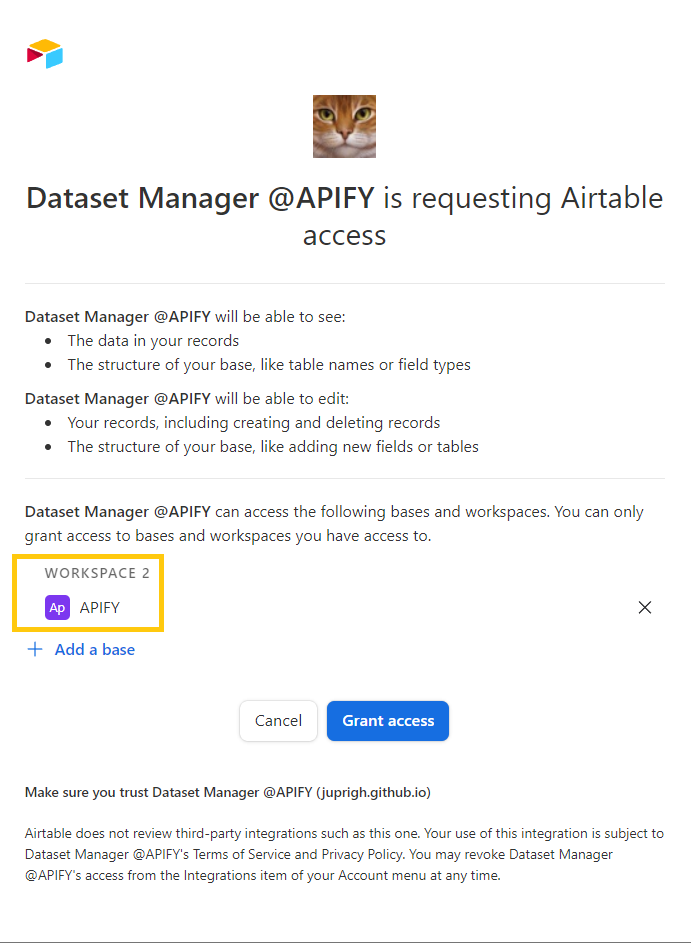 - Done # STEP 2: INTEGRATION (optional) - This actor can run as standalone or used for integration. - On your actor console select Integration Tab - Click Add Integration - On Generic integrations section click Connect Actor or Task - Choose what to connect search for Airtable Exporter and click connect - Input necessary parameters and click save - Run you actor as usual - Done # STEP 3: UNINSTALL - On your
 APIFY Key-Value storage delete store named paws-auth-v1 - On AIRTABLE account menu click Integrations  - Select Third-party Integration and click Dataset Manager @APIFY
  - Click Revoke Access
  ## How It's Works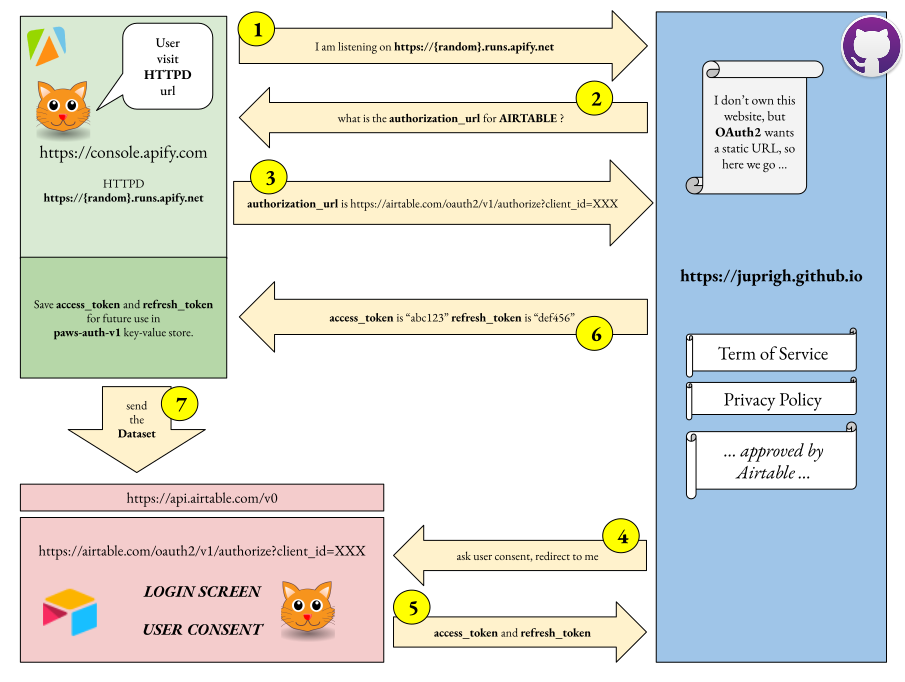
Categories
Common Use Cases
Market Research
Gather competitive intelligence and market data
Lead Generation
Extract contact information for sales outreach
Price Monitoring
Track competitor pricing and product changes
Content Aggregation
Collect and organize content from multiple sources
Ready to Get Started?
Try Airtable Exporter now on Apify. Free tier available with no credit card required.
Start Free TrialActor Information
- Developer
- jupri
- Pricing
- Paid
- Total Runs
- 31,853
- Active Users
- 169
Related Actors

Web Scraper
by apify

Cheerio Scraper
by apify

Website Content Crawler
by apify

Legacy PhantomJS Crawler
by apify
Apify provides a cloud platform for web scraping, data extraction, and automation. Build and run web scrapers in the cloud.
Learn more about ApifyNeed Professional Help?
Couldn't solve your problem? Hire a verified specialist on Fiverr to get it done quickly and professionally.
Trusted by millions | Money-back guarantee | 24/7 Support