
Social Card Maker
by happitap
Generate polished social-card images (link previews, posts, comments, reviews) across platforms — customizable layout, branding, and downloadable imag...
Opens on Apify.com
About Social Card Maker
Generate polished social-card images (link previews, posts, comments, reviews) across platforms — customizable layout, branding, and downloadable image outputs (PNG) ready to post.
What does this actor do?
Social Card Maker is a web scraping and automation tool available on the Apify platform. It's designed to help you extract data and automate tasks efficiently in the cloud.
Key Features
- Cloud-based execution - no local setup required
- Scalable infrastructure for large-scale operations
- API access for integration with your applications
- Built-in proxy rotation and anti-blocking measures
- Scheduled runs and webhooks for automation
How to Use
- Click "Try This Actor" to open it on Apify
- Create a free Apify account if you don't have one
- Configure the input parameters as needed
- Run the actor and download your results
Documentation
Social Card Maker Transform any URL or custom content into stunning social media card images in seconds. Create professional, platform-specific social cards that match the exact visual style of Twitter, LinkedIn, Facebook, Instagram, or your custom brand. Perfect for marketers, content creators, developers, and anyone who needs beautiful social graphics at scale.  ## ✨ Why Use Social Card Maker? - 🎨 Perfect Platform Matching - Cards look exactly like native posts from each platform - ⚡ Lightning Fast - Generate cards in seconds, not minutes - 🔄 Batch Processing - Create multiple cards from a list of URLs - 🎯 Zero Design Skills Required - Just provide content, we handle the design - 📊 Scale Effortlessly - Generate 1 or 1,000 cards with the same ease - 🌐 API-First - Integrate into your workflow via REST API - 💰 Cost-Effective - Pay only for what you use, no monthly subscriptions ## 🎯 Perfect For - Content Marketers: Create consistent social graphics for blog posts - Social Media Managers: Generate preview cards for multiple campaigns - Developers: Auto-generate OG images for documentation sites - Agencies: Produce client deliverables at scale - Entrepreneurs: Create professional social assets without designers - Automation Workflows: Integrate with Zapier, Make, or custom scripts ## 🚀 How to Use ### Option 1: Via Apify Console (No Code) 1. Open the Actor: Go to apify.com/happitap/social-card-maker 2. Enter Your Content: - Add a URL, OR - Enter custom text, images, and branding 3. Configure Settings: Choose platform, dimensions, format 4. Click "Start": Your card generates in seconds 5. Download: Get your image from the Output tab ### 📱 How to Get Facebook URLs #### For Facebook Posts: 1. Go to the Facebook post you want to create a card for 2. Click the three dots (•••) in the top-right corner of the post 3. Select "Copy link" from the menu
 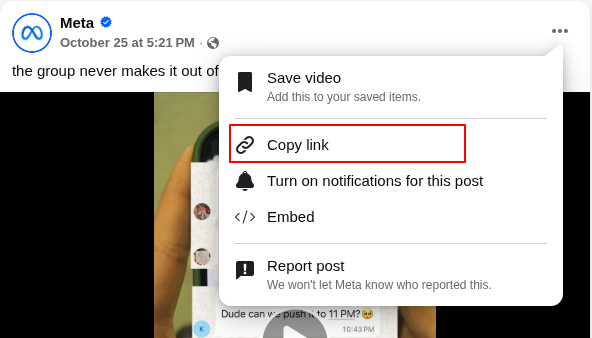 4. Paste the URL into the actor's "Target post URL" field Example:
 json { "targetUrl": "https://www.facebook.com/share/v/12LLJgiB8Lt/", "platform": "facebook" } #### For Facebook Comments: 1. Find the comment you want to feature 2. Click on the timestamp of the comment (e.g., "2h", "1d") 3. Right-click on the timestamp and select "Copy link address" 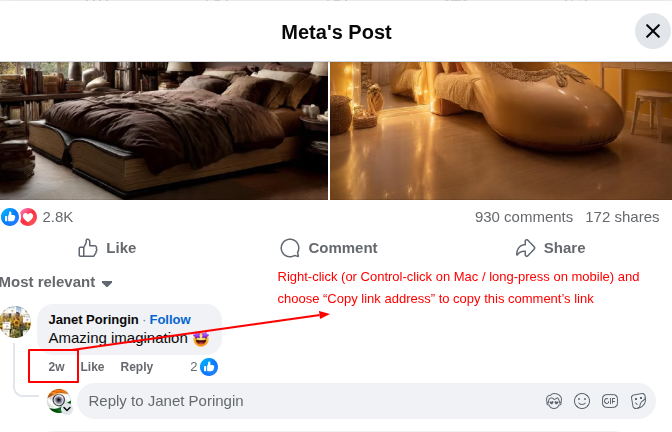 4. Paste the URL into the actor's "Target post URL" field Example:
 json { "targetUrl": "https://www.facebook.com/MetaIndia/posts/pfbid0pokAKNvLPeWxPDkFtpQVmwK3LJ9FfrLpBKBH5B9WB1yLWpFUpQYkDZkB64ejQjS9l?comment_id=834450149073514", "platform": "facebook" } 💡 Tip: You can also add custom author information if the automatic extraction doesn't work: json { "targetUrl": "https://www.facebook.com/...", "platform": "facebook", "custom": { "authorName": "John Doe", "authorHandle": "@johndoe" } } ### 🐦 How to Get Twitter/X URLs #### For Twitter/X Posts: 1. Go to the tweet you want to create a card for 2. Click the share icon (↗️) at the bottom of the tweet 3. Select "Copy link" from the menu 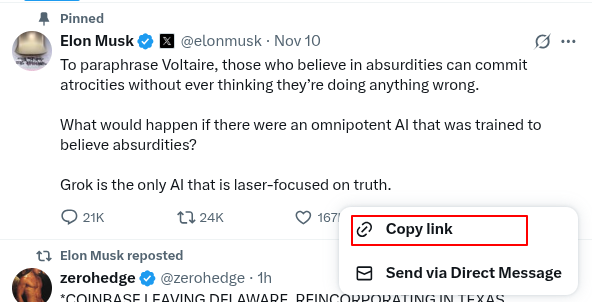 4. Paste the URL into the actor's "Target post URL" field Example:
 json { "targetUrl": "https://twitter.com/user/status/1234567890", "platform": "twitter" } #### For Twitter/X Replies/Comments: 1. Find the reply/comment you want to feature 2. Click the share icon (↗️) on that specific reply 3. Select "Copy link" 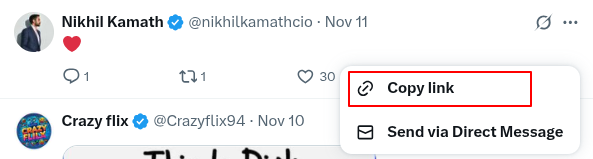 4. Paste the URL into the actor's "Target post URL" field Example:
 json { "targetUrl": "https://twitter.com/user/status/1234567890", "platform": "twitter" } 💡 Note: Twitter/X reply URLs look similar to regular tweet URLs. The actor will automatically extract the reply content. ### 💼 How to Get LinkedIn URLs #### For LinkedIn Posts: 1. Navigate to the LinkedIn post 2. Click the three dots (•••) in the top-right corner of the post 3. Select "Copy link to post" 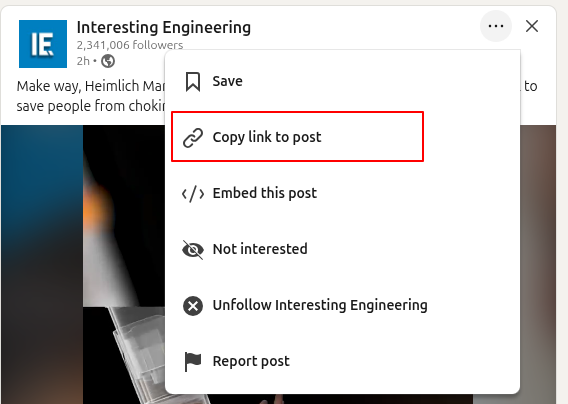 4. Paste the URL into the actor's "Target post URL" field Example:
 json { "targetUrl": "https://www.linkedin.com/posts/username_post-id", "platform": "linkedin" } #### For LinkedIn Comments: 1. Find the comment you want to feature 2. Click the three dots (•••) on the comment 3. Select "Copy link to comment" 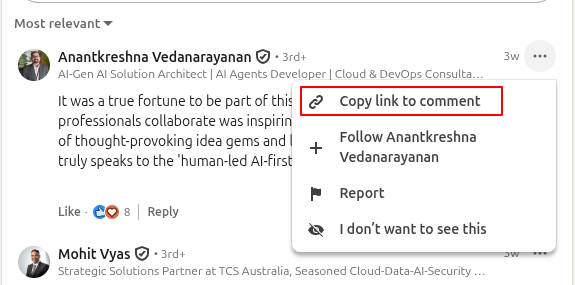 4. Paste the URL into the actor's "Target post URL" field Example:
 json { "targetUrl": "https://www.linkedin.com/feed/update/urn:li:activity:1234567890?commentUrn=urn:li:comment:9876543210", "platform": "linkedin" } ### 📸 How to Get Instagram URLs #### For Instagram Posts: 1. Open the Instagram post in your browser or app 2. Click the three dots (•••) in the top-right corner of the post 3. Select "Copy link" 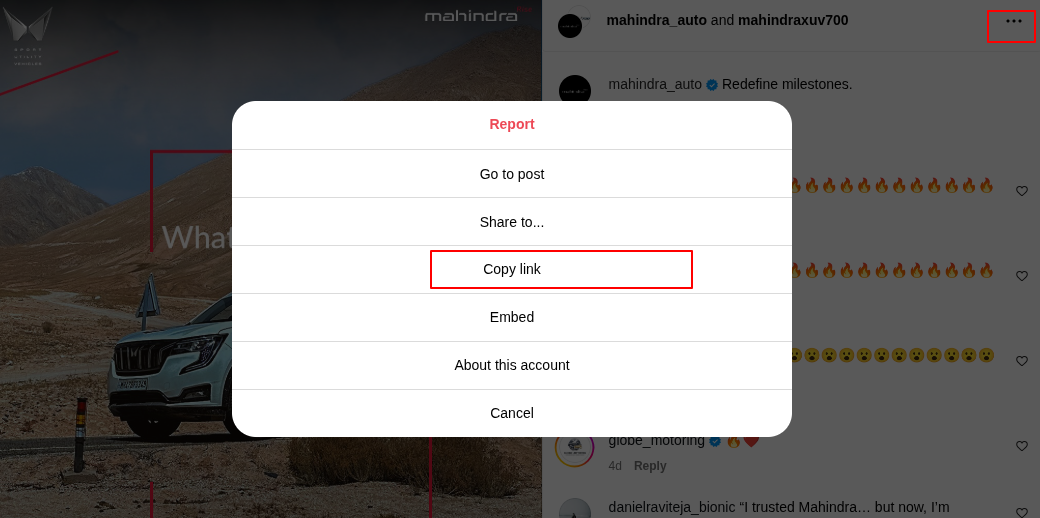 4. Paste the URL into the actor's "Target post URL" field Example:
 json { "targetUrl": "https://www.instagram.com/p/ABC123/", "platform": "instagram" } #### For Instagram Comments: 1. Find the comment you want to feature 2. Tap/click on the timestamp of the comment 3. Copy the URL from your browser's address bar  4. Paste the URL into the actor's "Target post URL" field Example:
 json { "targetUrl": "https://www.instagram.com/p/ABC123/c/17890123456789/", "platform": "instagram" } ### Option 2: Via API (For Developers) Run the actor programmatically from any language: #### JavaScript / Node.js javascript import { ApifyClient } from 'apify-client'; const client = new ApifyClient({ token: 'YOUR_API_TOKEN' }); const run = await client.actor('happitap/social-card-maker').call({ targetUrl: 'https://twitter.com/user/status/123', platform: 'twitter' }); // Get the generated card const dataset = await client.dataset(run.defaultDatasetId).listItems(); console.log('Card URL:', dataset.items[0].imageUrl); #### Python python from apify_client import ApifyClient client = ApifyClient('YOUR_API_TOKEN') run = client.actor('happitap/social-card-maker').call(run_input={ 'targetUrl': 'https://twitter.com/user/status/123', 'platform': 'twitter' }) # Get the generated card dataset = client.dataset(run['defaultDatasetId']).list_items() print('Card URL:', dataset.items[0]['imageUrl']) #### cURL bash curl -X POST https://api.apify.com/v2/acts/happitap~social-card-maker/runs \ -H "Authorization: Bearer YOUR_API_TOKEN" \ -H "Content-Type: application/json" \ -d '{ "targetUrl": "https://twitter.com/user/status/123", "platform": "twitter" }' ## 📝 Input Examples ### Single URL json { "targetUrl": "https://twitter.com/apify/status/123", "platform": "twitter" } ### Multiple URLs (Batch Processing) json { "targetUrls": [ "https://blog.example.com/post-1", "https://blog.example.com/post-2", "https://blog.example.com/post-3" ], "platform": "linkedin" } ### Custom Content (No URL Required) json { "platform": "twitter", "custom": { "title": "Just shipped a new feature! 🚀", "description": "Check out what's new in v2.0", "authorName": "Your Company", "authorHandle": "@yourcompany" } } ### Brand Card with Logo json { "platform": "custom", "custom": { "title": "Q4 Results: Record Growth", "description": "Revenue up 45% YoY across all segments", "logoUrl": "https://example.com/logo.png", "authorName": "Finance Team" } } ## 🎨 Supported Platforms Each platform template matches the authentic visual style: | Platform | Style | Best For | |----------|-------|----------| | Twitter/X | Dark theme, blue accents | Tweets, announcements, quick updates | | LinkedIn | Professional light theme | Business content, articles, company news | | Facebook | Light theme, Facebook blue | General posts, community updates | | Instagram | Gradient background | Visual content, stories, creative posts | | YouTube | Dark theme, red accents | Video thumbnails, channel content | | Custom | Fully customizable | Brand-specific cards, custom colors/logos | ## 📤 What You Get Every run produces: ### ✅ High-Quality Image - Format: PNG or JPEG (your choice) - Size: 1200×630px (default, customizable) - Quality: Crystal-clear, ready to publish - Access: Direct download or API link ### ✅ Complete Metadata Each card includes detailed information: json { "imageUrl": "https://api.apify.com/v2/key-value-stores/.../social-card.png", "platform": "twitter", "sourceUrl": "https://twitter.com/user/status/123", "width": 1200, "height": 630, "format": "png", "cardData": { "title": "Your post title", "description": "Your description", "authorName": "Author", "platformName": "Twitter" } } Image URL is directly accessible and can be used immediately in your applications! ## ⚙️ Configuration Options ### Basic Settings | Field | Description | Default | |-------|-------------|---------| | Target URL | Single URL to generate a card from | None | | Target URLs | Multiple URLs for batch processing | None | | Platform | Choose: twitter, linkedin, facebook, instagram, youtube, custom | Auto-detected | ### Custom Content (Override URL data or create from scratch) | Field | Description | Example | |-------|-------------|---------| | Title | Main headline | "Just shipped v2.0! 🚀" | | Description | Supporting text | "New features include..." | | Author Name | Display name | "Your Company" | | Author Handle | Username | "@yourcompany" | | Avatar URL | Author image | "https://..." | | Media URL | Card image | "https://..." | | Logo URL | Brand logo | "https://..." | | CTA Label | Button text | "Learn more" | ### Output Settings | Setting | Options | Default | |---------|---------|---------| | Format | PNG or JPEG | PNG | | Width | Any pixel width | 1200px | | Height | Any pixel height | 630px | | Quality | 0-100 (JPEG only) | 90 | ## 💡 Real-World Use Cases ### 1. Content Marketing at Scale Generate consistent social cards for every blog post automatically. Integrate with your CMS to create cards when articles are published. ### 2. Social Media Management Create multiple card variations for A/B testing campaigns. Test different headlines, images, and CTAs. ### 3. Developer Documentation Auto-generate Open Graph images for docs pages. Every page gets a beautiful preview card when shared. ### 4. Agency Deliverables Produce client social assets in bulk. Generate 100+ cards in minutes instead of hours in Photoshop. ### 5. E-commerce Product Cards Create product preview cards from your product URLs. Perfect for social sharing and ads. ### 6. Event Promotion Generate event cards for conferences, webinars, and meetups. Consistent branding across all platforms. ## 💰 Pricing Social Card Maker uses Apify's consumption-based pricing: - Pay Per Use: Only pay for what you generate - Typical Cost: ~$0.01-0.05 per card - Free Tier: Apify includes free monthly credits - Volume Discounts: Lower costs at scale View detailed pricing → ## 📊 Performance - ⚡ Speed: 3-5 seconds per card - 🔄 Batch: Process 100+ URLs in parallel - 💾 Storage: Images stored in Apify's infrastructure - 🌍 Global: CDN-backed image delivery ## 📖 API Reference ### Base URL https://api.apify.com/v2/acts/happitap~social-card-maker ### Authentication All API requests require authentication via token: Authorization: Bearer YOUR_API_TOKEN Get your API token from Apify Console → Settings → Integrations ### Endpoints #### Run Actor (Synchronous) POST /runs?token=YOUR_API_TOKEN&waitForFinish=120 Returns the run result after completion (waits up to 120 seconds). #### Get Run Output GET /runs/{runId}/dataset/items?token=YOUR_API_TOKEN Returns the dataset items (card metadata and image URLs). #### Download Image GET https://api.apify.com/v2/key-value-stores/{storeId}/records/{imageKey} Direct link to download the generated card image. ### Full API Documentation - Apify API Reference - Actor Run API - Dataset API ## ❓ FAQ Q: Can I use my own fonts? A: Currently uses Inter font family. Custom fonts coming soon! Q: What image formats are supported? A: PNG (best quality, larger file) and JPEG (smaller file, configurable quality). Q: Can I scrape private posts? A: No. Only public URLs that don't require authentication can be scraped. Q: How long are generated images stored? A: Images persist in your Apify storage according to your account's retention settings. Q: Can I integrate this with Zapier/Make? A: Yes! Use Apify's integrations with Zapier, Make, or call directly via API. Q: What happens if a URL fails? A: The actor continues processing other URLs and logs the error. You can provide custom fallback data. ## 🆘 Support - 📧 Email: support@apify.com - 💬 Discord: Join Apify Community - 📚 Documentation: docs.apify.com - 🐛 Report Issues: GitHub Issues ## 📜 License This actor is open source and available on the Apify platform. --- Made with ❤️ by Apify Try it now →
Categories
Common Use Cases
Market Research
Gather competitive intelligence and market data
Lead Generation
Extract contact information for sales outreach
Price Monitoring
Track competitor pricing and product changes
Content Aggregation
Collect and organize content from multiple sources
Ready to Get Started?
Try Social Card Maker now on Apify. Free tier available with no credit card required.
Start Free TrialActor Information
- Developer
- happitap
- Pricing
- Paid
- Total Runs
- 30
- Active Users
- 3
Related Actors

🏯 Tweet Scraper V2 - X / Twitter Scraper
by apidojo

Instagram Scraper
by apify

TikTok Scraper
by clockworks

Instagram Profile Scraper
by apify
Apify provides a cloud platform for web scraping, data extraction, and automation. Build and run web scrapers in the cloud.
Learn more about ApifyNeed Professional Help?
Couldn't solve your problem? Hire a verified specialist on Fiverr to get it done quickly and professionally.
Trusted by millions | Money-back guarantee | 24/7 Support