Walmart Data Extractor
by epctex
Need to pull product data from Walmart at scale? This actor is your direct line to their catalog. It’s built to handle the messy, real-world job of ex...
Opens on Apify.com
About Walmart Data Extractor
Need to pull product data from Walmart at scale? This actor is your direct line to their catalog. It’s built to handle the messy, real-world job of extracting clean, structured data so you don't have to. Think of it as your automated shopping assistant. You tell it what to look for—whether that's a specific category, brand, or a custom search list—and it goes to work. It fetches product titles, current prices (including any variations), images, brand info, and all the key details you'd see on a product page. You get back a neat dataset, typically as JSON or CSV, ready for your analysis, price tracking, or inventory projects. I use it for competitive monitoring and market research. Instead of manually checking hundreds of listings, I set this up to run on a schedule. It saves a ton of time and gives me a consistent, reliable feed of data. If you're building a price comparison engine, tracking brand availability, or just need to gather product information in bulk, this actor handles the heavy lifting. Just configure your target searches or lists, and let it run. You'll get the structured Walmart product data you need, without the manual copy-paste headache.
What does this actor do?
Walmart Data Extractor is a web scraping and automation tool available on the Apify platform. It's designed to help you extract data and automate tasks efficiently in the cloud.
Key Features
- Cloud-based execution - no local setup required
- Scalable infrastructure for large-scale operations
- API access for integration with your applications
- Built-in proxy rotation and anti-blocking measures
- Scheduled runs and webhooks for automation
How to Use
- Click "Try This Actor" to open it on Apify
- Create a free Apify account if you don't have one
- Configure the input parameters as needed
- Run the actor and download your results
Documentation
Actor - Walmart Scraper ## Walmart scraper Since Walmart doesn't provide an API, this actor should help you to retrieve data from it. Now with location support! The Walmart data scraper supports the following features: - Scrape product details - You can scrape attributes like images, seller information, photos, brands, variants, ID of the product, and many more. You can find details below. - Get product reviews! - Now you can gather up all the reviews that has been submitted for a product. Blazing fast with no limitation! - Scrape search results - You can scrape for a specific search result by keyword. - Scrape using location - You can use a US postal code to set the location. - Scrape and filter any categories - You can provide any category with any kind of filter that you want. - Scrape a parent category and get all the items in its subcategory - You can provide any parent(big) category and let the actor to scrape its sub-categories - Define the maximum number of pages that needs to be scraped - If you only want to scrape the first 3 pages, there is an option for that. #### Walmart specific Don't worry when you get a little bit different products than you saw on the browser page. Walmart is ordering products differently for each user. ## Need to find product pairs between Walmart and another online shop? Use the AI Product Matcher🔗. This AI model allows you to compare items from different web stores, identifying exact matches and comparing real-time data obtained via web scraping. With the AI Product Matcher, you can use scraped product data to monitor product matches across the industry, implement dynamic pricing for your website, replace or complement manual mapping, and obtain realistic estimates against your competition for upcoming promo campaigns. Most importantly, it is relatively easy to get started with (just follow this guide) and can match thousands of product pairs. ## Bugs, fixes, updates, and changelog This scraper is under active development. If you have any feature requests you can create an issue from here. ### Incoming Changes - Fetching product reviews - Fetch Questions and Answers - Performance upgrades ## Setup & Usage You can see how this actor works in this video: ### Start URLs 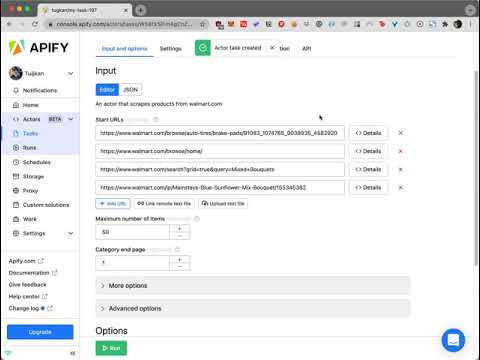 You can check the output of this video here. ### Search
 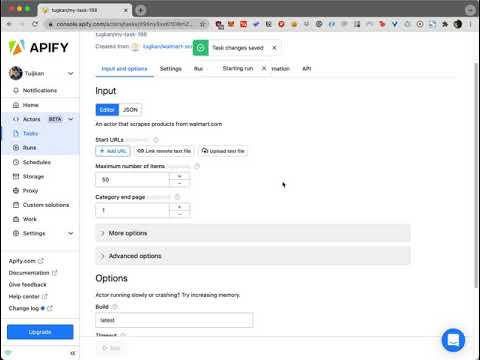 You can check the output of this video here. ## Input Parameters The input of this scraper should be JSON containing the list of pages on Walmart that should be visited. Possible fields are: -
 search: (Optional) (String) Keyword that can be searched in Walmart search engine. - postalCode: (Optional) (Number) The US postal code used to set the location. This field will be depreciated soon. Please use zipCode. - zipCode: (Optional) (Number) The US postal code used to set the location. - startUrls: (Optional) (Array) List of Walmart URLs. You should only provide category detail, product detail, or search URLs. - endPage: (Optional) (Number) Final number of page that you want to scrape. The default is Infinite. This applies to all search requests and startUrls individually. - maxItems: (Optional) (Number) You can limit scraped items. This should be useful when you search through the big lists or search results. - includeReviews: (Optional) (Boolean) This option allows you to include all product reviews in the scraped data. - onlyReviews: (Optional) (Boolean) Discards the product data and only retrieves the reviews when includeReviews is true. - proxy: (Required) (Proxy Object) Proxy configuration. - extendOutputFunction: (Optional) (String) Function that takes a JQuery handle ($) as an argument and returns an object with data. - outputFilterFunction: (Optional) (String) Function that takes an output item as an argument and returns the mapped data. This solution requires the use of Proxy servers, either your own proxy servers or you can use Apify Proxy. ### Tip Please keep in mind that for the sake of not losing any of the data, the actor returns all the possible output. That's it's suggested to use outputFilterFunction all the time. When you want to have filtering over a category URL; go to Walmart, create filters over the category, and copy and paste the link as one of the startUrl. If you would like to scrape only the first page of a search list or category list, then put the link for the page and have the endPage as 1. With the last approach that is explained above you can also fetch any interval of pages. If you provide the 5th page of a category and define the endPage parameter as 6 then you'll have the 5th and 6th pages only. ### Output Filter Function This function is used for mapping the output data that the actor scrapes from the target. It has the following implementation: data = eval(outputFilterFunction)(data); So you can use this function to retrieve only the attributes you'd like to have. The following example is for retrieving only id and name attributes: (object) => ({ id: object.id, name: object.name }) ### Compute Unit Consumption The actor is optimized to run blazing fast and scrape many products as possible. Therefore, it forefronts all product detail requests. If the actor doesn't block very often it'll scrape 50 products in 2 minutes with ~0.3-0.5 compute units. ### Walmart Scraper Input example json { "startUrls": [ { "url": "https://www.walmart.com/browse/auto-tires/brake-pads/91083_1074765_9038935_4582920" }, { "url": "https://www.walmart.com/browse/home/" }, { "url": "https://www.walmart.com/search?grid=true&query=Mixed+Bouquets" }, { "url": "https://www.walmart.com/ip/Mainstays-Blue-Sunflower-Mix-Bouquet/155345382" } ], "search": "apples", "endPage": 6, "maxItems": 100, "postalCode": 10100, "includeReviews": true, "onlyReviews": false, "outputFilterFunction": "(object) => ({...object})" } ## During the Run During the run, the actor will output messages letting you know what is going on. Each message always contains a short label specifying which page from the provided list is currently specified. When items are loaded from the page, you should see a message about this event with a loaded item count and total item count for each page. If you provide incorrect input to the actor, it will immediately stop with a failure state and output an explanation of what is wrong. ## Walmart Export During the run, the actor stores results into a dataset. Each item is a separate item in the dataset. You can manage the results in any language (Python, PHP, Node JS/NPM). See the FAQ or our API reference to learn more about getting results from this Walmart actor. ## Scraped Walmart Products The structure of each item in Walmart products can be checked from here: https://api.apify.com/v2/datasets/3Nk7RZP8vheqazCtb/items?clean=true&format=json ## Contact Please visit us through epctex.com to see all the products that are available for you. If you are looking for any custom integration or so, please reach out to us through the chat box in epctex.com. In need of support? business@epctex.com is at your service.
Categories
Common Use Cases
Market Research
Gather competitive intelligence and market data
Lead Generation
Extract contact information for sales outreach
Price Monitoring
Track competitor pricing and product changes
Content Aggregation
Collect and organize content from multiple sources
Ready to Get Started?
Try Walmart Data Extractor now on Apify. Free tier available with no credit card required.
Start Free TrialActor Information
- Developer
- epctex
- Pricing
- Paid
- Total Runs
- 128,299
- Active Users
- 982
Related Actors

Google Maps Reviews Scraper
by compass

Facebook Ads Scraper
by apify

Google Ads Scraper
by silva95gustavo

Facebook marketplace scraper
by curious_coder
Apify provides a cloud platform for web scraping, data extraction, and automation. Build and run web scrapers in the cloud.
Learn more about ApifyNeed Professional Help?
Couldn't solve your problem? Hire a verified specialist on Fiverr to get it done quickly and professionally.
Trusted by millions | Money-back guarantee | 24/7 Support