
Traffic Generator (Youtube, Web, Etsy, Behance and many more!)
by epctex
Maximize your website's performance and visibility with our Traffic Generator. Drive targeted traffic, simulate page views, and stress-test against po...
Opens on Apify.com
About Traffic Generator (Youtube, Web, Etsy, Behance and many more!)
Maximize your website's performance and visibility with our Traffic Generator. Drive targeted traffic, simulate page views, and stress-test against potential threats. With the power to generate millions of visits, it's the ultimate solution for boosting your online presence.
What does this actor do?
Traffic Generator (Youtube, Web, Etsy, Behance and many more!) is a web scraping and automation tool available on the Apify platform. It's designed to help you extract data and automate tasks efficiently in the cloud.
Key Features
- Cloud-based execution - no local setup required
- Scalable infrastructure for large-scale operations
- API access for integration with your applications
- Built-in proxy rotation and anti-blocking measures
- Scheduled runs and webhooks for automation
How to Use
- Click "Try This Actor" to open it on Apify
- Create a free Apify account if you don't have one
- Configure the input parameters as needed
- Run the actor and download your results
Documentation
Traffic Generator Actor ## What is Traffic Generator actor? The Traffic Generator Actor is an advanced, automated tool on Apify that simulates user traffic to your digital platforms on any web page, YouTube video, Etsy shop, Behance profile, and more. Whether you’re aiming to boost your SEO rankings or put your site’s durability to the test, this actor is your digital key. ### Key features - 📈 Generate Page Views: Creates unique visits to elevate your site's SEO and visibility on platforms like Google, Etsy, and Behance. - 🎥 Generate YouTube View Counts: Instantly boosts view counts for YouTube videos, enhancing their popularity. - 💪 Generate Stress and Load: Puts your site through rigorous testing to ensure stability during high traffic peaks. - 🕷️ Enable Crawling: Mimics user behavior across multiple pages, if you have multiple links on the webpage you want to generate traffic, the actor will handle them too. - ⏱️ Kill Switch: Automatically stops and replicates the process after a set time so that you will be in control. - 🧑🤝🧑 Duplicate Current Run: Scales up the operation by running multiple actors simultaneously. ## Use Cases | Who Can Use Traffic Generator - SEO experts looking to increase organic traffic on any targeted web page such as blog sites. - Webmasters preparing for high-traffic events or campaigns. - Developers need to test website limits via stress tests. - Digital marketers aiming to enhance web analytics data. - Etsy shop owners who want to increase visits to their shops. - Designers looking to enhance their Behance profile views. - Youtubers wishing to increase YouTube video views. ## Input Add any website, profile, or video URL that you want to create traffic to the input area. 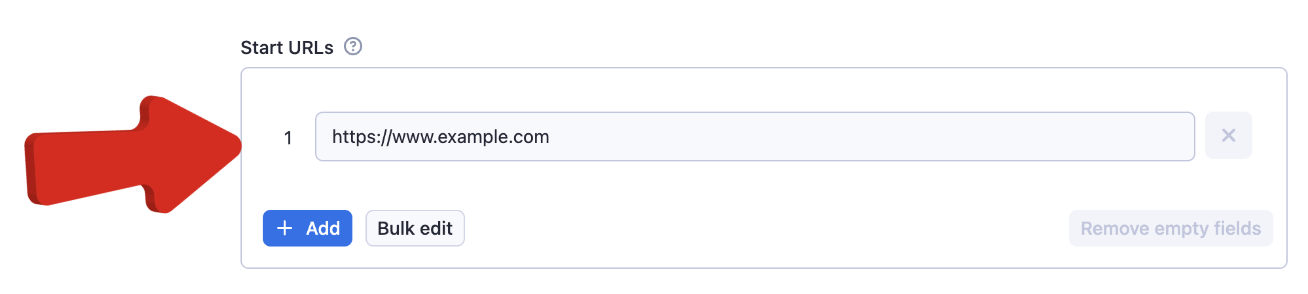 Choose whether you want to generate pageviews or make a stress test.
 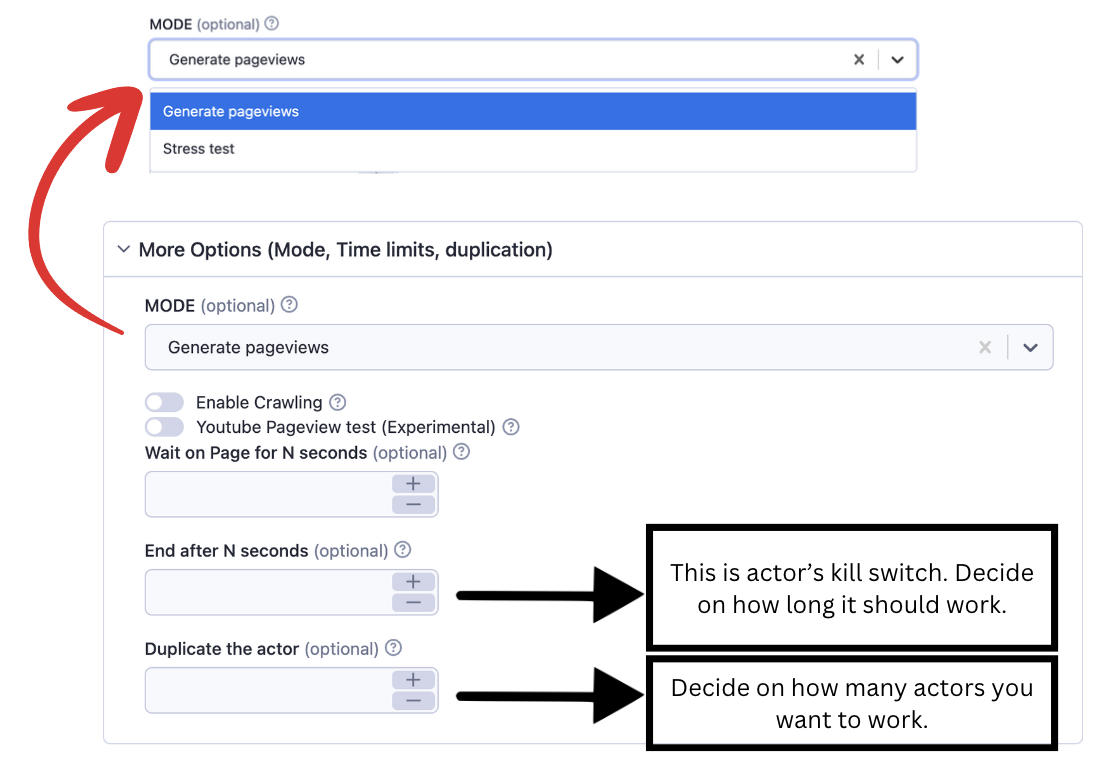 Example JSON:
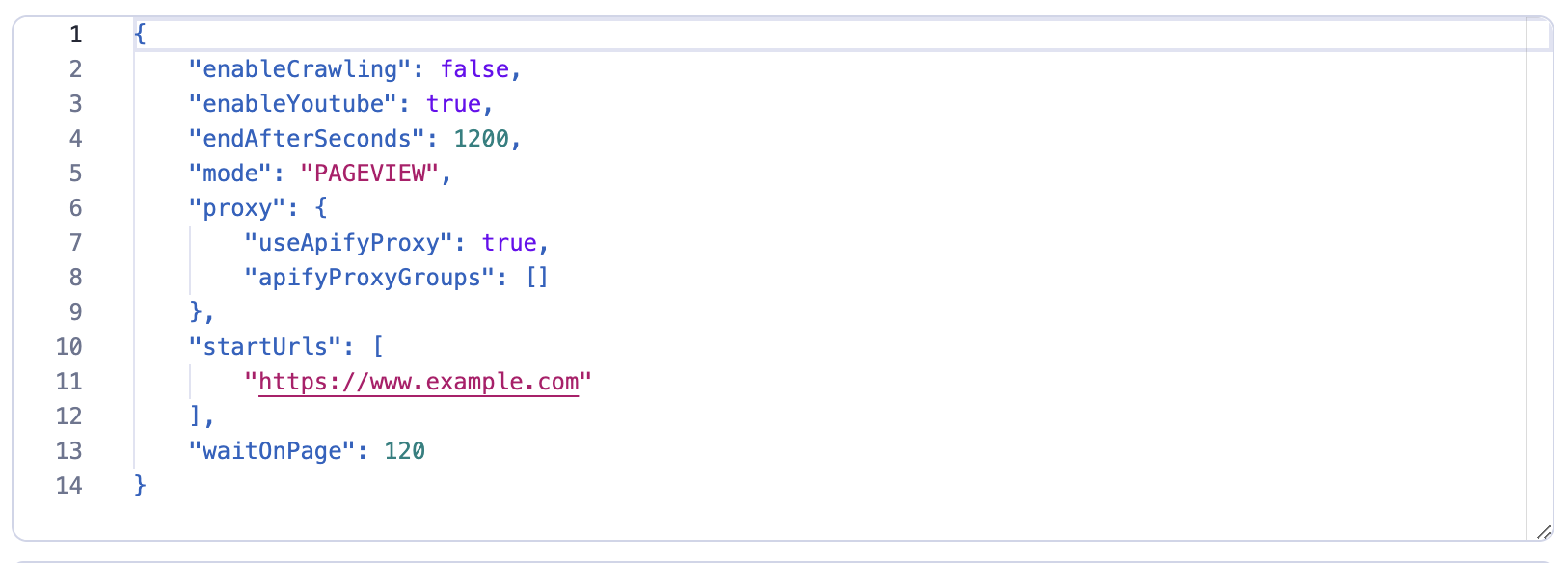
 json { "mode": "PAGEVIEW", "startUrls": ["https://apify.com/"], "enableCrawling": true, "crawlingLinkSelector": "a", "enableYoutube": false, "enableAdvancedFingerprinting": false, "blockUrlPatterns": [ ".jpg", ], "maxConcurrency": 10, "duplicateActor": 2, "waitForPageview": true, "endAfterSeconds": 100 } ### Input Parameters Explained - startUrls: (Required) (String/Array) Which URLs you want to request by the actor. - mode: (Required) (String) Mode of the actor. Only pageviews and stress testing is enabled. If you want to generate page views on your website, you can use PAGEVIEW option. Otherwise, if you are looking for stress testing, STRESS_TEST would be ideal. - blockUrlPatterns: (Optional) (String/Array) Optimizes web crawling by preventing the browser from loading specific URL patterns. This feature reduces bandwidth usage and improves crawl speed by filtering out unnecessary resources, such as images, scripts, or stylesheets. (e.g., file extensions like '.jpg', domains, or path fragments) - enableCrawling: (Optional) (Boolean) If the webpage you want to increase traffic to, has multiple links and subpages, the actor will also work and increase traffic to these pages. - crawlingLinkSelector: (Optional) (String) If Enable Crawling option is enabled, this attribute will allow you to target the link selectors. By default, it is getting all the links by using a. - enableAdvancedFingerprinting: (Optional) (Boolean) Enables advanced fingerprinting. This option generates fingerprints from multiple devices and OS systems. If you enable this option, it will also remove the WebRTC IP leak. - enableYoutube: (Optional) (Boolean) (Experimental Feature) This feature is for YouTube videos. For more information, check “Example Input Scenario” after this section. 👇 - maxConcurrency: (Optional) (Number) If you want to limit actor's maximum concurrency to stabilize the memory (or your server), this option can be used. Default is Infinite. - waitOnPage: (Optional) (Only on Pageview Mode) How much time that the actor stay on each of the pages. If you want to specify the number of seconds that the actor will spend on every page, you should enable and fill this field. - endAfterSeconds: (Optional) You can limit the time of working of the actor. Basically, if you want to kill the actor after a certain number of seconds, you should enable and fill this field. The actor runs forever unless you abort it. That's why you should always set the option of endAfterSeconds. If you want to generate traffic constantly then keep this option as empty. - duplicateActor: (Optional) This option will duplicate the current run with this number. Please keep in mind that the load on the website will be multiplied by this number. Remember great power comes with great responsibility. If you want to double the actor number, make sure to do it under control. If you fill this field by 3, then the actor will clone itself and run by 4 runs in total. However, you should always keep in mind that there is a limitation that you have on Apify (memory or CUs) which you can find on your dashboard. This option is created for stress-load tests. - proxy: (Required) (Proxy Object) Proxy configuration. This solution requires the use of Proxy servers, either your proxy servers or you can use Apify Proxy. ### Example Input Scenario 1: How to Generate YouTube Video View? For instance, if you want the actor to stay for 2 minutes in your Youtube video; set the “wait on page” value to 120 seconds, and set the “end after” value as 1200 seconds to produce 10 views. After 1200 seconds, the actor will stop working. (Don’t forget to switch to Youtube Pageview test on) 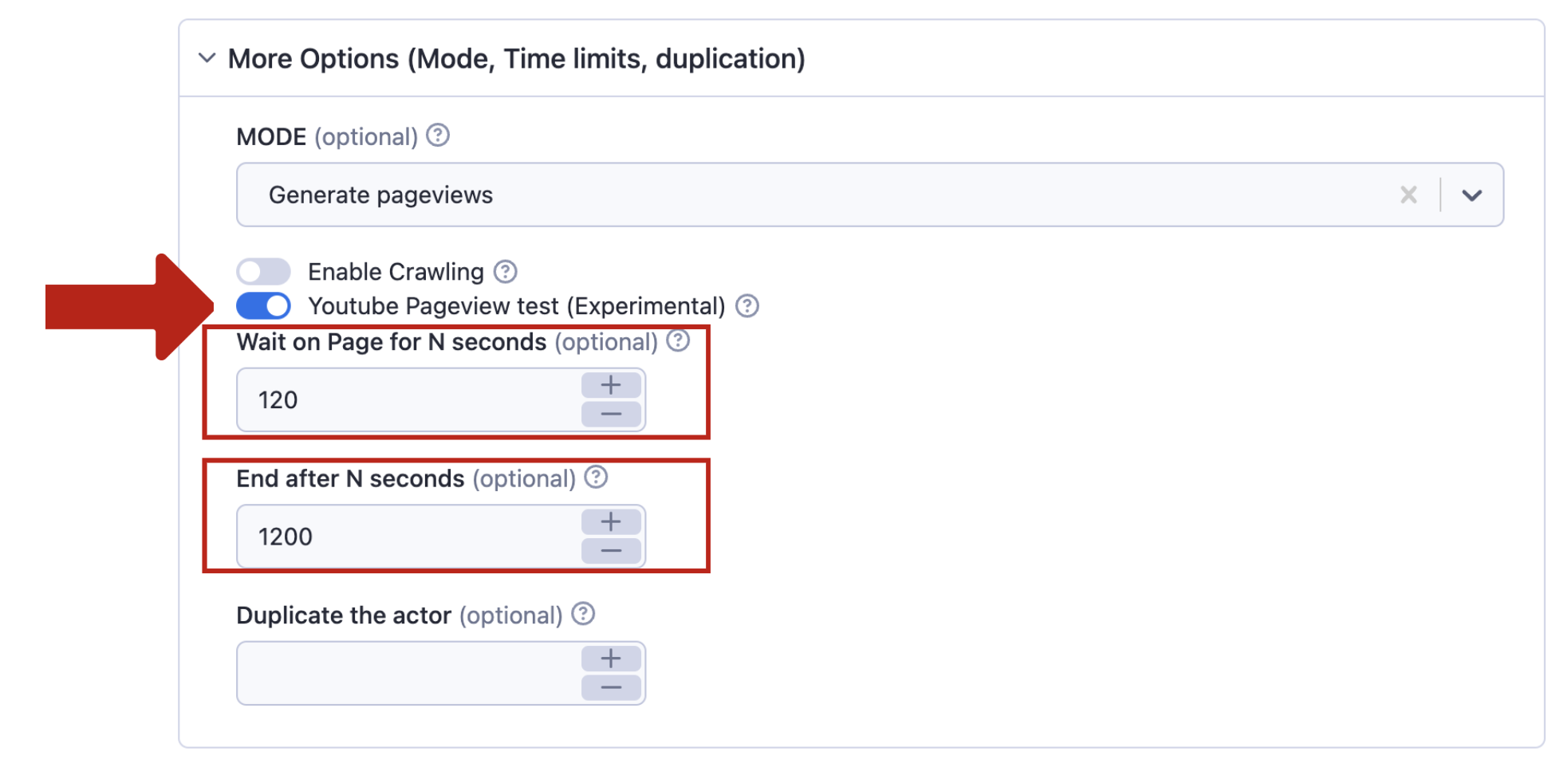 It is recommended to keep advanced options and run options as default.
  Here's its equivalent in JSON:
  ### Example Input Scenario 2: How to Generate Webpage Traffic? If you want to create web traffic, after entering the URL of the page, just run the actor. Note that if the website has subpages, and you wish to increase their traffic too, switch on the “enable crawling”.
 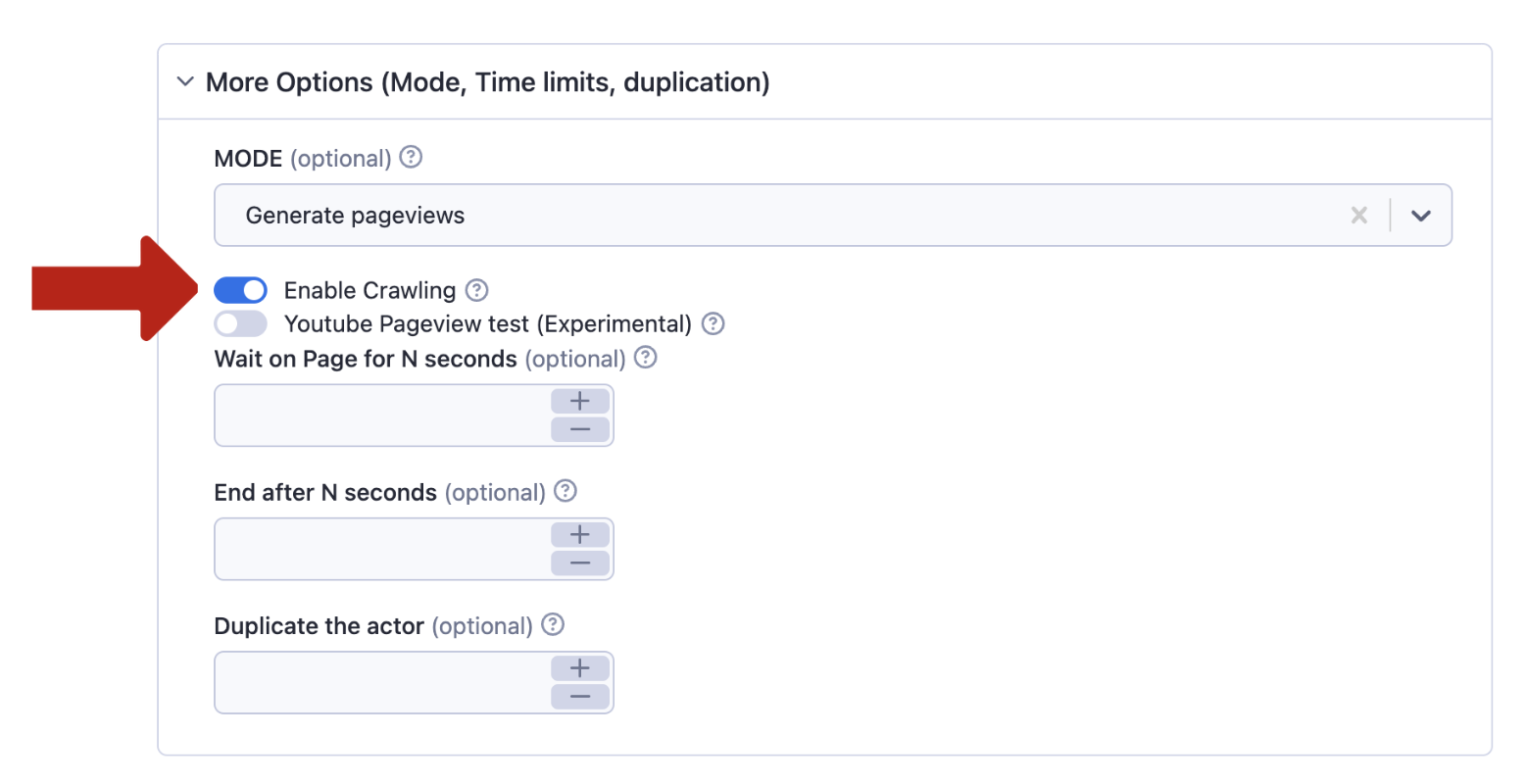 It is recommended to keep advanced options and run options as default.
 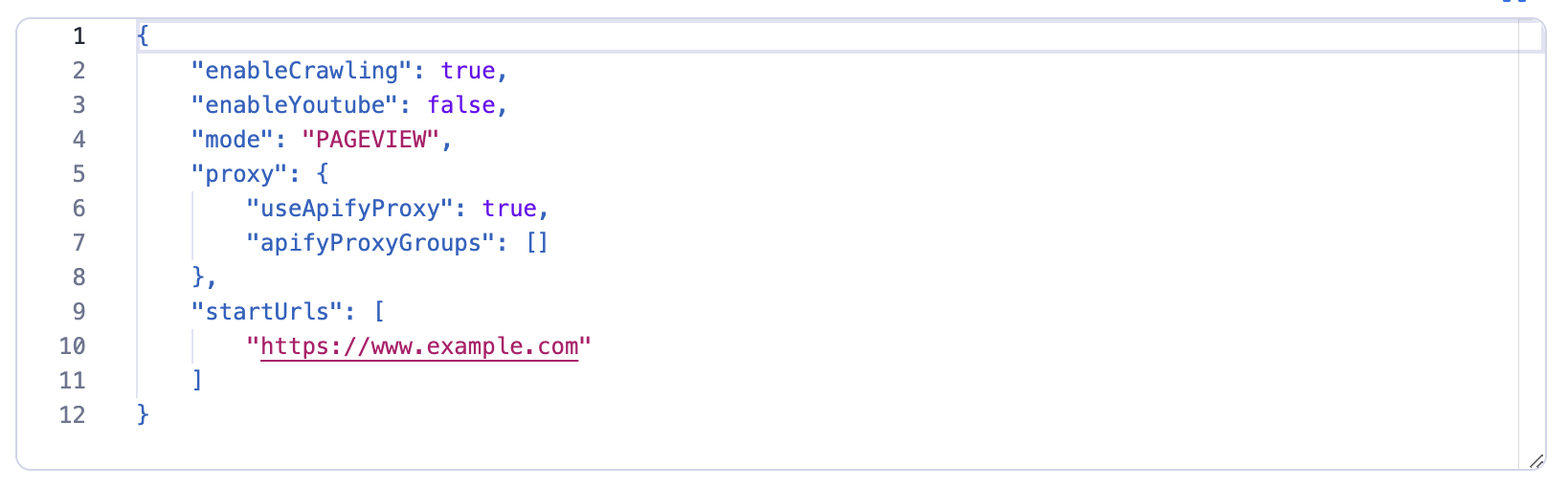 ## Output Check the analytics of your website while the actor runs, you will see the results in minutes! ### Important Note The Traffic Generator Actor is a powerful tool designed to significantly elevate traffic across various platforms, but please note it doesn’t store its operational data in a dataset. Monitor the Traffic Generator's effectiveness directly through your analytics dashboard. Please keep in mind that actor duplication is a very strong option to generate traffic to the website. Ex: If you fill this field by 3, then the actor will clone itself and run by 4 runs in total. However, you should always keep in mind that there is a limitation that you have on Apify (memory or CUs) which you can find on your dashboard. The actor runs forever unless you abort it. That's why you should always set the option of
 endAfterSeconds. If you want to generate traffic constantly then keep this option as empty. ## During the Run During the run, the actor will output messages letting you know what is going on. Each message always contains a short label specifying which page from the provided list is currently specified. If you provide incorrect input to the actor, it will immediately stop with a failure state and output an explanation of what is wrong. ### Compute Unit Consumption The actor is optimized to run blazing fast and scrape as many listings as possible. Therefore, it forefronts all requests. If the actor doesn't block very often it'll scrape 100 pages in 2 minutes with ~0.03-0.05 compute units. ## Bugs, fixes, updates, and changelog This scraper is under active development. If you have any feature requests you can create an issue from here. ## How to use Traffic Generator https://www.youtube.com/watch?v=5tXygwPJmJ8&ab_channel=epctex ## FAQ Can the Traffic Generator Actor improve my website's SEO?
Yes! By increasing pageviews, it can help boost your site's ranking on search engines. 🚀 Is it safe to use for my website?
Absolutely. The kill switch feature ensures it stops before causing any issues. 🛡️ How can I track the traffic generated?
Keep an eye on your site's analytics dashboard to see the real-time impact. 📊 Will this work for video platforms like YouTube?
Yes, it has a feature to increase YouTube view counts. 🎥 Can I control how long the actor runs?
Yes, you can set a specific duration with the endAfterSeconds parameter. ⏳ What if I have a large website and want to generate comprehensive traffic?
Enable the duplicateActor option to scale up the traffic generation across your site. 🌐 Does the Traffic Generator creates different identities per request?
That is absolutely true. Each of the pageviews are count as unique. 🔓 What about the WebRTC?
The actor is protected against WebRTC leaks, if you enable the Advanced Fingerprinting options. 🛡️ ## Contact Please visit us through epctex.com to see all the products that are available for you. If you are looking for any custom integration or so, please reach out to us through the chat box in epctex.com. In need of support? business@epctex.com is at your service.
Categories
Common Use Cases
Market Research
Gather competitive intelligence and market data
Lead Generation
Extract contact information for sales outreach
Price Monitoring
Track competitor pricing and product changes
Content Aggregation
Collect and organize content from multiple sources
Ready to Get Started?
Try Traffic Generator (Youtube, Web, Etsy, Behance and many more!) now on Apify. Free tier available with no credit card required.
Start Free TrialActor Information
- Developer
- epctex
- Pricing
- Paid
- Total Runs
- 147,962
- Active Users
- 38,642
Related Actors

Video Transcript Scraper: Youtube, X, Facebook, Tiktok, etc.
by invideoiq

Linkedin Profile Details Scraper + EMAIL (No Cookies Required)
by apimaestro

Twitter (X.com) Scraper Unlimited: No Limits
by apidojo

Content Checker
by jakubbalada
Apify provides a cloud platform for web scraping, data extraction, and automation. Build and run web scrapers in the cloud.
Learn more about ApifyNeed Professional Help?
Couldn't solve your problem? Hire a verified specialist on Fiverr to get it done quickly and professionally.
Trusted by millions | Money-back guarantee | 24/7 Support