
TikTok Video Downloader
by dz_omar
Extract TikTok 🎥 video download links without watermarks. Get complete metadata, engagement metrics, and automatic downloads with smart resource alloc...
Opens on Apify.com
About TikTok Video Downloader
Extract TikTok 🎥 video download links without watermarks. Get complete metadata, engagement metrics, and automatic downloads with smart resource allocation. Perfect for content creators, researchers, and businesses needing clean TikTok content.
What does this actor do?
TikTok Video Downloader is a web scraping and automation tool available on the Apify platform. It's designed to help you extract data and automate tasks efficiently in the cloud.
Key Features
- Cloud-based execution - no local setup required
- Scalable infrastructure for large-scale operations
- API access for integration with your applications
- Built-in proxy rotation and anti-blocking measures
- Scheduled runs and webhooks for automation
How to Use
- Click "Try This Actor" to open it on Apify
- Create a free Apify account if you don't have one
- Configure the input parameters as needed
- Run the actor and download your results
Documentation
🎬 TikTok Video Downloader - Direct Links & Downloads  Extract direct download links from TikTok videos with complete metadata and optional automatic video downloads using intelligent resource allocation. Built for content creators, researchers, and businesses who need reliable access to TikTok content without watermarks. ## Key Benefits & Use Cases ### For Researchers & Analysts - Archive TikTok videos for research and trend analysis - Extract metadata for social media studies and engagement analytics - Build datasets with downloadable video files and comprehensive statistics ### For Content Creators & Marketers - Download competitor content for inspiration and analysis - Archive your own TikTok videos as backup with full metadata - Extract engagement metrics and performance data ### For Media & Entertainment - Archive viral content and trending videos - Extract video files for editing and repurposing - Monitor brand mentions and user-generated content ## 🔎 Complete Data Extraction ### Video Intelligence - Metadata: ID, title, description, creation date, duration, dimensions - Engagement: Views, likes, shares, comments count - Technical: File size, quality (540p/720p), FPS selection (30/60) - Creator: Author name, author ID, profile information ### Smart Download System - Direct URLs: Instant access to playable video links without TikTok watermarks - Optional Downloads: Configurable video file downloads with intelligent resource allocation - Quality Selection: Choose between 30 FPS or 60 FPS video quality - Memory Optimization: Dynamic resource calculation based on file size Note: Videos are extracted directly from TikTok's CDN servers, providing clean video files without the standard TikTok watermark overlay that appears in the mobile app. ### Intelligent Resource Management When video downloads are enabled, the Actor uses smart memory allocation powered by our specialized Universal File Downloader to optimize performance: Dynamic Resource Calculation: Analyzes video file size and allocates optimal memory (128MB to 32GB) and timeout settings automatically. Prevents Failures: Eliminates Out-Of-Memory errors by calculating exact requirements before download. Cost Efficient: Only uses the memory needed for each specific video, preventing resource waste. ## ⚙️ Configuration Options ### 🔗 Input URLs Process individual TikTok videos or batch multiple URLs:
 json { "videoUrls": [ "https://www.tiktok.com/@dummyuser/video/7234567890123456789" ] } ### 🎞️ Video Quality Selection 📺 preferredFps (String) - Default: "60" - Options: "30" (Standard) or "60" (Smooth) - Use Case: Choose video frame rate based on your needs - Note: Actor automatically selects best available bitrate within chosen FPS ### 📥 Download Control 💾 downloadVideo (Boolean) - Default: true - Purpose: Enable or disable automatic video file downloads - Use Case: Set to false for metadata-only extraction to save costs and processing time - Note: When disabled, only direct URLs and metadata are extracted ### ⏱️ Processing Control ⏰ timeout (Integer) - Default: 30 - Range: 10-120 seconds - Purpose: Maximum time to wait for each video extraction - Use Case: Adjust based on network conditions and video complexity ### 🌐 Proxy Configuration 🔒 proxyConfig (Object) - Purpose: Use proxy servers for requests to avoid IP blocking - Recommended: Residential proxies for reliable access - Benefits: Better success rates, geographic flexibility, reduced blocking - Default: Disabled (direct requests) ## 📊 Sample Output Structure 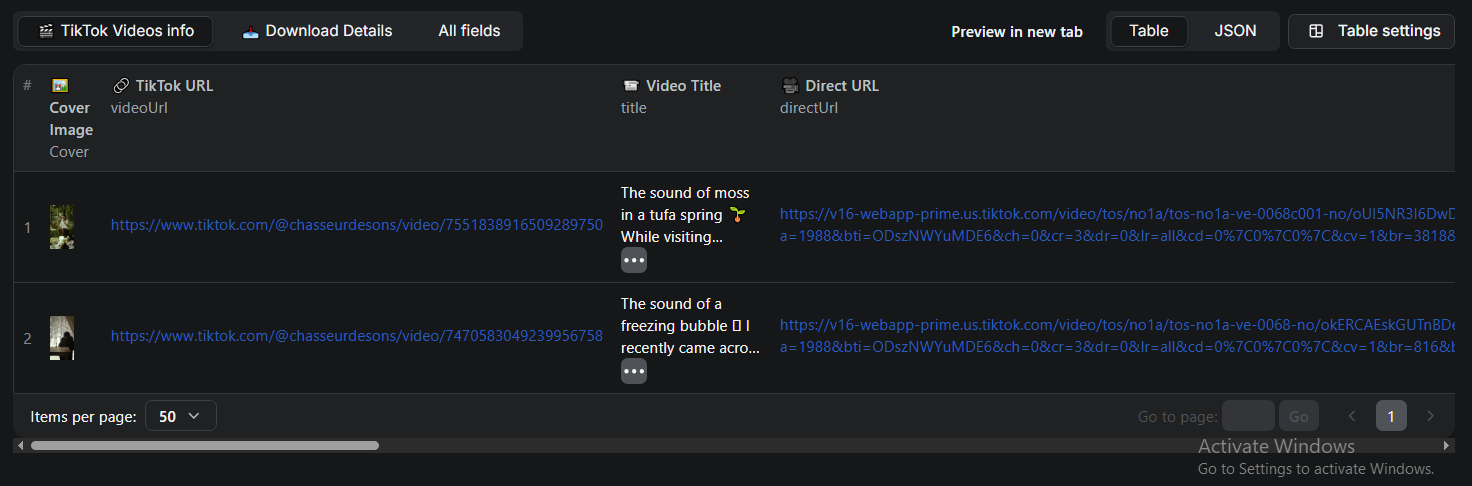 ### Complete Output with Download
 json { "videoUrl": "https://www.tiktok.com/@dummyuser/video/7234567890123456789", "directUrl": "https://v16-webapp-prime.tiktok.com/video/tos/alisg/example-url...", "title": "Sample TikTok Video Title", "author": "dummyuser", "authorId": "1234567890123456789", "Cover": "https://p16-pu-sign-no.tiktokcdn-eu.com/tos-no1a-p-0037-no/o0gWBfoTDFe...", "duration": 30, "viewCount": 1500000, "likeCount": 150000, "shareCount": 12000, "commentCount": 8500, "width": 576, "height": 1024, "quality": "540p", "fileSize": "5826163", "videoId": "7234567890123456789", "extractedAt": "2025-09-20T12:00:00.000Z", "download": { "available": true, "url": "https://api.apify.com/v2/key-value-stores/example-store/records/video.mp4", "format": "mp4", "requested": true, "status": "completed", "error": null, "fileSize": 5826163, "fileSizeHuman": "5.55 MB", "downloadSpeed": "4.2 MB/s", "duration": "1.3s", "runId": "exampleRunId123" }, "processingTime": 4200, "success": true } ### Metadata-Only Output (downloadVideo: false) json { "videoUrl": "https://www.tiktok.com/@dummyuser/video/7234567890123456789", "directUrl": "https://v16-webapp-prime.tiktok.com/video/tos/alisg/example-url...", "title": "Sample TikTok Video Title", "author": "dummyuser", "authorId": "1234567890123456789", "Cover": "https://p16-pu-sign-no.tiktokcdn-eu.com/tos-no1a-p-0037-no/o0gWBfoTDFe...", "duration": 30, "viewCount": 1500000, "likeCount": 150000, "shareCount": 12000, "commentCount": 8500, "width": 576, "height": 1024, "quality": "540p", "fileSize": "5826163", "videoId": "7234567890123456789", "extractedAt": "2025-09-20T12:00:00.000Z", "download": { "available": false, "requested": false, "status": "disabled" }, "processingTime": 1200, "success": true } The extracted videos are clean without TikTok watermarks, as they're obtained directly from TikTok's content delivery network rather than through the mobile app interface. ## 🎯 Configuration Examples ### Basic Video Extraction (Metadata Only) json { "videoUrls": [ "https://www.tiktok.com/@samplecreator/video/7234567890123456789" ], "preferredFps": "60", "downloadVideo": false } ### Full Extraction with Downloads json { "videoUrls": [ "https://www.tiktok.com/@samplecreator/video/7234567890123456789" ], "preferredFps": "60", "downloadVideo": true } ### Batch Processing with Proxy json { "videoUrls": [ "https://www.tiktok.com/@creator1/video/7111111111111111111", "https://www.tiktok.com/@creator2/video/7222222222222222222", "https://www.tiktok.com/@creator3/video/7333333333333333333" ], "preferredFps": "30", "timeout": 45, "downloadVideo": true, "proxyConfig": { "useApifyProxy": true, "apifyProxyGroups": ["RESIDENTIAL"] } } ### High Performance Configuration json { "videoUrls": [ "https://www.tiktok.com/@qualitycreator/video/7444444444444444444" ], "preferredFps": "60", "timeout": 60, "downloadVideo": true, "proxyConfig": { "useApifyProxy": true, "apifyProxyGroups": ["RESIDENTIAL"], "apifyProxyCountry": "US" } } ## 🔄 Advanced Features ### Reliability & Performance - Smart Rate Limiting: 2-second delays between requests to avoid detection - Session Management: Advanced proxy session rotation for improved success rates - Error Recovery: Robust error handling with detailed failure reporting - Batch Processing: Efficient handling of multiple URLs with progress tracking - Resource Optimization: Dynamic memory allocation for download operations ### Proxy & Network Features - Residential Proxies: Support for Apify's residential proxy network - Geographic Selection: Choose proxy country for regional content access - Session Rotation: Automatic session management to avoid IP blocking - Retry Logic: Intelligent retry mechanisms with exponential backoff ### Content Processing - FPS-Based Selection: Intelligent video quality selection based on preferred frame rate - Bitrate Optimization: Automatically selects highest quality within chosen FPS - Multiple CDN Support: Handles various TikTok CDN endpoints and formats - Cookie Management: Proper session handling for reliable video access ### Data Quality - Complete Metadata: Comprehensive video and creator information - Engagement Metrics: Real-time view counts, likes, shares, and comments - Technical Details: File sizes, dimensions, duration, and quality information - Timestamp Tracking: Processing times and extraction timestamps ## 🛠️ Troubleshooting ### Video Extraction Issues - No Direct URL: Video may be private, deleted, or region-restricted - Quality Issues: Try different FPS settings if preferred quality unavailable - Access Denied: Enable proxy configuration for better access - Geographic Blocks: Use proxy with specific country settings ### Download Problems - File Size Errors: Large videos require more memory - Actor handles this automatically - Timeout Issues: Increase timeout setting for slow network conditions - Authentication: Ensure APIFY_TOKEN is properly set for download functionality - Storage Limits: Check available Key-Value Store space for large downloads ### Proxy Issues - Connection Failures: Verify proxy configuration and available proxy groups - Geographic Restrictions: Try different proxy countries if content is region-locked - Rate Limiting: Proxy helps but TikTok may still impose limits on heavy usage - Session Problems: Actor automatically manages session rotation ### Performance Issues - Slow Processing: Enable proxy configuration for better stability - Rate Limiting: Actor includes built-in delays, but consider proxy usage - Memory Usage: Downloads automatically allocate optimal memory based on file size - Cost Optimization: Use downloadVideo: false for metadata-only extraction ## 📈 Resource Requirements ### Memory Allocation - Basic Extraction: 128-256 MB (default) - With Downloads: Auto-calculated based on video file sizes (128MB-32GB) - Batch Processing: Scales automatically per video - Proxy Usage: Minimal additional overhead ### Processing Times - Metadata Only: 1-3 seconds average per video - With Downloads: 3-8 seconds + download time - Batch Processing: ~5 seconds per video + 2-second delays - Large Files: Download time varies based on file size and network speed ### Cost Considerations - Metadata Only: Minimal compute units (recommended for large batches) - With Downloads: Higher cost due to memory allocation and processing time - Proxy Usage: Additional proxy costs when enabled - Storage: Downloaded files count toward Key-Value Store limits ## ⚠️ Important Notes ### Legal & Ethical Usage - Respect Copyright: Only download content you have rights to use - Platform Terms: Use responsibly and respect TikTok's terms of service - Rate Limiting: Built-in delays help maintain respectful usage patterns - Content Rights: Extracted content belongs to original creators ### Technical Limitations - Maximum URLs: 50 videos per batch to ensure reliable processing - Public Content: Only processes publicly accessible TikTok videos - CDN Availability: Direct URLs have expiration times set by TikTok - Geographic Restrictions: Some content may not be available in all regions - Proxy Requirements: Some regions or high-volume usage may require proxy configuration ### Download Requirements - APIFY_TOKEN: Required environment variable for video download functionality - Storage Space: Downloaded videos consume Key-Value Store space - Memory Allocation: Large videos automatically allocate appropriate resources - Processing Time: Downloads increase overall Actor execution time --- ## 🤝 Support & Resources ### Getting Help - 📧 Email: fridaytechnolog@gmail.com - 🐙 GitHub: DZ-ABDLHAKIM - 🐦 Twitter: @DZ_45Omar - 🔧 Apify: dz_omar ### Related Actors - Universal File Downloader: Powers the intelligent download system - TikTok Profile Scraper: Extract user profiles and video lists - Social Media Analytics: Comprehensive social media data extraction ---
Categories
Common Use Cases
Market Research
Gather competitive intelligence and market data
Lead Generation
Extract contact information for sales outreach
Price Monitoring
Track competitor pricing and product changes
Content Aggregation
Collect and organize content from multiple sources
Ready to Get Started?
Try TikTok Video Downloader now on Apify. Free tier available with no credit card required.
Start Free TrialActor Information
- Developer
- dz_omar
- Pricing
- Paid
- Total Runs
- 357
- Active Users
- 40
Related Actors

🏯 Tweet Scraper V2 - X / Twitter Scraper
by apidojo

Instagram Scraper
by apify

TikTok Scraper
by clockworks

Instagram Profile Scraper
by apify
Apify provides a cloud platform for web scraping, data extraction, and automation. Build and run web scrapers in the cloud.
Learn more about ApifyNeed Professional Help?
Couldn't solve your problem? Hire a verified specialist on Fiverr to get it done quickly and professionally.
Trusted by millions | Money-back guarantee | 24/7 Support