
Idealista Scraper API
by dz_omar
Extracts structured property data (price, features, contact info, images) from any Idealista.com/.pt/.it listing URL. Outputs clean JSON for real esta...
Opens on Apify.com
About Idealista Scraper API
Extracts structured property data (price, features, contact info, images) from any Idealista.com/.pt/.it listing URL. Outputs clean JSON for real estate analysis, market research, and automation workflows. Handles anti-bot protections automatically.
What does this actor do?
Idealista Scraper API is a web scraping and automation tool available on the Apify platform. It's designed to help you extract data and automate tasks efficiently in the cloud.
Key Features
- Cloud-based execution - no local setup required
- Scalable infrastructure for large-scale operations
- API access for integration with your applications
- Built-in proxy rotation and anti-blocking measures
- Scheduled runs and webhooks for automation
How to Use
- Click "Try This Actor" to open it on Apify
- Create a free Apify account if you don't have one
- Configure the input parameters as needed
- Run the actor and download your results
Documentation
🏘️ Idealista Property Scraper API Extract comprehensive real estate data from single Idealista property listings across Spain, Portugal, and Italy with unparalleled detail and accuracy. Perfect for real estate analysts, content creators, investors, and SEO professionals who need structured property data without coding complexity. --- ## 🔎 What This Actor Extracts This scraper provides complete property intelligence from individual listings: ### 📋 Core Property Data * 📌 Property Details: ID, title, description, location, and listing URL * 💰 Pricing: Current listing price with currency formatting * 📏 Specifications: Built area, rooms, bathrooms via propertySpecs * 🏢 Property Features: Detailed characteristics array with all property attributes * ⚡ Energy Performance: Energy efficiency ratings and labels when available * 📅 Listing Status: Last update information (e.g., "updated 17 days ago") ### 🖼️ Visual Content * 📸 Image Gallery: High-resolution photos with titles, descriptions, and tags * 🖼️ Main Image: Primary property photo URL * 🗺️ Map Integration: Google Maps static images with GPS coordinates * 🎥 Virtual Tours: 360° tour URLs when available * 📋 Floor Plans: Architectural layouts marked with isPlan flag ### 🏢 Agency & Contact Information * 🏛️ Agency Details: Professional name, location, logo, and website * 📞 Contact Methods: Phone numbers, chat/form availability flags * 🔗 Reference: Property reference number and agency type * 📍 Map Location: Agency location data when available ### 🏗️ Building & Amenities * 🏠 Building Features: Elevator, parking, construction details * 🌿 Amenities: Swimming pool, garden, terrace, air conditioning * 🎯 Property Specs: Structured data for rooms, bathrooms, area, and boolean amenities --- ## ⚙️ One URL Per Run This actor is built for one listing per run. Want to extract 10 listings? Just call the actor 10 times — either manually or automatically. > ⚠️ Perfect for automation: developers can loop through multiple URLs and call this actor via API. --- ## 🔗 Need Bulk Extraction? Looking to scrape hundreds or thousands of properties at once? Check out our Idealista Bulk Property Scraper which: - 🚀 Processes multiple search URLs in a single run - 📈 Extracts unlimited properties (bypasses Idealista's 1,800-property limit) - 🤖 Uses this API internally for individual property extraction - 💰 More cost-effective for large-scale operations --- ## 🌐 Supported Domains You can use this actor on any public Idealista property URL such as: * https://www.idealista.pt/en/imovel/33826216/ * https://www.idealista.com/en/inmueble/106316721/ * https://www.idealista.it/en/immobile/30856200/ --- ## ✅ Sample Input Only one field is required: a property URL. json { "Url": "https://www.idealista.it/en/immobile/30856200/", "proxyConfig": { "useApifyProxy": true, "apifyProxyGroups": ["RESIDENTIAL"] }, "maxRetries": 2, "timeout": 30, "saveMapImages": true, "includeGallery": true, "extractContactInfo": true } --- ## 📊 Sample Output json { "MainImage": "https://img4.idealista.com/blur/WEB_DETAIL_TOP-L-L/0/id.pro.es.image.master/52/48/b2/1314359991.jpg", "title": "Flat / apartment for sale in Calle Barrinou", "price": "39000 €", "location": "Balaguer", "description": "This comment was automatically translated and may not be 100% accurate. See description in the original language Local to reform in Balaguer. It has an area of 60 m2.", "characteristics": [ "59 m² built", "2 bedrooms", "1 bathroom", "Second hand/good condition" ], "contactInfo.phones": "+34 965 02 32 90", "mapImagePath": "https://api.apify.com/v2/key-value-stores/L9wbNlkhaeaKs7kfD/records/105296229.jpg", "Url": "https://www.idealista.com/en/inmueble/105296229/", "updatedAt": "Listing updated more than 2 months ago", "scrapedAt": "2025-08-09T05:02:30.463Z" } ### 🖼️ Live Results View 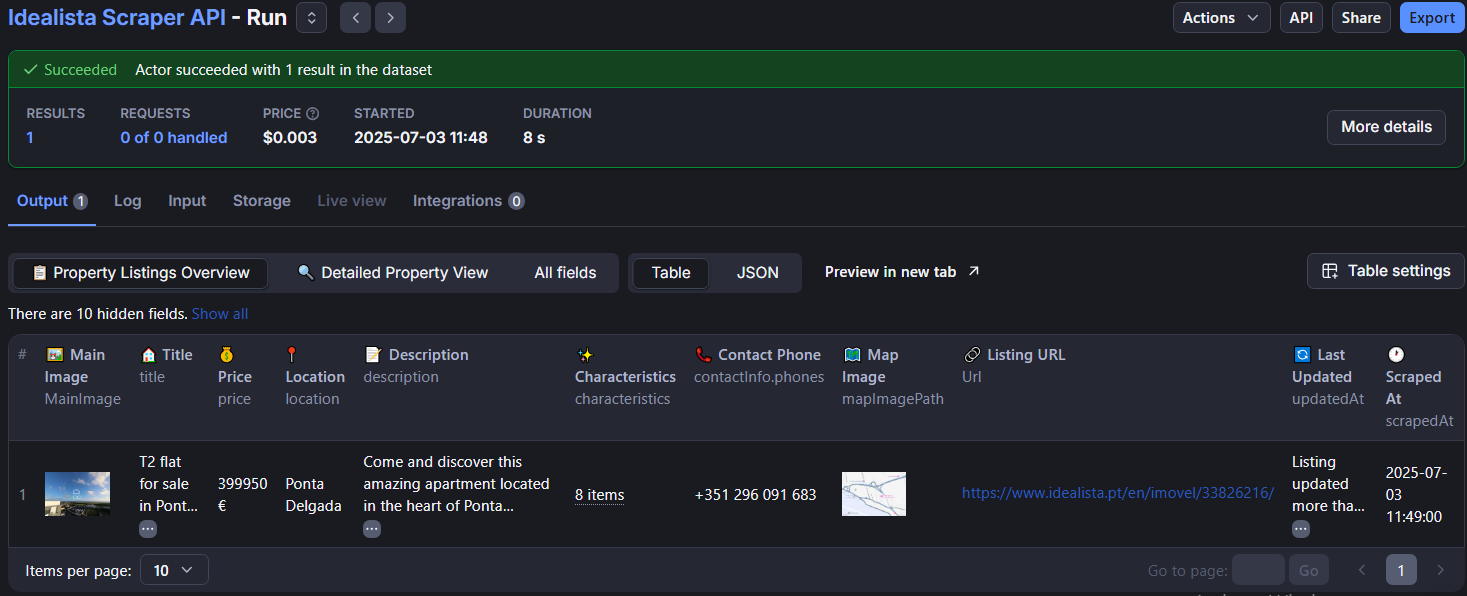 Real-time view of extracted property data in the Apify console --- ## 🔧 Integration & Automation ### API Integration This actor is designed to be called programmatically:
 javascript // Example: Scraping multiple properties in a loop const propertyUrls = [ "https://www.idealista.it/en/immobile/30856200/", "https://www.idealista.com/en/inmueble/106316721/", "https://www.idealista.pt/en/imovel/33826216/" ]; for (const url of propertyUrls) { const run = await apifyClient.actor("dz_omar/idealista-scraper-api").call({ Url: url, proxyConfig: { useApifyProxy: true, apifyProxyGroups: ["RESIDENTIAL"] }, maxRetries: 2, timeout: 30, saveMapImages: true, includeGallery: true, extractContactInfo: true }); const { items } = await apifyClient.dataset(run.defaultDatasetId).listItems(); console.log(items[0]); // Property data } ### Used by Bulk Scraper The Idealista Bulk Property Scraper uses this API internally to: 1. Process search result pages 2. Navigate through property listings 3. Extract detailed data from each property 4. Aggregate results into comprehensive datasets --- ## Actor Standby This actor supports Actor Standby mode for real-time API usage with instant response times. Perfect for applications requiring immediate property data extraction without startup delays. --- ### 🌟 What is Standby Mode? Standby mode transforms this actor into a real-time API server that stays ready in the background, eliminating the typical 10-30 second startup time of traditional actors. #### Traditional Actor Run: 1. ⏳ Start actor (10-30 seconds) 2. 🔍 Process property (5-15 seconds) 3. 📊 Return results 4. 🛑 Actor stops #### Standby Mode: 1. 🔍 Process property instantly (5-15 seconds) 2. 📊 Return results immediately 3. 🔄 Stay ready for next request --- ### 📊 Performance Comparison | Mode | Startup Time | Processing Time | Total Response Time | |------|-------------|-----------------|-------------------| | Traditional | 10-30 seconds | 5-15 seconds | 15-45 seconds | | Standby | 0 seconds | 5-15 seconds | 5-15 seconds | Result: 3x faster response times with Standby mode! --- ### 🔧 How to Use Standby Mode #### 1. Identify if Standby is Available Look for the "Standby" tab on this actor's page. If you see it, the actor supports Standby mode. #### 2. Get Your Standby URL Your unique Standby endpoint: https://dz-omar--idealista-scraper-api.apify.actor/ #### 3. Authentication Include your Apify API token in the request: Method 1 (Recommended): Authorization Header bash curl -X POST "https://dz-omar--idealista-scraper-api.apify.actor/" \ -H "Content-Type: application/json" \ -H "Authorization: Bearer YOUR_APIFY_TOKEN" \ -d '{"Url":"https://www.idealista.com/en/inmueble/107168202/","proxyConfig":{"useApifyProxy":true,"apifyProxyGroups":["RESIDENTIAL"]}}' Method 2: Query Parameter bash curl -X POST "https://dz-omar--idealista-scraper-api.apify.actor/?token=YOUR_APIFY_TOKEN" \ -H "Content-Type: application/json" \ -d '{"Url":"https://www.idealista.com/en/inmueble/107168202/","proxyConfig":{"useApifyProxy":true,"apifyProxyGroups":["RESIDENTIAL"]}}' --- ### 💻 Code Examples #### JavaScript/Node.js javascript const response = await fetch('https://dz-omar--idealista-scraper-api.apify.actor/', { method: 'POST', headers: { 'Content-Type': 'application/json', 'Authorization': 'Bearer YOUR_APIFY_TOKEN' }, body: JSON.stringify({ Url: "https://www.idealista.com/en/inmueble/107168202/", proxyConfig: { useApifyProxy: true, apifyProxyGroups: ["RESIDENTIAL"] } }) }); const propertyData = await response.json(); console.log(propertyData); #### Python python import requests url = "https://dz-omar--idealista-scraper-api.apify.actor/" headers = { "Content-Type": "application/json", "Authorization": "Bearer YOUR_APIFY_TOKEN" } data = { "Url": "https://www.idealista.com/en/inmueble/107168202/", "proxyConfig": { "useApifyProxy": True, "apifyProxyGroups": ["RESIDENTIAL"] } } response = requests.post(url, headers=headers, json=data) property_data = response.json() print(property_data) #### PHP php $url = "https://dz-omar--idealista-scraper-api.apify.actor/"; $data = [ "Url" => "https://www.idealista.com/en/inmueble/107168202/", "proxyConfig" => [ "useApifyProxy" => true, "apifyProxyGroups" => ["RESIDENTIAL"] ] ]; $options = [ 'http' => [ 'method' => 'POST', 'header' => [ 'Content-Type: application/json', 'Authorization: Bearer YOUR_APIFY_TOKEN' ], 'content' => json_encode($data) ] ]; $response = file_get_contents($url, false, stream_context_create($options)); $propertyData = json_decode($response, true); print_r($propertyData); --- ### 📈 Standby Mode Specifications #### Performance Limits: - 🕐 Maximum Response Time: 5 minutes - 🚀 Rate Limit: 2,000 requests per second per account - ⚡ Automatic Scaling: Handles traffic spikes automatically - 🔄 Always Available: No startup delays #### Billing: - 💰 Same pricing structure as traditional runs - 📊 Background resource usage during idle time - ⚙️ Automatic termination after idle timeout --- ### 🎯 Perfect Use Cases for Standby Mode #### ✅ Ideal Scenarios: - 📱 Mobile Apps: Instant property lookups - 🌐 Web Applications: Real-time property data display - 🤖 Chatbots: Immediate property information responses - 📊 API Integrations: Seamless third-party service connections - ⚡ High-Frequency Requests: Multiple properties per minute #### ❌ Not Ideal For: - 📦 Bulk Operations: Use Idealista Bulk Scraper instead - 🕐 Infrequent Usage: Traditional mode more cost-effective - 📋 Batch Jobs: Single large extractions --- ### 🔄 Traditional vs Standby Mode Comparison | Feature | Traditional Mode | Standby Mode | |---------|------------------|--------------| | Startup Time | 10-30 seconds | Instant | | Best For | Single/batch jobs | Real-time API usage | | Cost Model | Pay per run | Pay per run + idle time | | Scaling | Manual | Automatic | | Response Time | 15-45 seconds | 5-15 seconds | | Rate Limits | Per run | 2,000 req/sec | | Use When | Occasional scraping | Frequent API calls | --- ### 💡 Integration Tips #### Error Handling javascript try { const response = await fetch('https://dz-omar--idealista-scraper-api.apify.actor/', { method: 'POST', headers: { 'Content-Type': 'application/json', 'Authorization': 'Bearer YOUR_APIFY_TOKEN' }, body: JSON.stringify({ Url: propertyUrl, proxyConfig: { useApifyProxy: true, apifyProxyGroups: ["RESIDENTIAL"] } }) }); if (!response.ok) { throw new Error(`HTTP ${response.status}: ${response.statusText}`); } const data = await response.json(); if (data.status === 'failed') { console.error('Property extraction failed:', data.error); return null; } return data; } catch (error) { console.error('Request failed:', error); return null; } #### Timeout Configuration javascript // Set custom timeout for your HTTP client const controller = new AbortController(); const timeoutId = setTimeout(() => controller.abort(), 30000); // 30 second timeout const response = await fetch(url, { signal: controller.signal, // ... other options }); clearTimeout(timeoutId); --- ### 🚨 Important Notes - 🔑 Always include authentication (API token required) - 📝 Same input format as traditional mode - 🔄 Automatic scaling handles traffic spikes - 💰 Monitor usage to manage costs effectively - ⚡ 5-minute maximum response time limit --- ### 🔗 Getting Started 1. Get your API token 2. Find the Standby tab on this actor's page 3. Copy the Standby URL: https://dz-omar--idealista-scraper-api.apify.actor/ 4. Make your first request using the examples above 5. Integrate into your application for real-time property data Ready to experience 3x faster property extraction? Try Standby mode! ## 🎯 Output Data Structure ### Key Fields Explained: * id: Unique property identifier from Idealista * characteristics: Array of property features (size, rooms, condition, etc.) * building: Building-specific features (elevator, parking, etc.) * energyPerformance: Energy efficiency data object * amenities: Property amenities (pool, garden, AC, etc.) * propertySpecs: Structured specifications with boolean flags * contactInfo: Complete agency information with contact methods * gallery: Image array with titles, descriptions, and tags * Map: Google Maps integration with coordinates * mapImagePath: Path to saved map image in key-value store --- ## 💡 Who Is This For? ### Single Property Analysis: * 🧑💼 Real estate agencies analyzing specific listings * 📈 Investors evaluating individual properties * 🔍 Content creators gathering specific property data * 🤖 Developers building targeted automation * 📱 Apps requiring individual property lookups ### Bulk Operations: * 📊 Market analysts needing hundreds of properties → Use Idealista Bulk Scraper * 🏢 Agencies monitoring entire markets → Use Idealista Bulk Scraper * 📈 Investors tracking regional trends → Use Idealista Bulk Scraper --- ## 📚 Configuration Options ### Input Parameters: - Url (required): Single property URL to scrape - proxyConfig: Proxy settings (RESIDENTIAL recommended) - maxRetries: Number of retry attempts (default: 2) - timeout: Request timeout in seconds (default: 30) - saveMapImages: Save map images to storage (default: true) - includeGallery: Extract image gallery (default: true) - extractContactInfo: Include agency details (default: true) ### Proxy Requirements Proxies are required for reliable operation. Recommended configuration: json "proxyConfig": { "useApifyProxy": true, "apifyProxyGroups": ["RESIDENTIAL"] } --- ## 💰 Pricing & Cost Optimization ### Tiered Pricing Structure (Effective August 23, 2025): | Apify Subscription | Initialization | Data Extraction | Total per Property | |-------------------|---------------|-----------------|----------------------| | No Subscription | $0.005 | $0.008 | $0.013 | | Bronze | $0.001 | $0.002 | $0.003 | | Silver | $0.00001 | $0.0015 | $0.00151 | | Gold | $0.00001 | $0.0015 | $0.00151 | ### 💡 Cost Optimization Recommendations: #### 🥉 Bronze Subscription Benefits: - 95% cost reduction vs no subscription ($0.003 vs $0.013) - Same pricing as current rates - Perfect for moderate usage (100-1000 properties/month) #### 🥈 Silver/Gold Subscription Benefits: - 99% cost reduction vs no subscription ($0.00151 vs $0.013) - 50% cheaper than Bronze subscription - Ideal for high-volume operations (1000+ properties/month) ### Example Cost Calculations: | Properties | No Subscription | Bronze | Silver/Gold | Savings with Gold | |-----------|----------------|--------|-------------|---------------------| | 100 | $1.30 | $0.30 | $0.15 | $1.15 (88% saved) | | 1,000 | $13.00 | $3.00 | $1.51 | $11.49 (88% saved) | | 10,000 | $130.00 | $30.00 | $15.10 | $114.90 (88% saved) | > 💎 Upgrade Recommendation: For users processing 500+ properties monthly, upgrading to Silver or Gold subscription provides massive cost savings and pays for itself quickly. ### Bulk Operations Pricing: For extracting multiple properties, consider the Idealista Bulk Scraper which offers: - One-time setup fee based on your subscription tier - Same per-property costs as above - Automated workflow management - Resume capability for large extractions --- ## ⚖️ Legal Considerations This actor: - Respects robots.txt directives - Implements rate limiting to avoid server overload - Only extracts publicly available data - Does not bypass paywalls or login requirements - Follows Idealista's terms of service --- ## 🤝 Support & Contact For assistance or custom implementations: * 📧 Email: fridaytechnolog@gmail.com * 🐙 GitHub: DZ-ABDLHAKIM * 🐦 Twitter: @DZ_45Omar * 🔧 Apify: dz_omar --- ## 🔗 Related Actors - Idealista Bulk Property Scraper - For extracting hundreds or thousands of properties in a single run ## 📋 Changelog ### Version 1.0 (Initial Release) * ✅ Complete property data extraction * ✅ Rich image gallery with metadata ### Version 2.0 (Latest) * ✅ Implemented tiered pricing structure based on Apify subscription levels * ✅ Advanced anti-bot detection bypass for Idealista's updated security measures * ✅ Actor Standby Mode support Real-time API with instant response times * ✅ Google Maps integration with image saving
Categories
Common Use Cases
Market Research
Gather competitive intelligence and market data
Lead Generation
Extract contact information for sales outreach
Price Monitoring
Track competitor pricing and product changes
Content Aggregation
Collect and organize content from multiple sources
Ready to Get Started?
Try Idealista Scraper API now on Apify. Free tier available with no credit card required.
Start Free TrialActor Information
- Developer
- dz_omar
- Pricing
- Paid
- Total Runs
- 27,283
- Active Users
- 215
Related Actors

🏯 Tweet Scraper V2 - X / Twitter Scraper
by apidojo

Google Search Results Scraper
by apify

Instagram Profile Scraper
by apify

Tweet Scraper|$0.25/1K Tweets | Pay-Per Result | No Rate Limits
by kaitoeasyapi
Apify provides a cloud platform for web scraping, data extraction, and automation. Build and run web scrapers in the cloud.
Learn more about ApifyNeed Professional Help?
Couldn't solve your problem? Hire a verified specialist on Fiverr to get it done quickly and professionally.
Trusted by millions | Money-back guarantee | 24/7 Support