
Youtube Comment Scraper Pro
by coregent
Powerful YouTube Comment Scraper for data collection, analytics, and automation. Extracts comments, replies, author info, engagement metrics, and full...
Opens on Apify.com
About Youtube Comment Scraper Pro
Powerful YouTube Comment Scraper for data collection, analytics, and automation. Extracts comments, replies, author info, engagement metrics, and full video metadata in structured JSON or CSV — fast, reliable, and scalable.
What does this actor do?
Youtube Comment Scraper Pro is a web scraping and automation tool available on the Apify platform. It's designed to help you extract data and automate tasks efficiently in the cloud.
Key Features
- Cloud-based execution - no local setup required
- Scalable infrastructure for large-scale operations
- API access for integration with your applications
- Built-in proxy rotation and anti-blocking measures
- Scheduled runs and webhooks for automation
How to Use
- Click "Try This Actor" to open it on Apify
- Create a free Apify account if you don't have one
- Configure the input parameters as needed
- Run the actor and download your results
Documentation
YouTube Comment Scraper Pro Powerful YouTube Comment Scraper for data collection, analytics, and automation. Extracts comments, replies, author info, engagement metrics, and full video metadata in structured JSON or CSV — fast, reliable, and scalable.  ## Features - Comprehensive Comment Extraction: Scrapes main comments and their replies with accurate counts - Deterministic Loading: Advanced multi-phase loading strategy ensures consistent results across runs - Smart Pagination: Uses both DOM scrolling and YouTube's internal API continuation tokens - Rich Data Output: Extracts 30+ data fields including comment text, author info, engagement metrics, video metadata, and more - Reply Filtering: Option to include or exclude comment replies - Optimized Performance: ~30 seconds per video with efficient loading strategies - Proxy Support: Optional datacenter proxy support to avoid rate limiting (requires Apify proxy subscription) - Robust Error Handling: Comprehensive error handling and retry mechanisms ## Performance Benchmark Results: - Speed: ~30 seconds per video - Throughput: ~2.4 comments/second - Scalability: Handles up to 10,000 comments per video ## Configuration Options ### Input Parameters | Parameter | Type | Default | Description | |-----------|------|---------|-------------| |
 startUrls | Array | [] | YouTube video URLs to scrape (max 100 videos) | | maxComments | Integer | 1000 | Maximum comments per video (1-10,000) | | includeReplies | Boolean | true | Include comment replies in results | | useProxy | Boolean | false | Enable Apify datacenter proxies (⚠️ costs apply) | | proxyCountryCode | String | "" | Optional proxy country code (e.g., "US", "GB") | ## Input Examples You can configure the scraper using either JSON format (for local development and API) or through the Apify Console GUI. ### JSON Format (INPUT.json or API) json { "startUrls": [ "https://www.youtube.com/watch?v=7Sx0o-41r2k", "https://www.youtube.com/watch?v=5oAnKSCP4do", "https://www.youtube.com/watch?v=QJBP2uy8LcU" ], "maxComments": 100, "includeReplies": true, "useProxy": false, "proxyCountryCode": "" } Description: - Scrapes 3 YouTube videos - Collects up to 100 comments per video - Includes comment replies - No proxy (direct connection) ### GUI Format (Apify Console) When using the Apify platform, you can configure the same settings through an intuitive web interface: 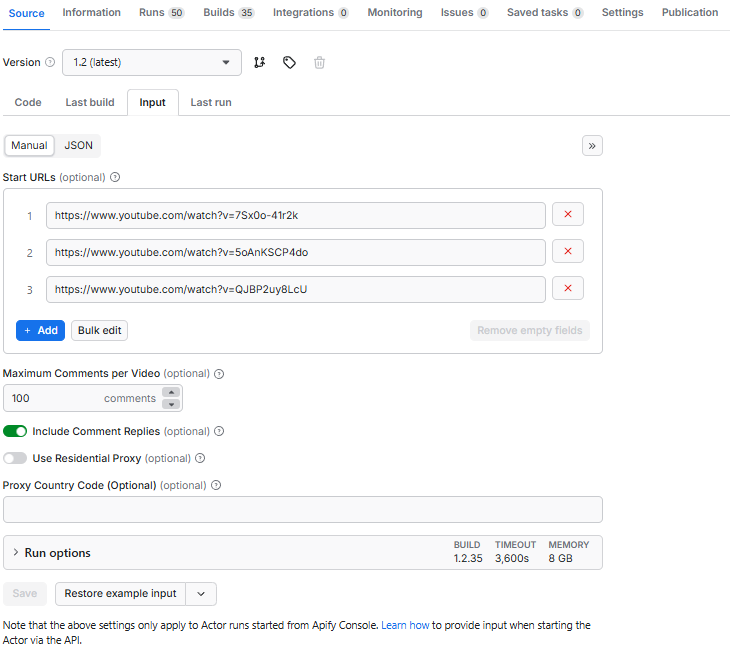 GUI Features: - Start URLs: Add multiple video URLs with the "+ Add" button - Maximum Comments per Video: Set using number input (default: 1000) - Include Comment Replies: Toggle switch (ON/OFF) - Use Residential Proxy: Toggle switch (⚠️ costs apply when enabled) - Proxy Country Code: Optional text field for country-specific proxies Both methods produce identical results. Use JSON for programmatic access and API integrations, or use the GUI for easier manual configuration. ## Output Data Structure The scraper extracts 30+ fields per comment/reply, organized in the following order: ### Core Comment Fields 1. PageURL - YouTube video URL 2. Comment - Comment text content 3. Author - Username/channel name of comment author 4. IsAuthorVerified - Whether author has verified badge (boolean) 5. Type - Record type: "comment", "Reply", or "error" 6. CommentId - Unique comment identifier 7. ParentCommentId - ID of parent comment (for replies) 8. LikeCount - Number of likes on comment 9. ReplyCount - Number of replies (0 for reply records) 10. IsPinned - Whether comment is pinned (boolean) 11. PublishedAt - Comment publication date/time 12. UpdatedAt - Last update date/time ### Author Details 13. IsHeartedByCreator - Creator hearted the comment (boolean) 14. AuthorChannelId - Author's YouTube channel ID 15. AuthorChannelURL - Author's channel URL 16. IsChannelOwner - Whether author is the video owner (boolean) ### Comment Analytics 17. CommentLength - Character count of comment text 18. Mentions - @mentions and #hashtags in comment 19. Language - Detected language (English, Chinese, Japanese, etc.) 20. CommentPosition - Position in comment thread 21. ThreadDepth - Nesting level (0 for main comments) ### Video Information 22. Title - Video title 23. VideoId - YouTube video ID 24. VideoPublishedAt - Video publication date ### Channel Information 25. ChannelName - Channel name 26. ChannelId - Channel ID 27. ChannelSubscribers - Subscriber count 28. VideoViews - Video view count 29. VideoLikes - Video like count 30. VideoDislikes - Video dislike count (usually empty - YouTube removed public dislikes) 31. VideoCategory - Video category ### Metadata 32. CommentsCount - Total comments on video (from YouTube) 33. CollectedAt - Timestamp when data was collected (ISO 8601) ## Output Examples The scraper provides flexible output formats viewable in the Apify Console. You can view results in JSON or Table format, with options to display either Overview columns (essential fields) or All columns (complete dataset). ### Overview Columns (Simplified View) JSON Format - Overview Columns Shows the 8 most important fields for quick analysis:
 json { "PageURL": "https://www.youtube.com/watch?v=7Sx0o-41r2k", "Comment": "It's impressive how all of us [ Claude users ] are crafting and iterating our own tools...", "Author": "@ncxbrasa", "Type": "comment", "LikeCount": "8", "ReplyCount": "0", "Title": "How I ACTUALLY Use Claude Code... My Complete Workflow", "CommentsCount": "137" } Table View - Overview Columns 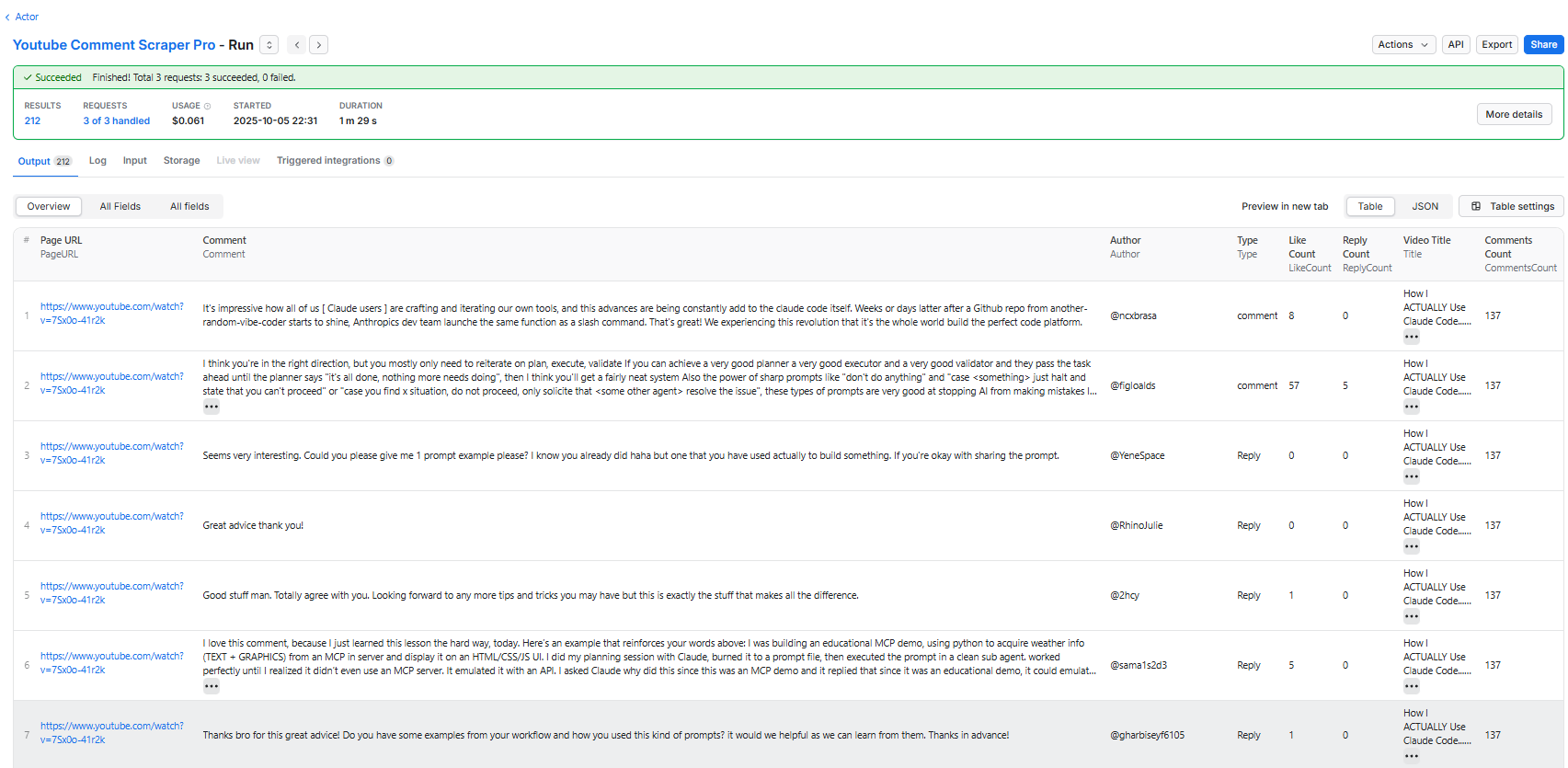 Overview columns include: - PageURL - Comment - Author - Type - LikeCount - ReplyCount - Title - CommentsCount ### All Columns (Complete Dataset) JSON Format - All Columns Shows all 33+ fields with complete metadata:
 json { "PageURL": "https://www.youtube.com/watch?v=7Sx0o-41r2k", "Comment": "It's impressive how all of us [ Claude users ] are crafting and iterating our own tools...", "Author": "@ncxbrasa", "IsAuthorVerified": false, "Type": "comment", "CommentId": "Ugxd_sFuCosrWloiBLx4AaABAg", "ParentCommentId": "", "LikeCount": "8", "ReplyCount": "0", "IsPinned": false, "PublishedAt": "2 months ago", "UpdatedAt": "2 months ago", "IsHeartedByCreator": false, "AuthorChannelId": "@ncxbrasa", "AuthorChannelURL": "https://www.youtube.com/@ncxbrasa", "IsChannelOwner": false, "CommentLength": 418, "Mentions": "", "Language": "English", "CommentPosition": 1, "ThreadDepth": 0, "Title": "How I ACTUALLY Use Claude Code... My Complete Workflow", "VideoId": "7Sx0o-41r2k", "VideoPublishedAt": "Aug 1, 2025", "ChannelName": "AI LABS", "ChannelId": "@AILABS-393", "ChannelSubscribers": "94.5K subscribers", "VideoViews": "97,626 views", "VideoLikes": "2,613", "VideoDislikes": "", "VideoCategory": "AI LABS", "CommentsCount": "137", "CollectedAt": "2025-10-05T11:32:07.176Z" } Table View - All Columns 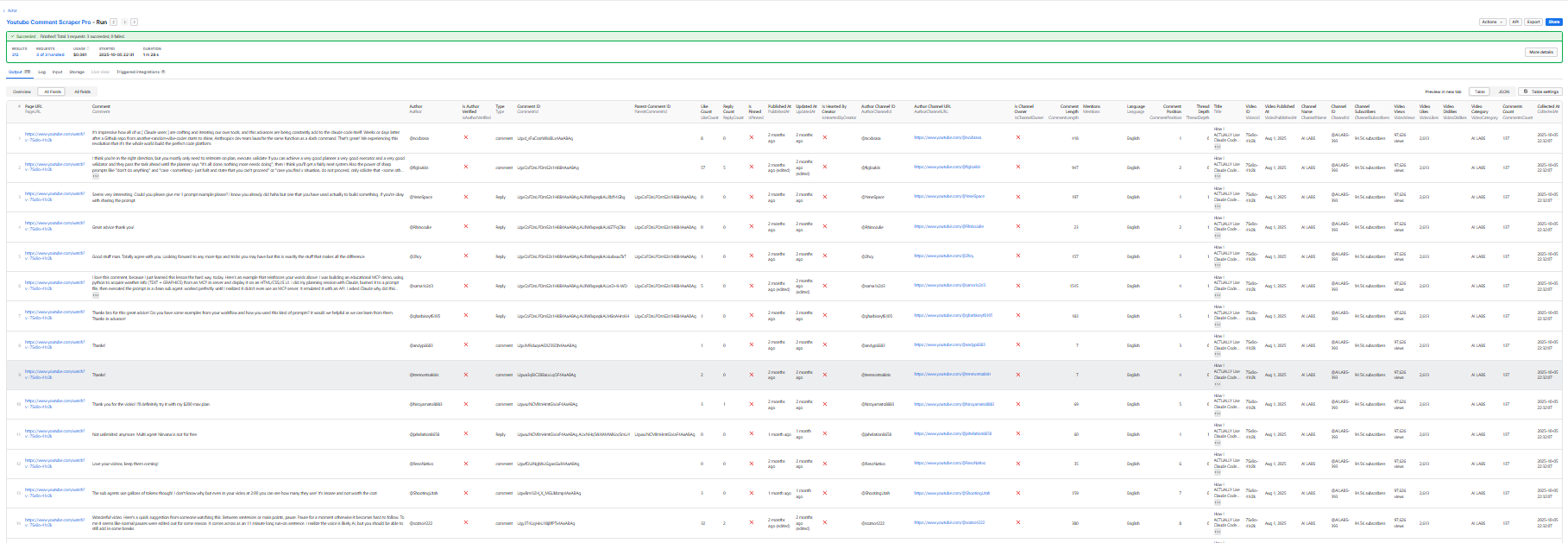 The table view displays all 33 fields in a spreadsheet-like format, making it easy to: - Sort by any column - Filter specific data - Export to CSV/Excel - Analyze engagement metrics - Track comment threads and replies ### Export Options From the Apify Console, you can export results in multiple formats: - JSON - Full structured data - CSV - Spreadsheet compatible - Excel - Direct Excel format - HTML - Web-ready table - XML - Enterprise integration ## Usage ### On Apify Platform 1. Go to the Actor's input tab 2. Add YouTube video URLs to
 startUrls 3. Configure maxComments and includeReplies as needed 4. Click "Start" to run the scraper 5. Download results from the Dataset tab ### Local Development 1. Clone the repository 2. Install dependencies: bash npm install 3. Create/edit INPUT.json with your configuration: json { "startUrls": ["https://www.youtube.com/watch?v=VIDEO_ID"], "maxComments": 100, "includeReplies": true } 4. Run locally: bash npm start 5. Or use Apify CLI: bash apify run ## How It Works ### Multi-Phase Loading Strategy 1. Phase 1: Thread Loading - Initial page load and data extraction - Scrolling to load comment threads into DOM - Dynamic targeting based on maxComments setting - Early exit when target count reached 2. Phase 2: Reply Expansion (if includeReplies=true) - Systematic expansion of reply sections - Balanced approach for accuracy and speed - Scroll to view and click "View replies" buttons 3. Phase 3: API Continuation - Extract comments from DOM - Use YouTube's internal API for additional comments - Continuation token-based pagination - 500ms delay between requests (prevents rate limiting) ### Rate Limiting Protection - Sequential Processing: Videos processed one at a time - API Delays: 500ms between continuation requests - Gradual Scrolling: Prevents detection as bot - Optional Proxy: Datacenter proxies available if needed ## Technical Implementation Built with: - Puppeteer Crawler - Headless Chrome automation - Crawlee - Web scraping and browser automation framework - Apify SDK - Actor development toolkit - Dataset - Structured data storage ### Key Features - Deterministic Loading: Consistent results across runs - Comprehensive Error Handling: 53 try/catch blocks for robustness - Memory Efficient: Handles thousands of comments without leaks - Proxy Configuration: Optional datacenter proxy support - Input Validation: Schema-based validation for all inputs ## Deploy to Apify ### Option 1: Connect Git Repository 1. Go to Actor creation page 2. Click Link Git Repository 3. Connect your repository ### Option 2: Push from Local Machine 1. Install Apify CLI: bash npm install -g apify-cli 2. Login to Apify: bash apify login 3. Deploy your Actor: bash apify push Your Actor will be available at Actors → My Actors ## Troubleshooting ### Rate Limiting (429 Errors) - Enable useProxy option in input configuration - Reduces request frequency if scraping many videos ### Missing Comments - Increase maxComments if videos have more comments - Check that comments are enabled on the video - Some comments may be filtered by YouTube (spam, deleted) ### Slow Performance - Expected: ~30 seconds per video for 100 comments - Disable includeReplies if you only need top-level comments - Reduce maxComments if you don't need all comments ## Important Notes ⚠️ Proxy Usage: Datacenter proxies cost money on Apify. Only enable useProxy if experiencing rate limiting. ⚠️ Comment Replies: When includeReplies=false, only top-level comments are returned. Reply records are filtered out. ⚠️ Record Counts: Total records may be less than maxComments × videoCount due to: - Videos having fewer comments than requested - Disabled comments - YouTube's spam filtering - Deleted comments ## Resources ### Documentation - Crawlee Documentation - Apify Platform Documentation - Puppeteer Crawler API - Apify SDK for JavaScript ### Tutorials - Crawlee + Apify Platform Guide - Puppeteer Examples - Node.js Tutorials - How to Scale Puppeteer ### Community - Join Discord Community - Apify Blog - GitHub Issues ## License Apache 2.0
Categories
Common Use Cases
Market Research
Gather competitive intelligence and market data
Lead Generation
Extract contact information for sales outreach
Price Monitoring
Track competitor pricing and product changes
Content Aggregation
Collect and organize content from multiple sources
Ready to Get Started?
Try Youtube Comment Scraper Pro now on Apify. Free tier available with no credit card required.
Start Free TrialActor Information
- Developer
- coregent
- Pricing
- Paid
- Total Runs
- 794
- Active Users
- 11
Related Actors

TikTok Scraper
by clockworks

TikTok Data Extractor
by clockworks

Fast TikTok API (free-watermark videos)
by novi

YouTube Scraper
by streamers
Apify provides a cloud platform for web scraping, data extraction, and automation. Build and run web scrapers in the cloud.
Learn more about ApifyNeed Professional Help?
Couldn't solve your problem? Hire a verified specialist on Fiverr to get it done quickly and professionally.
Trusted by millions | Money-back guarantee | 24/7 Support