
TikTok Comments Scraper
by clockworks
Need to pull comments and data from TikTok videos for research, analysis, or archiving? This scraper is built for that. Give it any public TikTok vide...
Opens on Apify.com
About TikTok Comments Scraper
Need to pull comments and data from TikTok videos for research, analysis, or archiving? This scraper is built for that. Give it any public TikTok video URL, and it will extract the comment thread along with crucial video and profile details. You'll get all the comments, usernames, and comment dates. It also pulls the core video metrics: like counts, share numbers, and view counts. For deeper context, it captures the poster's profile info, the video description with hashtags, and even the music track used. Everything is structured and ready for your database or spreadsheet. I use it to export data directly to JSON, CSV, or Excel for offline analysis. You can also run it headlessly via its API for automation, schedule regular scrapes to monitor trends, or pipe the data into other apps. It's straightforward—configure your target URLs, choose an output format, and run it. The data you get is what you see on the public page, delivered in a clean, usable format for your projects.
What does this actor do?
TikTok Comments Scraper is a web scraping and automation tool available on the Apify platform. It's designed to help you extract data and automate tasks efficiently in the cloud.
Key Features
- Cloud-based execution - no local setup required
- Scalable infrastructure for large-scale operations
- API access for integration with your applications
- Built-in proxy rotation and anti-blocking measures
- Scheduled runs and webhooks for automation
How to Use
- Click "Try This Actor" to open it on Apify
- Create a free Apify account if you don't have one
- Configure the input parameters as needed
- Run the actor and download your results
Documentation
What is TikTok Comments Scraper? TikTok Comments Scraper is a simple and powerful tool that allows you to scrape comments from TikTok videos: comment text, user ID, timestamp, number of replies and replies content, number of likes, etc. To get TikTok comments, just insert the video URL or TikTok username and click the Save & Start button. ## How to scrape TikTok with TikTok Comments Scraper TikTok Comments Scraper was designed to be easy to start with, even if you’ve never extracted data from the web before. Here’s how you can scrape TikTok comments data with this tool: 1. Create a free Apify account using your email. 2. Open TikTok Comments Scraper. 3. Add one or more TikTok video URLs to scrape comments. Alternatively, add one ore more TikTok usernames whose videos' comments you want to scrape. 4. Click Start and wait for the data to be extracted. 5. Export TikTok comments in JSON, XML, CSV, Excel, or HTML. Watch this guide to run TikTok Comments Scraper smoothly: https://www.youtube.com/watch?v=g1HX0DeboQU ## Input The input for TikTok Comments Scraper should be a TikTok video URL or TikTok username and number of comments. You can add one or multiple URLs or usernames. Here’s how it looks like: 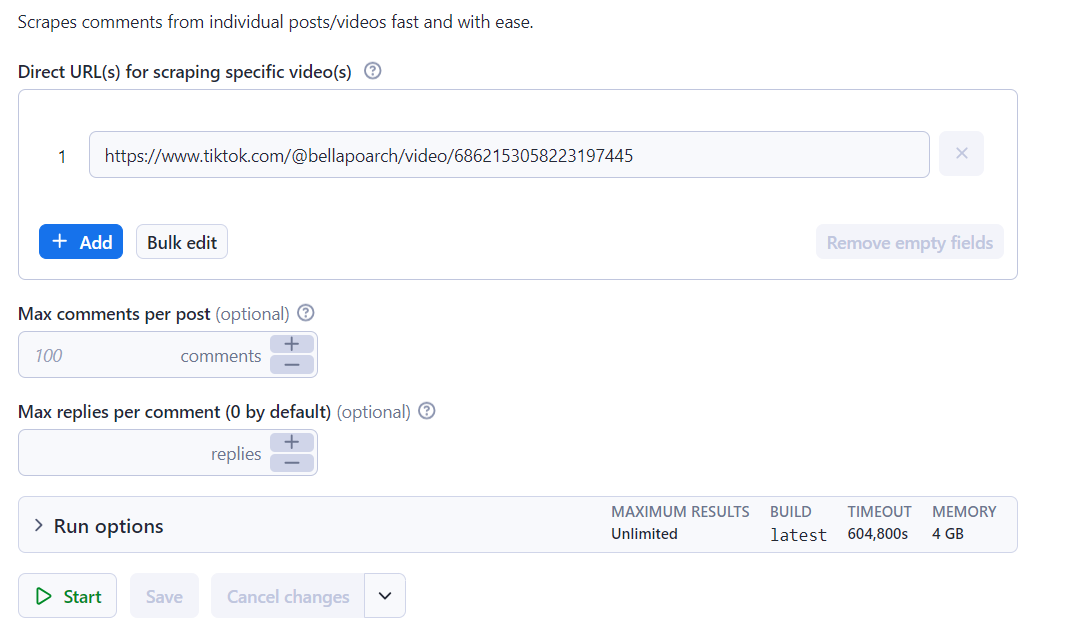 You can, of course, write the input in JSON too. It’s simple:
 json { "maxRepliesPerComment": 2, "postURLs": [ "https://www.tiktok.com/@bellapoarch/video/6862153058223197445" ], "commentsPerPost": 100 } ## Output This TikTok comment finder will get you a database of results. See example below. 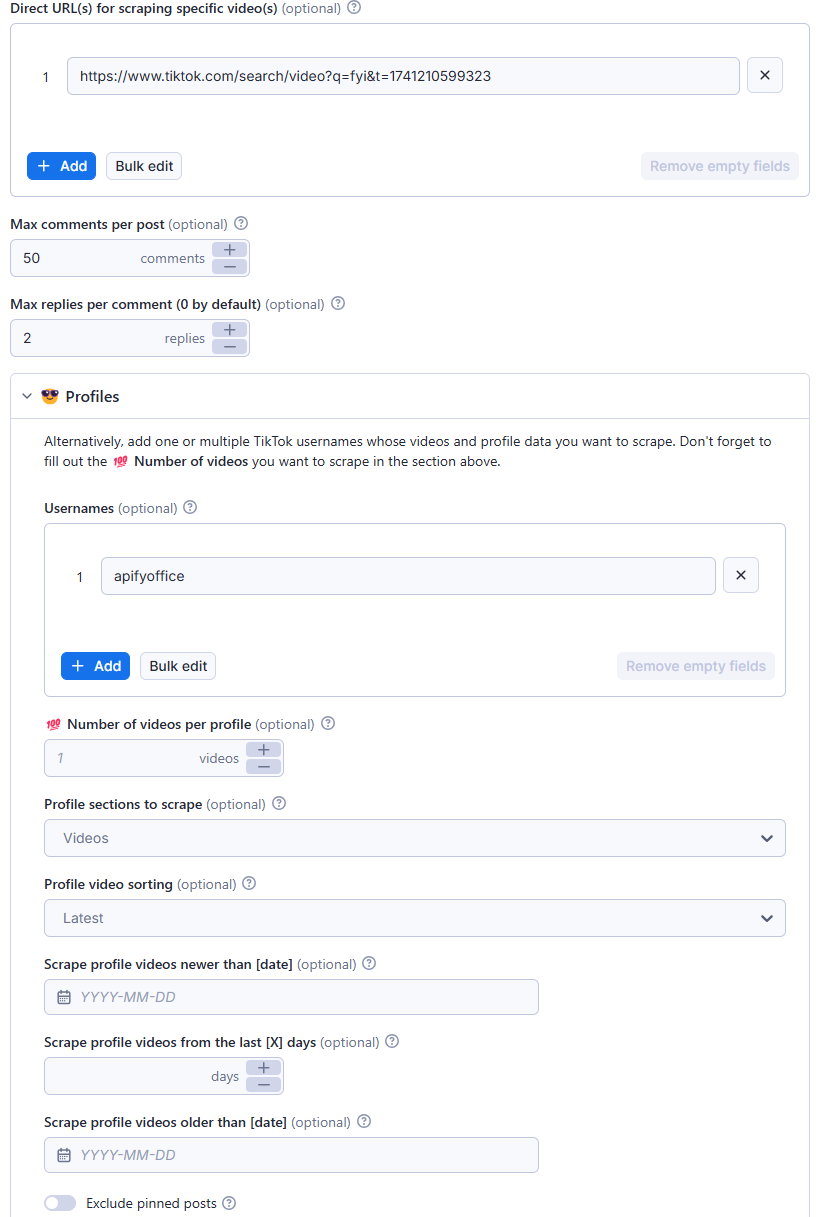 Click on Export XY results to download your data from this TikTok comment finder tool in XML, CSV, Excel, HTML, or JSON, as shown below.
 json { "text": "Bella poarch -67.3M\nRiver flows in you -55.5M\nMirror guy -53.3M\nLeah halton -53.2M\nStawberry chocholate -50.7M", "diggCount": 246, "replyCommentTotal": 3, "createTimeISO": "2024-08-06T11:21:16.000Z", "uniqueId": "rizqirxq", "videoWebUrl": "https://www.tiktok.com/@bellapoarch/video/6862153058223197445", "uid": "6904063862041396225", "cid": "7399984975553086214", "avatarThumbnail": "https://p77-sign-va.tiktokcdn.com/tos-maliva-avt-0068/5e2902b2db8018cbbde7a1aed077a35a~c5_100x100.jpg?lk3s=30310797&nonce=98619&refresh_token=fc34fd41c37618135499867e61bb948b&x-expires=1723125600&x-signature=2ei997Hv96D%2BjKrFEhd91Uk9AyI%3D&shp=30310797&shcp=-" } ## How can I use the data extracted with TikTok Comments Scraper? ✨ Find authentic product reviews and conduct sentiment analysis 👩🔬 Get data for research and social listening experiments 🦠 Analyze viral campaigns and trends 🥸 Identify unverified content and inaccurate information with high public value 📚 Prepare for or analyze a TikTok marketing campaign ## Integrate TikTok Comments Scraper and automate your workflow Last but not least, TikTok Scraper can be connected with almost any cloud service or web app thanks to integrations on the Apify platform. These include: - Make - Zapier - Slack - Airbyte - GitHub - Google Drive - and much more. Alternatively, you can use webhooks to carry out an action whenever an event occurs, e.g. get a notification whenever TikTok Scraper successfully finishes a run. ## Scrape any TikTok data you need with dedicated scrapers You can use the dedicated scrapers below if you want to scrape specific TikTok data. Each of them is built particularly for the relevant TikTok data scraping case, be it hashtags, search results, profiles, or all data at once. Feel free to browse them:
| 🎹 Tiktok Scraper | 📹 Tiktok Video Scraper | 🧛 TikTok Profile Scraper | 🎸 Tiktok Sound Scraper |
| 📊 TikTok Data Extractor | 🛍 Tiktok Ads Scraper | #️⃣ TikTok Hashtag Scraper | 🔍TikTok Discover Scraper |
apify-client NPM package. To access the API using Python, use the apify-client PyPI package. Check out the Apify API reference docs for full details, or click on the TikTok Comments API tab for code examples. ### Is it legal to scrape TikTok with TikTok Comments Scraper? Our TikTok scrapers, TikTok Comments Scraper included, are ethical and do not extract any private user data, such as email addresses, gender, or location. They can only extract what the user has chosen to share publicly. However, you should be aware that your results might contain personal data. Personal data is protected by GDPR in the European Union and other laws and regulations around the world. You should not scrape personal data unless you have a legitimate reason to do so. If you’re unsure whether your reason is legitimate, consult your lawyers. You can also read our blog post on the legality of web scraping and ethical scraping. ### How much does it cost to use TikTok Comments Scraper? TikTok Comments Scraper uses the Pay-per-result pricing model, so your costs can be easily calculated: it will cost you $5 to scrape 1,000 results, so $0.005 per item. Apify provides you with $5 free usage credits every month on the Apify Free plan, so you can get 1,000 results from TikTok Comments Scraper for free. But if you need to extract data regularly, you should get an Apify subscription. We recommend our $49/month Starter plan — that one could get you over 9,800 results from TikTok Comments Scraper every month.
Categories
Common Use Cases
Market Research
Gather competitive intelligence and market data
Lead Generation
Extract contact information for sales outreach
Price Monitoring
Track competitor pricing and product changes
Content Aggregation
Collect and organize content from multiple sources
Ready to Get Started?
Try TikTok Comments Scraper now on Apify. Free tier available with no credit card required.
Start Free TrialActor Information
- Developer
- clockworks
- Pricing
- Paid
- Total Runs
- 2,290,171
- Active Users
- 18,914
Related Actors

🏯 Tweet Scraper V2 - X / Twitter Scraper
by apidojo

Instagram Scraper
by apify

TikTok Scraper
by clockworks

Instagram Profile Scraper
by apify
Apify provides a cloud platform for web scraping, data extraction, and automation. Build and run web scrapers in the cloud.
Learn more about ApifyNeed Professional Help?
Couldn't solve your problem? Hire a verified specialist on Fiverr to get it done quickly and professionally.
Trusted by millions | Money-back guarantee | 24/7 Support