PDF to Markdown Converter - AI-Powered with OCR & Tables
by clearpath
Convert PDFs to clean Markdown with GPU-accelerated AI. Extracts tables, LaTeX formulas, and images from complex layouts. Supports OCR for scanned doc...
Opens on Apify.com
About PDF to Markdown Converter - AI-Powered with OCR & Tables
Convert PDFs to clean Markdown with GPU-accelerated AI. Extracts tables, LaTeX formulas, and images from complex layouts. Supports OCR for scanned docs in 8 languages. Batch process hundreds of PDFs in parallel via URL, upload, or API.
What does this actor do?
PDF to Markdown Converter - AI-Powered with OCR & Tables is a web scraping and automation tool available on the Apify platform. It's designed to help you extract data and automate tasks efficiently in the cloud.
Key Features
- Cloud-based execution - no local setup required
- Scalable infrastructure for large-scale operations
- API access for integration with your applications
- Built-in proxy rotation and anti-blocking measures
- Scheduled runs and webhooks for automation
How to Use
- Click "Try This Actor" to open it on Apify
- Create a free Apify account if you don't have one
- Configure the input parameters as needed
- Run the actor and download your results
Documentation
PDF to Markdown The most accurate PDF to Markdown converter on Apify — AI-powered with GPU acceleration for complex layouts, tables, formulas, and images. Convert any PDF document into clean, structured Markdown with intelligent layout detection, OCR for scanned documents, and optional image extraction. Built for developers who need reliable PDF processing at scale. - Complex layouts — Multi-column documents, academic papers, financial reports - Table extraction — Preserves table structure in Markdown format - Formula support — Mathematical equations converted to LaTeX - Batch processing — Process hundreds of PDFs in parallel - Multiple input methods — File upload, URLs, or base64 API calls ## Demo 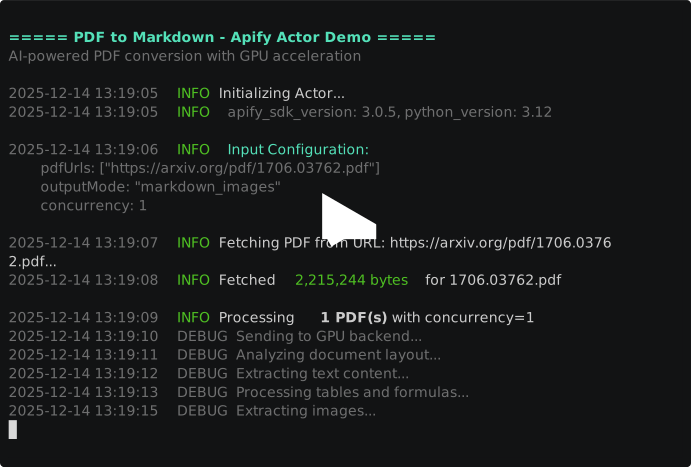 ## Key Features ### Document Processing - Intelligent layout detection — Handles single and multi-column layouts automatically - Table recognition — Extracts tables with proper Markdown formatting - Formula extraction — Converts mathematical formulas to LaTeX notation - Image extraction — Optionally extract embedded images with public URLs - OCR support — Process scanned PDFs with 8 language options ### Developer-Friendly - Batch processing — Submit multiple PDFs in a single run - Parallel execution — Configurable concurrency (1-10 simultaneous PDFs) - Three output modes — Choose between text-only, with images, or full extraction - Structured output — Consistent JSON schema for easy integration - Public image URLs — Images stored in Apify Key-Value Store, not base64 blobs ### Reliability - Automatic retries — Exponential backoff for transient failures - Partial success — Continues processing if individual PDFs fail - Detailed status — Per-document success/error reporting - Processing metrics — Page count, markdown length, processing time ## Use Cases ### For RAG Pipeline Developers - Prepare documents for LLM retrieval — Convert PDFs to clean text for embedding - Build knowledge bases — Extract structured content from document libraries - Enhance chatbot context — Feed processed documents into AI assistants - Create searchable archives — Transform PDF collections into queryable text ### For Data Engineers - Document migration — Convert legacy PDF archives to Markdown - Content pipelines — Automate PDF processing in data workflows - ETL integration — Extract text data for downstream processing - Compliance archival — Create text-based backups of PDF documents ### For Researchers - Extract tables from papers — Pull data tables from academic PDFs - Process formulas — Convert mathematical notation to LaTeX - Batch analysis — Process entire paper collections - Figure extraction — Capture charts and diagrams with metadata ## Quick Start ### Basic — Single PDF URL
 json { "pdfUrls": ["https://example.com/document.pdf"] } ### Advanced — Batch with Images json { "pdfUrls": [ "https://example.com/report-q1.pdf", "https://example.com/report-q2.pdf", "https://example.com/report-q3.pdf" ], "outputMode": "markdown_images", "concurrency": 5 } ### Complete — All Parameters json { "pdfFile": null, "pdfUrls": ["https://example.com/document.pdf"], "pdfBase64Items": [ { "filename": "uploaded-doc.pdf", "data": "JVBERi0xLjQKJeLjz9..." } ], "outputMode": "full", "language": "en", "concurrency": 3 } ## Pricing — Pay Per Event (PPE) Transparent pay-per-PDF pricing based on output mode: | Output Mode | Price per PDF | Description | |-------------|---------------|-------------| | markdown | $0.02 | Text-only extraction | | markdown_images | $0.03 | Text + extracted images stored in KV | | full | $0.04 | Text + images + raw JSON metadata | ### Cost Examples | PDFs | Output Mode | Total Cost | |------|-------------|------------| | 10 | markdown | $0.20 | | 50 | markdown | $1.00 | | 100 | markdown | $2.00 | | 100 | markdown_images | $3.00 | | 100 | full | $4.00 | | 500 | markdown | $10.00 | | 1,000 | markdown | $20.00 | | 1,000 | markdown_images | $30.00 | | 1,000 | full | $40.00 | ### Cost Optimization Tips - Use markdown mode if you don't need images - Filter PDFs before submission to avoid processing irrelevant documents - Start with lower concurrency and scale up as needed ## Input Parameters | Parameter | Type | Default | Required | Description | |-----------|------|---------|----------|-------------| | pdfFile | file upload | - | No | Upload a single PDF file via the Apify UI | | pdfUrls | string[] | - | No | Array of URLs pointing to PDF files | | pdfBase64Items | object[] | - | No | Array of base64-encoded PDFs with filenames | | outputMode | enum | markdown | No | Output format: markdown, markdown_images, or full | | language | enum | en | No | Language hint for OCR accuracy | | concurrency | integer | 3 | No | Parallel processing (1-10) | At least one PDF source is required (pdfFile, pdfUrls, or pdfBase64Items). ### Output Modes | Mode | Markdown | Images | JSON Content | Best For | |------|----------|--------|--------------|----------| | markdown | Yes | No | No | Text extraction, RAG pipelines | | markdown_images | Yes | Yes (URLs) | No | Full document conversion | | full | Yes | Yes (URLs) | Yes | Analysis, debugging | ### Supported Languages | Code | Language | |------|----------| | en | English | | ch | Chinese (Simplified) | | chinese_cht | Chinese (Traditional) | | japan | Japanese | | korean | Korean | | ta | Tamil | | te | Telugu | | ka | Kannada | ### Base64 Input Format For API integration, use pdfBase64Items: json { "pdfBase64Items": [ { "filename": "invoice-001.pdf", "data": "JVBERi0xLjQKJeLjz9MKNSAwIG9iago8PC..." }, { "filename": "contract-2024.pdf", "data": "JVBERi0xLjUKJeLjz9MKMSAwIG9iago8PC..." } ] } ## Output Each PDF produces one dataset item with the following structure: json { "filename": "annual-report-2024.pdf", "sourceType": "url", "sourceUrl": "https://example.com/annual-report-2024.pdf", "status": "success", "markdown": "# Annual Report 2024\n\n## Executive Summary\n\nThis year marked significant growth across all business units...\n\n## Financial Highlights\n\n| Metric | Q1 | Q2 | Q3 | Q4 |\n|--------|-----|-----|-----|-----|\n| Revenue | $12M | $14M | $15M | $18M |\n| Profit | $2M | $3M | $3.5M | $4M |\n\n## Strategic Initiatives\n\n### Digital Transformation\n\nOur investment in AI-powered solutions delivered...", "pageCount": 24, "markdownLength": 45230, "images": [ "https://api.apify.com/v2/key-value-stores/abc123/records/annual-report-2024/figure-1.png", "https://api.apify.com/v2/key-value-stores/abc123/records/annual-report-2024/chart-revenue.png", "https://api.apify.com/v2/key-value-stores/abc123/records/annual-report-2024/logo.jpg" ], "imageCount": 3, "jsonContent": null, "error": null, "errorDetails": null, "processingTimeMs": 32450, "timestamp": "2025-01-15T10:30:00.000Z" } ### Output Fields | Field | Type | Description | |-------|------|-------------| | filename | string | Original filename | | sourceType | string | Input source: url, upload, or base64 | | sourceUrl | string | Source URL (if applicable) | | status | string | success or error | | markdown | string | Extracted Markdown content | | pageCount | number | Number of pages in PDF | | markdownLength | number | Character count of markdown | | images | array | List of public URLs for extracted images | | imageCount | number | Number of extracted images | | jsonContent | object | Raw extraction metadata (full mode only) | | error | string | User-friendly error message (if failed) | | errorDetails | string | Additional error context | | processingTimeMs | number | Processing duration in milliseconds | | timestamp | string | ISO 8601 timestamp | ### Error Output Example json { "filename": "encrypted-doc.pdf", "sourceType": "url", "sourceUrl": "https://example.com/encrypted-doc.pdf", "status": "error", "markdown": null, "pageCount": null, "markdownLength": 0, "images": [], "imageCount": 0, "jsonContent": null, "error": "PDF is password-protected", "errorDetails": null, "processingTimeMs": 1250, "timestamp": "2025-01-15T10:31:00.000Z" } ## API Integration ### Python python from apify_client import ApifyClient client = ApifyClient("your_api_token") run_input = { "pdfUrls": [ "https://example.com/report-q1.pdf", "https://example.com/report-q2.pdf", ], "outputMode": "markdown_images", "concurrency": 3, } run = client.actor("your-username/pdf-to-markdown").call(run_input=run_input) # Fetch results for item in client.dataset(run["defaultDatasetId"]).iterate_items(): if item["status"] == "success": print(f"Processed: {item['filename']}") print(f"Pages: {item['pageCount']}") print(f"Markdown length: {item['markdownLength']} chars") # Save markdown to file with open(f"{item['filename']}.md", "w") as f: f.write(item["markdown"]) else: print(f"Failed: {item['filename']} - {item['error']}") ### JavaScript / TypeScript javascript import { ApifyClient } from 'apify-client'; const client = new ApifyClient({ token: 'your_api_token' }); const input = { pdfUrls: [ 'https://example.com/report-q1.pdf', 'https://example.com/report-q2.pdf', ], outputMode: 'markdown_images', concurrency: 3, }; const run = await client.actor('your-username/pdf-to-markdown').call(input); const { items } = await client.dataset(run.defaultDatasetId).listItems(); for (const item of items) { if (item.status === 'success') { console.log(`Processed: ${item.filename}`); console.log(`Pages: ${item.pageCount}`); console.log(`Images: ${item.imageCount}`); } else { console.log(`Failed: ${item.filename} - ${item.error}`); } } ### cURL bash curl -X POST "https://api.apify.com/v2/acts/your-username~pdf-to-markdown/runs?token=your_api_token" \ -H "Content-Type: application/json" \ -d '{ "pdfUrls": ["https://example.com/document.pdf"], "outputMode": "markdown" }' ## Technical Requirements | Requirement | Value | |-------------|-------| | Memory | 512 MB | | Processing Time | 20-45 seconds per PDF | | Max Queue Wait | 2 minutes | | Max Processing Time | 5 minutes per PDF | | Concurrency | 1-10 parallel PDFs | ### Supported PDF Types - Standard text PDFs - Scanned documents (via OCR) - Multi-column layouts - Tables and forms - Academic papers with formulas - Reports with charts and figures ### Limitations - Password-protected PDFs are not supported - Maximum recommended file size: 50 MB per PDF - Very complex layouts may have reduced accuracy ## FAQ What types of PDFs can this Actor process? This Actor handles most PDF types including standard text documents, scanned images (via OCR), multi-column layouts, academic papers, financial reports, and documents with tables and formulas. How long does processing take? Most PDFs complete in 20-45 seconds. Complex documents with many pages or images may take longer. The Actor has a 5-minute timeout per PDF. Can I process scanned documents? Yes! The Actor includes OCR (Optical Character Recognition) that works with scanned PDFs. Use the language parameter to improve accuracy for non-English documents. What languages are supported for OCR? Eight languages: English, Chinese (Simplified and Traditional), Japanese, Korean, Tamil, Telugu, and Kannada. How are images stored? When using markdown_images or full mode, extracted images are stored in Apify's Key-Value Store. The output contains public URLs that remain accessible as long as your storage retention allows. What happens if a PDF fails to process? The Actor continues processing other PDFs and reports failures in the output. Each item has a status field (success or error) and an error field with a user-friendly message. Can I process PDFs via API without uploading files? Yes! Use the pdfBase64Items parameter to submit base64-encoded PDF content directly, or use pdfUrls to provide URLs that the Actor will fetch. Is there a free trial? Yes, Apify offers free platform credits for new users. You can test the Actor with sample PDFs before committing to paid usage. How do I handle large batches efficiently? Increase the concurrency parameter (up to 10) to process more PDFs in parallel. For very large batches, consider splitting into multiple runs. What's the difference between output modes? - markdown: Text only, smallest output, fastest - markdown_images: Text + image URLs, good for full document conversion - full: Everything including raw JSON metadata, best for analysis/debugging ## Data Export Export your results in multiple formats: - JSON — Full structured data for programmatic access - CSV — Spreadsheet-compatible format - Excel — Direct import to Microsoft Excel - XML — Legacy system integration ## Automation - Scheduled runs — Process PDFs on a recurring schedule - Webhooks — Get notified when processing completes - API integration — Trigger runs from your application - Apify integrations — Connect with Zapier, Make, and more ## Related Actors ## Support - Issues & Bugs: Use the Issues tab on this Actor's page - Feature Requests: Open an issue or contact via email - Email: max@mapa.slmail.me - Response Time: Usually within 24 hours ## Legal Compliance This Actor processes documents that you provide. You are responsible for: - Having the right to process the documents you submit - Complying with applicable data protection regulations (GDPR, CCPA, etc.) - Ensuring processed content doesn't violate any terms of service The Actor does not store your PDFs beyond the processing duration. --- Start Converting PDFs to Markdown Now --- Transform your document workflows with accurate, AI-powered PDF extraction.
Categories
Common Use Cases
Market Research
Gather competitive intelligence and market data
Lead Generation
Extract contact information for sales outreach
Price Monitoring
Track competitor pricing and product changes
Content Aggregation
Collect and organize content from multiple sources
Ready to Get Started?
Try PDF to Markdown Converter - AI-Powered with OCR & Tables now on Apify. Free tier available with no credit card required.
Start Free TrialActor Information
- Developer
- clearpath
- Pricing
- Paid
- Total Runs
- 12
- Active Users
- 4
Related Actors

Video Transcript Scraper: Youtube, X, Facebook, Tiktok, etc.
by invideoiq

Linkedin Profile Details Scraper + EMAIL (No Cookies Required)
by apimaestro

Twitter (X.com) Scraper Unlimited: No Limits
by apidojo

Content Checker
by jakubbalada
Apify provides a cloud platform for web scraping, data extraction, and automation. Build and run web scrapers in the cloud.
Learn more about ApifyNeed Professional Help?
Couldn't solve your problem? Hire a verified specialist on Fiverr to get it done quickly and professionally.
Trusted by millions | Money-back guarantee | 24/7 Support