
Bulk Email List Validator, Cleaner & Verification API 🚀 2025
by clearpath
Verify email lists with 99% accuracy. Real-time SMTP validation, MX checks, catch-all detection, disposable email filtering. Prevent bounces, protect ...
Opens on Apify.com
About Bulk Email List Validator, Cleaner & Verification API 🚀 2025
Verify email lists with 99% accuracy. Real-time SMTP validation, MX checks, catch-all detection, disposable email filtering. Prevent bounces, protect sender reputation. Process 50K emails/batch. Returns deliverability scores, risk levels. REST API ready. Supports CSV uploads (Apollo.io etc.)
What does this actor do?
Bulk Email List Validator, Cleaner & Verification API 🚀 2025 is a web scraping and automation tool available on the Apify platform. It's designed to help you extract data and automate tasks efficiently in the cloud.
Key Features
- Cloud-based execution - no local setup required
- Scalable infrastructure for large-scale operations
- API access for integration with your applications
- Built-in proxy rotation and anti-blocking measures
- Scheduled runs and webhooks for automation
How to Use
- Click "Try This Actor" to open it on Apify
- Create a free Apify account if you don't have one
- Configure the input parameters as needed
- Run the actor and download your results
Documentation
Bulk Email Validator & Verification API [50K Emails] 🚀 (2025) Verify email lists with 99% accuracy using this powerful email validator and verification API. Stop bounces before they damage your sender reputation with real-time SMTP validation, MX record checks, catch-all detection, and disposable email filtering. This email verifier processes up to 50,000 emails per batch with 15+ comprehensive validation checks, ensuring your emails reach real inboxes, not bounce folders. Perfect as an alternative to ZeroBounce, NeverBounce, or other email validation services. 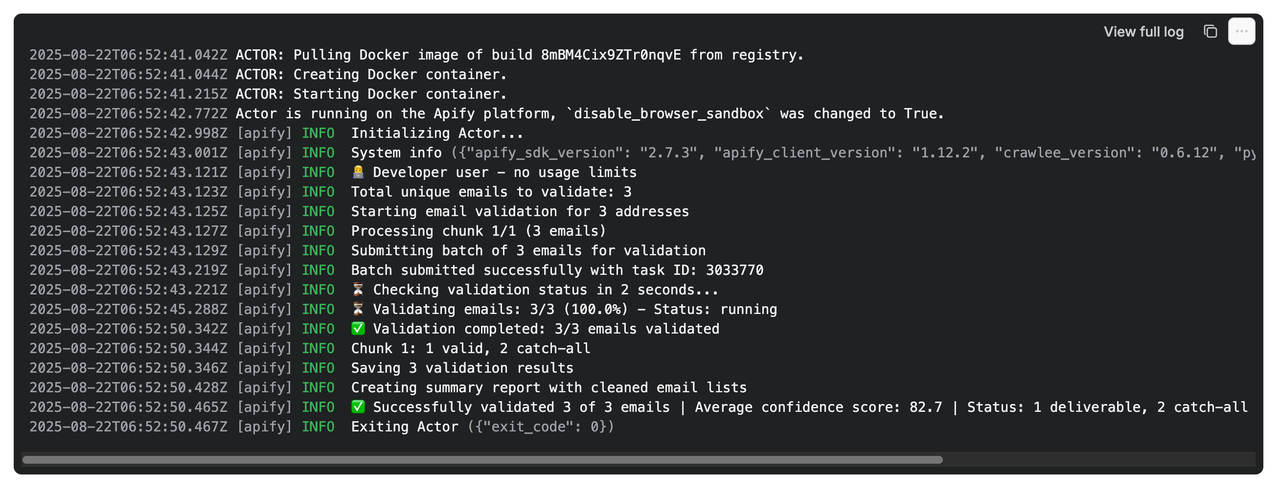 ## Why Your Domain Reputation Depends on This Every bounced email is a strike against your domain reputation. Too many strikes? Your legitimate emails start landing in spam folders—or worse, your domain gets blacklisted. This Email Validator prevents that disaster before it happens. ### The Hidden Cost of Invalid Emails: - 5% bounce rate = Email providers flag you as risky - 10% bounce rate = Your domain reputation plummets - 15% bounce rate = Welcome to the blacklist ## Why Choose This Email Validator? ### 🛡️ Protect Your Domain Reputation Your domain is your digital identity. High bounce rates destroy it. We validate emails BEFORE you send, keeping your bounce rate under 2%. ### 📈 Save Your Email Campaigns Invalid emails don't just bounce—they poison your entire campaign. Clean lists mean better deliverability for ALL your emails. ### 🚫 Stop Fraud & Fake Signups Detect disposable emails, role accounts, and honeypots before they infiltrate your database. ### 🎯 Enterprise-Grade Accuracy Multiple verification layers ensure confidence in every validation. No guesswork, just data. ### ⚡ Bulk Processing Power Validate up to 50,000 emails in a single batch. Perfect for large-scale list cleaning. ## Features - ✅ 15+ Validation Checks: Comprehensive verification including syntax, SMTP, MX records, and catch-all detection - ✅ Smart Email Classification: Instantly identify free, disposable, and role-based emails - ✅ Quality Scoring System: 0-100 confidence scores help you make informed decisions - ✅ Catch-All Detection: Know when domains accept all emails (high-risk for bounces) - ✅ Full MX Records: Complete mail exchange server information for transparency - ✅ Spamtrap Detection: Avoid emails that damage sender reputation - ✅ Risk Assessment: Clear categorization (safe/risky/invalid/disposable/catch-all) - ✅ Bulk Processing: Handle massive email lists efficiently - ✅ No Cookies Required: Clean, straightforward validation ## Input Simple and straightforward - just provide your email list:
 json { "emailAddresses": [ "john.doe@company.com", "support@business.org", "test@disposable-email.com", "admin@catch-all-domain.com" ] } With optional parameters: json { "emailAddresses": [ "contact@business.com", "fake.email@notreal", "temp@10minutemail.com" ], "maxItems": 5000, "proxyConfiguration": { "useApifyProxy": true } } ## CSV File Support ### 📝 Combining CSV and Direct Input You can provide emails through BOTH methods simultaneously! When you supply both emailAddresses and csvFile, the actor automatically merges them: - CSV emails are processed first (given priority) - Direct input emails are added next (from emailAddresses parameter) - Duplicates are automatically removed (case-insensitive matching) - Perfect for adding specific emails to your CSV list Example: json { "csvFile": "your-bulk-list.csv", "emailAddresses": ["priority@vip.com", "test@specific.com"], "maxItems": 10000 } ### 🎯 Automatic Email Column Detection The actor automatically detects your email column! No configuration needed - just upload your CSV and let the intelligent detection system handle the rest. The actor will fail gracefully with a clear error message if no email column can be detected, ensuring you're always aware of any issues. ### 📤 Upload Your CRM Exports Upload your CSVs with leads from Apollo, HubSpot, Salesforce, or any other CRM tool! This validator is designed to work seamlessly with exports from popular sales and marketing platforms: - Apollo.io: Direct support for contact export format - HubSpot: Works with contact and company exports - Salesforce: Compatible with lead and contact reports - LinkedIn Sales Navigator: Process your saved lead lists - Any CSV format: Supports comma, semicolon, tab, and pipe delimiters ### How to Use CSV Files 1. Upload directly: Use the file upload button in Apify Console 2. Provide a URL: Link to your CSV file hosted anywhere 3. Auto-detection: The actor scans your file and identifies email columns by: - Common header names (email, contact_email, primary_email, etc.) - Content analysis (looking for @ symbols and email patterns) - Smart pattern matching across multiple languages 4. Validation: All detected emails are validated comprehensively 5. Results: Get detailed validation results for each email address ### CSV Input Example json { "csvFile": "Upload your CSV file or provide URL", "maxItems": 10000 } With advanced options: json { "csvFile": "https://your-domain.com/emails.csv", "csvEmailColumn": "primary_email", // Optional: specify column "csvMergeMultipleColumns": true, // Optional: merge all email columns "maxItems": 50000 } ### Supported CSV Formats - File Types: .csv files with various encodings (UTF-8, ASCII, Latin-1) - Delimiters: Automatically detects comma (,), semicolon (;), tab (\t), or pipe (|) - Headers: Works with or without headers - the actor adapts automatically - Quoted Fields: Handles complex CSVs with quoted fields containing delimiters ## Output Examples ### Individual Email Results Each email gets detailed validation data: json // ✅ Valid email { "email": "john.doe@company.com", "status": "safe", "score": 98, "username": "john.doe", "domain": "company.com", "mx_records": ["mail.company.com", "backup-mx.company.com"], "smtp_connection_success": true, "mx_accepts_mail": true, "valid_syntax": true, "deliverable": true, "safe_to_send": true, "catch_all": false, "disposable": false, "role_account": false, "free_email": false, "spamtrap": false, "disabled": false, "inbox_full": false } // ❌ Invalid email { "email": "fake.email@notreal", "status": "invalid", "score": 0, "username": "fake.email", "domain": "notreal", "mx_records": [], "smtp_connection_success": false, "mx_accepts_mail": false, "valid_syntax": true, "deliverable": false, "safe_to_send": false, ... } // ❓ Unknown status { "email": "john@enterprise-corp.com", "status": "unknown", "score": 50, "username": "john", "domain": "enterprise-corp.com", "mx_records": ["mail.enterprise-corp.com"], "smtp_connection_success": false, "mx_accepts_mail": true, "valid_syntax": true, "deliverable": null, "safe_to_send": null, "reason": "Server timeout or anti-validation measures", ... } // 🗑️ Disposable email { "email": "temp@10minutemail.com", "status": "disposable", "score": 25, "username": "temp", "domain": "10minutemail.com", "mx_records": ["mx.10minutemail.com"], "smtp_connection_success": true, "mx_accepts_mail": true, "valid_syntax": true, "deliverable": true, "safe_to_send": false, "catch_all": false, "disposable": true, ... } // 🎣 Catch-all domain { "email": "anything@catch-all-domain.com", "status": "catch_all", "score": 71, "username": "anything", "domain": "catch-all-domain.com", "mx_records": ["mail.catch-all-domain.com"], "smtp_connection_success": true, "mx_accepts_mail": true, "valid_syntax": true, "deliverable": true, "safe_to_send": false, "catch_all": true, ... } ### 📊 Summary Report (Final Dataset Entry) After all emails are processed, you'll get a summary report with cleaned lists: json { "type": "summary_report", "timestamp": "2025-08-21T10:00:00Z", "total_processed": 100, "clean_emails": [ "john.doe@company.com", "alice@business.org", "contact@enterprise.com" ], "risky_emails": [ "info@catch-all-domain.com", "support@risky-provider.net" ], "invalid_emails": [ "fake@notreal", "broken@", "test@disposable.com" ], "statistics": { "deliverable": 75, "undeliverable": 20, "catch_all": 5, "disposable": 8, "average_score": 82.5 }, "emails_by_status": { "safe": ["john.doe@company.com", "alice@business.org"], "risky": ["info@domain.com"], "invalid": ["fake@notreal"], "catch_all": ["admin@catch-all.com"], "disposable": ["temp@10minute.com"] } } ## Pricing Simple, transparent pricing based on volume: | Volume | Price per 1000 emails | |--------|----------------------| | Standard | $8.00 | | Bronze Discount | $7.50 | | Silver Discount | $7.00 | | Gold Discount | $6.00 | Contact us for custom enterprise pricing on volumes above 1M emails. ## Understanding Your Results ### Status Indicators | Status | Symbol | Meaning | Action | |--------|--------|---------|---------| | safe | ✅ | Email is valid and safe to send | Send with confidence | | risky | ⚠️ | Email might have deliverability issues | Consider removing | | invalid | ❌ | Email will bounce | Remove immediately | | unknown | ❓ | Validation couldn't be completed | See section below | | disposable | 🗑️ | Temporary email address | Remove for quality | | catch_all | 🎣 | Domain accepts all emails | Use with caution | ### Understanding "Unknown" Status What does "unknown" mean? The validation service couldn't definitively verify this email address. This doesn't mean the email is invalid - it means verification couldn't be completed due to the recipient server's security measures. Common reasons for "unknown" status: - Corporate firewalls - Enterprise domains might block validation attempts - Greylisting - Servers temporarily reject checks to prevent spam - Anti-validation measures - Some providers intentionally hide mailbox existence - Strict security policies - Government, financial, and healthcare domains might often return unknown How to handle unknown emails: These emails often belong to legitimate business contacts, especially from large corporations. Consider your use case: - B2B outreach: Often worth keeping (many corporate emails return unknown) - Consumer marketing: Higher risk, consider your tolerance - Critical communications: Test with a small batch first ### Quality Score Interpretation - 90-100: Excellent quality, definitely send - 70-89: Good quality, safe to send - 50-69: Moderate risk, review before sending - 30-49: High risk, likely to bounce - 0-29: Do not send, will damage reputation ### Validation Checks Explained | Check | What It Means | Why It Matters | |-------|---------------|----------------| | valid_syntax | Email format is correct | Malformed emails always bounce | | mx_accepts_mail | Domain can receive emails | No MX records = guaranteed bounce | | smtp_connection_success | Mail server responds | Confirms server is active | | deliverable | Email can be delivered | Combined validation result | | safe_to_send | Low risk of bounce/spam | Protects your reputation | | catch_all | Domain accepts any address | Higher bounce risk | | disposable | Temporary email service | Often used for fraud/spam | | role_account | Generic address (info@, admin@) | Lower engagement rates | | free_email | Gmail, Yahoo, etc. | May indicate personal vs business | | spamtrap | Honeypot address | Sending here = instant blacklist | | inbox_full | Mailbox at capacity | Temporary delivery failure | ## Use Cases by Industry ### 📧 Email Marketing Teams Clean your lists before every campaign. A 2% reduction in bounce rate can improve overall deliverability by 15%. ### 🚀 SaaS Companies Validate emails at signup to prevent fake accounts and improve user quality metrics. ### 🛒 E-commerce Platforms Stop fraudulent orders by detecting disposable emails used for one-time purchases. ### 📊 CRM Managers Maintain database hygiene by regularly validating and removing invalid contacts. ### 🎯 Lead Generation Agencies Qualify leads instantly by validating emails in real-time during collection. ### 🏢 Enterprise Sales Teams Verify prospect emails before outreach to maximize connection rates. ## Performance & Limits - Batch Size: Up to 2,500 emails per run - Accuracy Rate: 99%+ for syntax, 95%+ for deliverability - Response Time: Results typically available within a few minutes for 1000 emails ## Security & Compliance - ✅ GDPR Compliant - ✅ No data retention after processing - ✅ Encrypted data transmission - ✅ No cookies or tracking ## Pro Tips for Best Results 1. Clean regularly: Validate your entire list quarterly to maintain hygiene 2. Pre-campaign validation: Always validate before major email campaigns 3. Real-time validation: Integrate validation at the point of email collection 4. Score thresholds: Set minimum score requirements (we recommend 70+) 5. Segment by status: Create separate lists for safe, risky, and invalid emails ## When to Use This Validator ### Before You Send - Email marketing campaigns - Cold outreach sequences - Newsletter distributions - Transactional email batches ### During Collection - User registration forms - Lead capture pages - Webinar signups - Newsletter subscriptions ### For Maintenance - Quarterly list cleaning - Database migration - CRM deduplication - Post-campaign hygiene ## Programmatic Access - Get Your Clean Email List ### Accessing the Summary Report The validator creates a special summary_report entry at the end of the dataset containing your cleaned email lists. Here's how to access it programmatically: #### JavaScript/Node.js javascript const { ApifyClient } = require('apify-client'); // Initialize the client const client = new ApifyClient({ token: 'YOUR_APIFY_TOKEN', }); // Get the dataset const dataset = await client.dataset('DATASET_ID').listItems(); // Find the summary report const summary = dataset.items.find(item => item.type === 'summary_report'); // Extract clean emails (score >= 70) const cleanEmails = summary.clean_emails; console.log('Clean emails ready to use:', cleanEmails); // Or get emails by specific status const safeEmails = summary.emails_by_status.safe; const riskyEmails = summary.emails_by_status.risky; #### Python python from apify_client import ApifyClient # Initialize the client client = ApifyClient('YOUR_APIFY_TOKEN') # Get the dataset dataset = client.dataset('DATASET_ID').list_items() # Find the summary report summary = next(item for item in dataset['items'] if item.get('type') == 'summary_report') # Extract clean emails (score >= 70) clean_emails = summary['clean_emails'] print(f'Clean emails ready to use: {clean_emails}') # Or get emails by specific status safe_emails = summary['emails_by_status']['safe'] risky_emails = summary['emails_by_status']['risky'] #### Direct API Access bash # Get all dataset items curl "https://api.apify.com/v2/datasets/DATASET_ID/items" \ -H "Authorization: Bearer YOUR_APIFY_TOKEN" # The summary report will be the last item with type: "summary_report" ### Using the Clean List Once you have the clean emails, you can: - Import directly into your email marketing platform - Filter further by specific criteria (e.g., only non-catch-all) - Export to CSV for manual review - Integrate into your CRM or automation workflows ### Quick Copy-Paste The clean_emails array is ready to copy and paste into any email platform that accepts comma-separated or line-separated email lists. ## ROI Calculator For every 1000 emails validated: - Prevent ~50-200 bounces (5-20% typical invalid rate) - Save domain reputation from damage - Improve deliverability for ALL future emails - Avoid blacklist recovery costs ($1000s in lost revenue) ## Get Started 1. Add your email list to the input 2. Configure your validation preferences 3. Run the validator 4. Download your clean, validated list 5. Send with confidence! --- ## Support - 📧 Email: max@mapa.slmail.me - 🐛 Issues: Use the Issues tab for bug reports and feature requests - 💬 Response time: Usually within 24 hours - 🔧 Custom features: Available upon request Stop guessing. Start knowing. Your domain reputation is too valuable to risk on unvalidated emails. 🚀 Start Validating Your Email List
Categories
Common Use Cases
Market Research
Gather competitive intelligence and market data
Lead Generation
Extract contact information for sales outreach
Price Monitoring
Track competitor pricing and product changes
Content Aggregation
Collect and organize content from multiple sources
Ready to Get Started?
Try Bulk Email List Validator, Cleaner & Verification API 🚀 2025 now on Apify. Free tier available with no credit card required.
Start Free TrialActor Information
- Developer
- clearpath
- Pricing
- Paid
- Total Runs
- 676
- Active Users
- 89
Related Actors

Video Transcript Scraper: Youtube, X, Facebook, Tiktok, etc.
by invideoiq

Linkedin Profile Details Scraper + EMAIL (No Cookies Required)
by apimaestro

Twitter (X.com) Scraper Unlimited: No Limits
by apidojo

Content Checker
by jakubbalada
Apify provides a cloud platform for web scraping, data extraction, and automation. Build and run web scrapers in the cloud.
Learn more about ApifyNeed Professional Help?
Couldn't solve your problem? Hire a verified specialist on Fiverr to get it done quickly and professionally.
Trusted by millions | Money-back guarantee | 24/7 Support