
Bluesky Video Downloader
by bytepulselabs
Download videos from Bluesky posts by adding one or more Bluesky post URLs to extract embedded videos. Then, save downloaded media files, run the down...
Opens on Apify.com
About Bluesky Video Downloader
Download videos from Bluesky posts by adding one or more Bluesky post URLs to extract embedded videos. Then, save downloaded media files, run the downloader via API, schedule and monitor downloads, or integrate with other tools for automated video archiving.
What does this actor do?
Bluesky Video Downloader is a web scraping and automation tool available on the Apify platform. It's designed to help you extract data and automate tasks efficiently in the cloud.
Key Features
- Cloud-based execution - no local setup required
- Scalable infrastructure for large-scale operations
- API access for integration with your applications
- Built-in proxy rotation and anti-blocking measures
- Scheduled runs and webhooks for automation
How to Use
- Click "Try This Actor" to open it on Apify
- Create a free Apify account if you don't have one
- Configure the input parameters as needed
- Run the actor and download your results
Documentation
What is Bluesky Video Downloader? Bluesky Video Downloader automates the download of videos from Bluesky. Just add one or more Bluesky posts to get all the publicly available videos you need. ## Why download Bluesky videos? Bluesky videos can provide valuable content for reposting, help you save entertaining clips, allow offline viewing, enable you to analyze trending content, or preserve important moments before they potentially disappear from the platform. ## How to download Bluesky videos Bluesky Video Downloader is designed to be fast and easy to use so there aren't too many parameters or settings. Just follow the steps below: 1. Create a free Apify account. 2. Open Bluesky Video Downloader. 3. Add one or more Bluesky post URLs. 4. Click "Save & Start" and wait for the datasets to be extracted. 5. Download your data in JSON, XML, CSV, Excel, or HTML. ## Input example The input for Bluesky Video Downloader should be a Bluesky post URL. You can add one or multiple post URLs. 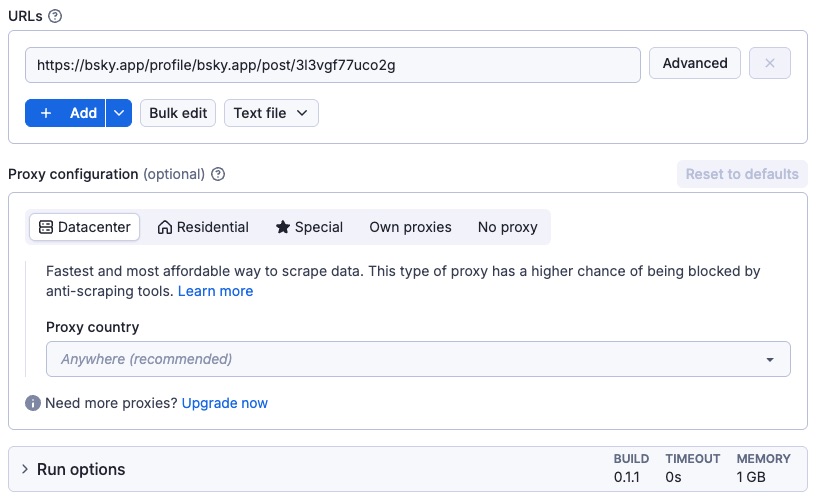 Here’s a sample of downloading video from the Bluesky. In JSON it looks like this:
 json { "urls": [ { "url": "https://bsky.app/profile/bsky.app/post/3l3vgf77uco2g" } ], "proxy": { "useApifyProxy": false } } ## Output example The results will be wrapped into a dataset which you can always find in the Storage tab. Here's an excerpt from the data you'd get: 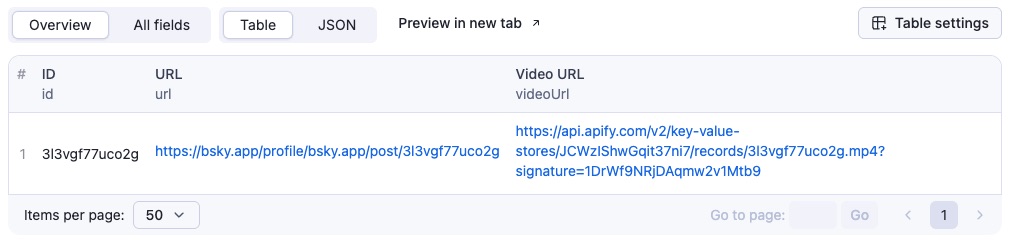 Here is the same data but in JSON. You can download the dataset extracted by Bluesky Video Downloader in various formats such as JSON, HTML, CSV, or Excel.
 json { "id": "3l3vgf77uco2g", "url": "https://bsky.app/profile/bsky.app/post/3l3vgf77uco2g", "videoUrl": "https://api.apify.com/v2/key-value-stores/2sORfdsGD9YEOpOC3/records/3l3vgf77uco2g.mp4" } ## Integrate Bluesky Video Downloader and automate your workflow Last but not least, Bluesky Video Downloader can be connected with almost any cloud service or web app thanks to integrations on the Apify platform. These include: - Make - Zapier - Slack - Airbyte - GitHub - Google Drive - and much more. Alternatively, you can use webhooks to carry out an action whenever an event occurs. For example, you can get a notification whenever Bluesky Video Downloader successfully finishes a run. ## Want to scrape Bluesky posts, profiles, or followers? You can use the other dedicated scrapers below if you want to scrape specific Bluesky data. You'll have fewer settings to change and faster results. Just enter one or more Bluesky handles or URLs and click to scrape.
Issues tab in Apify Console. ## FAQ ### How can I use Bluesky Video Downloader with the Apify API? The Apify API gives you programmatic access to the Apify platform. The API is organized around RESTful HTTP endpoints that enable you to manage, schedule, and run Apify actors. The API also lets you access any datasets, monitor actor performance, fetch results, create and update versions, and more. To access the API using Node.js, use the 













apify-client NPM package. To access the API using Python, use the apify-client PyPI package. Check out the Apify API reference docs for full details or click on the Bluesky Video Downloader API tab for code examples. ### How much does it cost to use Bluesky Video Downloader? Bluesky Video Downloader uses the Pay-per-event pricing model, so your costs can be easily calculated: it will cost you $0.006 for every time the Actor starts. An additional $0.06 is charged per every 10 MB video download. Given that with the Apify Free plan, you get $5 in credits monthly for free, this tool might be your best free YouTube video downloader of all.
Categories
Common Use Cases
Market Research
Gather competitive intelligence and market data
Lead Generation
Extract contact information for sales outreach
Price Monitoring
Track competitor pricing and product changes
Content Aggregation
Collect and organize content from multiple sources
Ready to Get Started?
Try Bluesky Video Downloader now on Apify. Free tier available with no credit card required.
Start Free TrialActor Information
- Developer
- bytepulselabs
- Pricing
- Paid
- Total Runs
- 248
- Active Users
- 34
Related Actors

🏯 Tweet Scraper V2 - X / Twitter Scraper
by apidojo

Instagram Scraper
by apify

TikTok Scraper
by clockworks

Instagram Profile Scraper
by apify
Apify provides a cloud platform for web scraping, data extraction, and automation. Build and run web scrapers in the cloud.
Learn more about ApifyNeed Professional Help?
Couldn't solve your problem? Hire a verified specialist on Fiverr to get it done quickly and professionally.
Trusted by millions | Money-back guarantee | 24/7 Support