
LinkedIn Company URL - Mass Profile Finder
by anchor
Need LinkedIn company URLs for a long list of businesses? This actor takes the manual search out of the equation. Just upload a CSV file with your com...
Opens on Apify.com
About LinkedIn Company URL - Mass Profile Finder
Need LinkedIn company URLs for a long list of businesses? This actor takes the manual search out of the equation. Just upload a CSV file with your company names, and it will find and return their official LinkedIn page URLs for you. It’s built for practical, repetitive tasks. Whether you're in sales building a target account list, a recruiter sourcing potential clients, or a marketer running a campaign, manually looking up each company is a time sink. This tool automates that lookup process in bulk. You get the results back in a structured format via the Apify API for easy integration into your own systems, or you can download them as a CSV, JSON, or Excel file directly from the app. To fully automate your workflow, you can set up scheduled runs or connect it to other platforms like n8n, Make, or Zapier. Stop copying and pasting one URL at a time. Try it for free and turn your list of company names into a ready-to-use list of LinkedIn profiles in minutes.
What does this actor do?
LinkedIn Company URL - Mass Profile Finder is a web scraping and automation tool available on the Apify platform. It's designed to help you extract data and automate tasks efficiently in the cloud.
Key Features
- Cloud-based execution - no local setup required
- Scalable infrastructure for large-scale operations
- API access for integration with your applications
- Built-in proxy rotation and anti-blocking measures
- Scheduled runs and webhooks for automation
How to Use
- Click "Try This Actor" to open it on Apify
- Create a free Apify account if you don't have one
- Configure the input parameters as needed
- Run the actor and download your results
Documentation
Find LinkedIn company URLs LinkedIn Company URL Finder is a no-code automation that finds LinkedIn company pages from company names or keywords. Get LinkedIn company URLs ready to download as CSV, Excel, JSON, HTML, XML, or RSS. ## 👥 Who is this LinkedIn tool for? This LinkedIn company URL finder is built for people who don’t want to write code but are comfortable using automation tools like APIs, n8n, Make, Zapier, etc. - Recruiters & talent sourcers who want quick access to LinkedIn company pages of target employers. - Sales & marketing teams who need a LinkedIn company URL list for outreach and lead generation. - Founders, analysts, and researchers doing market research and competitor monitoring on LinkedIn. If you care about automation, see the Integration section below for ready‑made patterns with n8n, Make, and Zapier. ## 🔍 What does this LinkedIn tool do? LinkedIn company URL finder lets you find LinkedIn company pages from company names and keywords (e.g. Tesla, Google, Startup Chicago). With this LinkedIn company URL finder you can: - Search LinkedIn for company pages from names/keywords instead of manual copy‑paste into LinkedIn search. - Generate large LinkedIn company URL lists automatically from simple text input. - Send LinkedIn company URLs directly to CRMs, spreadsheets, or other LinkedIn Actors via n8n, Make, Zapier, or the Apify API. - Run safely at scale with no LinkedIn session or cookies needed. ## 🏆 Satisfied users +2 million successful company profiles found. ## 👨🏻💻 How to find LinkedIn company URLs in a few clicks 1. Prepare a list of company names or search terms you want to find on LinkedIn. 2. Paste them into the actor input (or load them from a dataset). 3. Click Start to run the LinkedIn company URL finder. 4. When the run finishes, go to the Dataset tab and download your LinkedIn company URLs as CSV, Excel, JSON, HTML, XML, or RSS. Need a full walkthrough? Check this step‑by‑step guide from the official Apify blog: How to scrape LinkedIn company pages ## 🎥 Video tutorial This short video shows how to run the actor, and download the LinkedIn company URL results. https://youtu.be/DcWnXcDbLlY ## ⚡ Quick start 1. Start a new run of LinkedIn Company URL Finder. 2. Use a tiny list of companies like: - Tesla - Google - Microsoft 3. Run the actor and open the results in the Run output. You should see results similar to this: | info | mySearch | linkedinUrl | |---------|----------|-------------------------------------------------------| | Tesla | tesla | https://www.linkedin.com/company/tesla-motors | | Google | google | https://www.linkedin.com/company/google | | Microsoft | microsoft | https://www.linkedin.com/company/microsoft | You can then download this as CSV/Excel and plug the LinkedIn company URLs into your favorite tools, like n8n, Make, Zapier, or the Apify API. ## 📥 Input The actor expects a list of company names or search terms you want to find on LinkedIn. 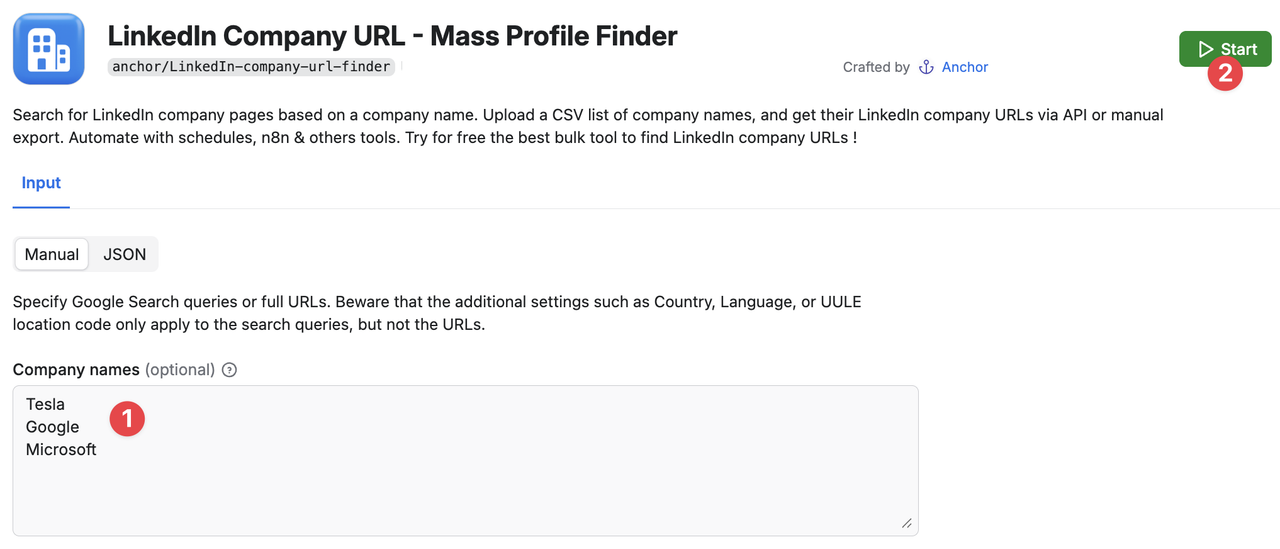 The JSON input example might look like this. Note that the queries are separated by new lines.
 json { "queries": "Tesla\nGoogle\nMicrosoft" } ## 📊 Results (Output) Once the Actor's run status switches to Succeeded, you can see your results in the Dataset tab. You can preview them or download them in HTML, JSON, CSV, Excel, XML, or RSS formats. For example, it may look like this: | info | mySearch | linkedinUrl | |---------|----------|-------------------------------------------------------| | Tesla | tesla | https://www.linkedin.com/company/tesla-motors | | Google | google | https://www.linkedin.com/company/google | | Microsoft | microsoft | https://www.linkedin.com/company/microsoft | 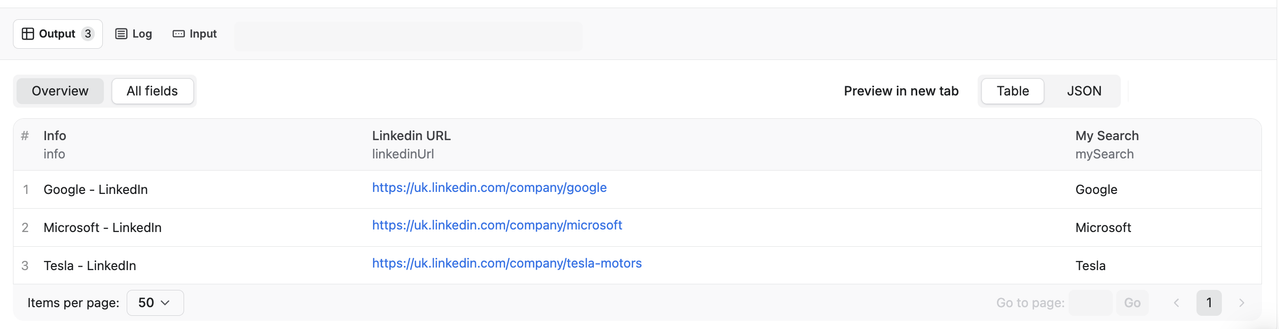 In JSON form, one item might look like:
 json [ { "mySearch": "Google", "linkedinUrl": "https://uk.linkedin.com/company/google", "info": "Google - LinkedIn" }, { "mySearch": "Microsoft", "linkedinUrl": "https://uk.linkedin.com/company/microsoft", "info": "Microsoft - LinkedIn" }, { "mySearch": "Tesla", "linkedinUrl": "https://uk.linkedin.com/company/tesla-motors", "info": "Tesla - LinkedIn" } ] Key fields: - info: the company name according to the LinkedIn page. - mySearch: the original company name or keyword you asked the actor to find. - linkedinUrl: the LinkedIn company page URL that the actor found for that search term. ## 💡 Why use LinkedIn Company URL Finder? Having a list of LinkedIn pages for companies can serve many purposes. Here are our favorite 3: 1. You are job hunting and you want all the URLs of the companies you would like to work for at your fingertips. This way you can rapidly access their pages anytime and quickly apply for a position through their LinkedIn page. 2. You are building a database of potential clients to contact. LinkedIn is a great networking and lead generation tool for this purpose, and you want all the LinkedIn URLs in a list that your marketing or sales team can go through. 3. You want to stay up to date on what your competitors are doing and monitor their recruiting strategies. A list of all their URLs will make your market research much easier. ## 🧠 Use cases for LinkedIn Company URL Finder Some popular ways to use this LinkedIn company URL finder: - Job seekers: Build a list of LinkedIn company pages for all your target employers and access them in one click. - Lead generation & sales: Create a LinkedIn company URL list for outreach campaigns, then pass it to your CRM or email tools. - Competitor & market research: Monitor competitors’ LinkedIn company pages and hiring patterns to track their growth and strategy. - Data pipelines & enrichment: Use this actor as the first step in a pipeline, providing LinkedIn company URLs to other enrichment actors or tools. - Automation & workflows: Trigger this LinkedIn company URL finder from n8n, Make, or Zapier to continuously enrich your spreadsheets or CRM with fresh LinkedIn company URLs. ## 🥢 Which LinkedIn Actor should I use? There are a couple of LinkedIn Actors on Apify. Make sure you only use Anchor's actors for better safety and quality results. Also, you may be wondering which Actors you need, so read below: ### Scraping small amounts When you need to gather data of less than 50 records per day, you can rely on Actors that require your LinkedIn cookies. These actors will “act as you”, so be careful. You will need the following actors: - You have a few LinkedIn people URLs, now looking for their information like job, description, skills…: LinkedIn x GPT - You have a few LinkedIn people URLs that you want to filter out using a ChatGPT prompt: LinkedIn x GPT ### Scraping big amounts When you need to gather data, like more than 50 records per day, it's recommended to avoid using your LinkedIn cookies. You will need the following actors: - Looking for many LinkedIn company URLs: Mass company finder (this actor). - Looking for many LinkedIn people URLs: Mass people finder - You have many LinkedIn people URLs, now looking for their information like job, description, skills…: Mass profile scraper By chaining these LinkedIn actors, you can: - Find LinkedIn company URLs at scale. - Find LinkedIn people URLs associated with those companies. - Enrich LinkedIn profiles with detailed information for recruiting, sales, or research. ## 🔌 Integration Use the results of this Actor automatically via the Apify API. See API v2 docs or Webhooks docs. - n8n: Try the official n8n template example to populate a google sheet with company names with their LinkedIn company URLs automatically. Feel free to customize it to your needs ! - Make: Use the HTTP module to start a run and “Get a file/JSON” to pull dataset items, or receive items via Make Webhooks for stream processing. - Zapier: Use “Webhooks by Zapier” to catch Apify webhooks on “dataset item created” or “run succeeded,” then map fields to your CRM/Sheets. You can also start runs with a POST action. ## 🫰🏻 LinkedIn company URL scraping pricing Apify provides you with $5 free usage credits to use every month on the Apify Free plan and you can get up to 20,000 LinkedIn results for those credits. So 20,000 results will be completely free! But if you need to get more data or to get your data regularly you should grab an Apify subscription. ## 📗 Is it legal to collect LinkedIn company URLs? Note that personal data is protected by GDPR in the European Union and by other regulations around the world. You should not scrape personal data unless you have a legitimate reason to do so. If you're unsure whether your reason is legitimate, consult your lawyers. We also recommend that you read our blog post: Is web scraping legal? This LinkedIn company URL finder only searches LinkedIn and collects public LinkedIn company page URLs based on your search terms. It does not extract any additional company data or private information. Always make sure your use case complies with LinkedIn’s terms and applicable laws. ## ❓ FAQ Q: How many LinkedIn company URLs can I find per run? A: It depends on your Apify usage limits and input size, but you can resolve thousands of company names per run, as long as you stay within your account’s compute and dataset limits. Q: Can I use this actor with n8n, Make, or Zapier? A: Yes. See the Integration section for details and an official n8n template that connects Google Sheets → this actor → Google Sheets. Q: Does this actor log into my LinkedIn account? A: No. This actor does not use your LinkedIn cookies or session. It only performs LinkedIn company URL search based on your input queries. ### 📞 Support & feedback - If you need any help or encounter a bug, please raise an issue directly on Apify. This allows us to better understand your problem by reproducing the issue. - If you have a feature request, a question or a suggestion, please contact us at actor_apify@guigloo.33mail.com Your feedback helps us improve this LinkedIn company URL finder for everyone on Apify. And if it saved you time, please leave a quick review: rate this Actor 🌟🌟🌟🌟🌟
Categories
Common Use Cases
Market Research
Gather competitive intelligence and market data
Lead Generation
Extract contact information for sales outreach
Price Monitoring
Track competitor pricing and product changes
Content Aggregation
Collect and organize content from multiple sources
Ready to Get Started?
Try LinkedIn Company URL - Mass Profile Finder now on Apify. Free tier available with no credit card required.
Start Free TrialActor Information
- Developer
- anchor
- Pricing
- Paid
- Total Runs
- 148,701
- Active Users
- 4,759
Related Actors

🏯 Tweet Scraper V2 - X / Twitter Scraper
by apidojo

Instagram Scraper
by apify

TikTok Scraper
by clockworks

Instagram Profile Scraper
by apify
Apify provides a cloud platform for web scraping, data extraction, and automation. Build and run web scrapers in the cloud.
Learn more about ApifyNeed Professional Help?
Couldn't solve your problem? Hire a verified specialist on Fiverr to get it done quickly and professionally.
Trusted by millions | Money-back guarantee | 24/7 Support